# Cerby web app

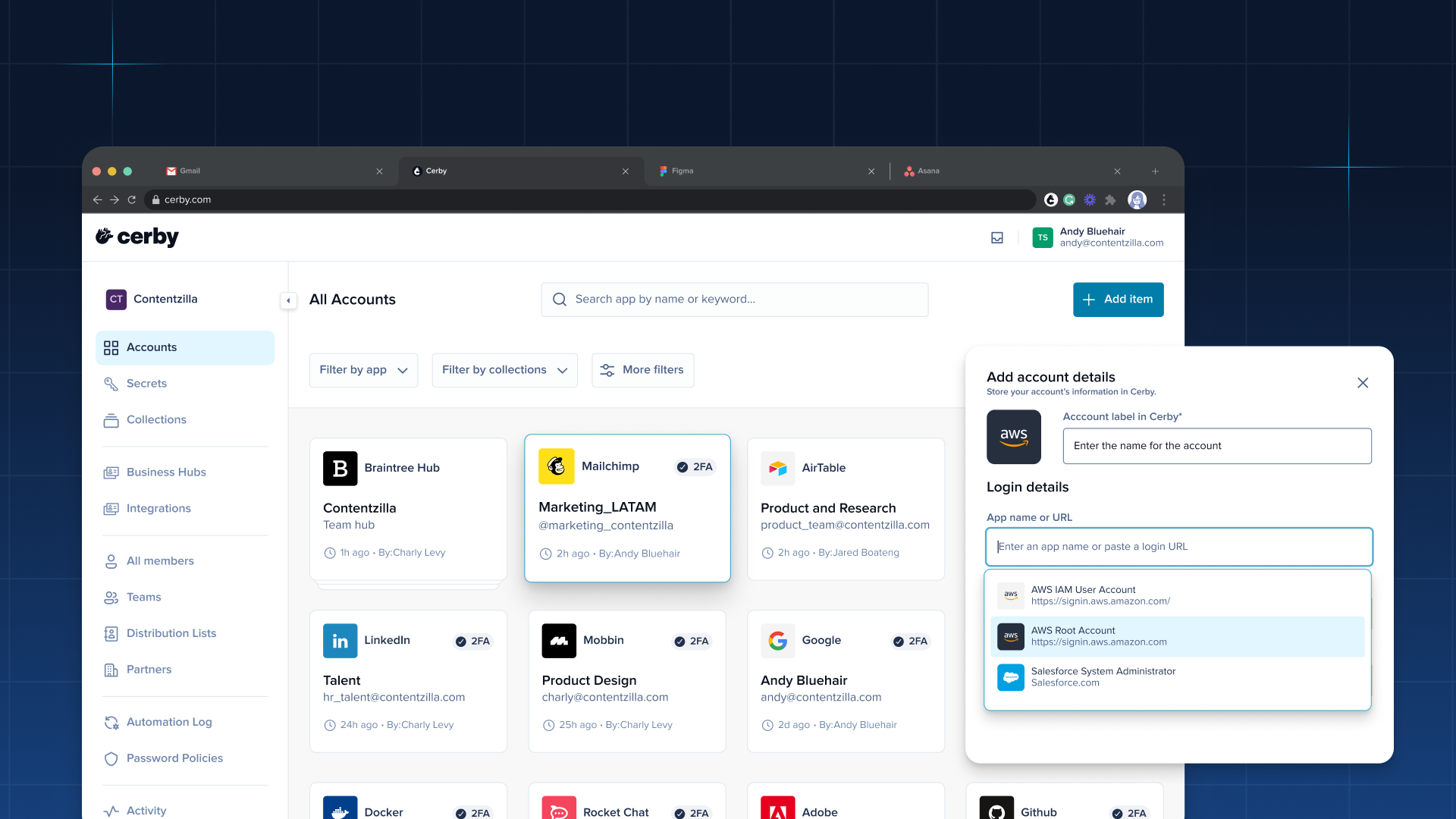
The Cerby web app is your central hub for managing credentials, identities, and access across all your connected applications. It gives you full visibility and control from a single interface.

<figure><img src="https://2432765489-files.gitbook.io/~/files/v0/b/gitbook-x-prod.appspot.com/o/spaces%2FA5ttyhSeCwMoE7UPFgC6%2Fuploads%2Fgit-blob-0e16b73ab6252c35648eeaacb64490208ca8053a%2FCerby%20Web%20app%20-%201920x1080.png?alt=media" alt="The Cerby web app showing the All Accounts page with the Add account details dialog open."><figcaption><p>The Cerby web app, main dashboard with account cards</p></figcaption></figure>

***

## Key benefits

* **Automated credential management:** Cerby handles password rotation, MFA setup, and session management so users don't have to.
* **Secure sharing:** Share accounts, secrets, and collections with individuals, teams, or external partners without exposing credentials.
* **Centralized access control:** Grant, update, and revoke access across all your applications from a single interface.
* **Full audit trail:** Track every login, change, and access event in the Activity log and Automation log.

***

## Explore the Cerby web app

<table data-view="cards"><thead><tr><th></th><th></th><th data-hidden data-card-target data-type="content-ref"></th></tr></thead><tbody><tr><td><strong>Accounts</strong></td><td>Add, manage, protect, and share accounts. Log in automatically and control who has access.</td><td><a href="https://help.cerby.com/cerby-web-app/accounts">https://help.cerby.com/cerby-web-app/accounts</a></td></tr><tr><td><strong>Activity</strong></td><td>Monitor and filter workspace events from the Activity log.</td><td><a href="https://help.cerby.com/cerby-web-app/activity">https://help.cerby.com/cerby-web-app/activity</a></td></tr><tr><td><strong>Automation log</strong></td><td>View and filter the history of automated jobs running in your workspace.</td><td><a href="https://help.cerby.com/cerby-web-app/automation-log">https://help.cerby.com/cerby-web-app/automation-log</a></td></tr><tr><td><strong>Business hubs</strong></td><td>Manage access to social media and marketing platforms through connected business hubs.</td><td><a href="https://help.cerby.com/cerby-web-app/business-hubs">https://help.cerby.com/cerby-web-app/business-hubs</a></td></tr><tr><td><strong>Collections</strong></td><td>Organize accounts and secrets into groups and manage shared access at scale.</td><td><a href="https://help.cerby.com/cerby-web-app/collections">https://help.cerby.com/cerby-web-app/collections</a></td></tr><tr><td><strong>Item importer</strong></td><td>Migrate your credentials from LastPass, 1Password, or a CSV file.</td><td><a href="https://help.cerby.com/cerby-web-app/item-importer">https://help.cerby.com/cerby-web-app/item-importer</a></td></tr><tr><td><strong>Partners</strong></td><td>Collaborate with external organizations through host-guest and local partner models.</td><td><a href="https://help.cerby.com/cerby-web-app/partners">https://help.cerby.com/cerby-web-app/partners</a></td></tr><tr><td><strong>Secrets</strong></td><td>Store and share sensitive data like API keys, SSH keys, and database credentials.</td><td><a href="https://help.cerby.com/cerby-web-app/secrets">https://help.cerby.com/cerby-web-app/secrets</a></td></tr><tr><td><strong>Teams</strong></td><td>Group workspace members into teams to simplify access management.</td><td><a href="https://help.cerby.com/cerby-web-app/teams">https://help.cerby.com/cerby-web-app/teams</a></td></tr><tr><td><strong>Users</strong></td><td>Invite and manage guest users and their access in your workspace.</td><td><a href="https://help.cerby.com/cerby-web-app/users">https://help.cerby.com/cerby-web-app/users</a></td></tr></tbody></table>


---

# Agent Instructions: Querying This Documentation

If you need additional information that is not directly available in this page, you can query the documentation dynamically by asking a question.

Perform an HTTP GET request on the current page URL with the `ask` query parameter:

```
GET https://help.cerby.com/cerby-web-app/readme.md?ask=<question>
```

The question should be specific, self-contained, and written in natural language.
The response will contain a direct answer to the question and relevant excerpts and sources from the documentation.

Use this mechanism when the answer is not explicitly present in the current page, you need clarification or additional context, or you want to retrieve related documentation sections.
