> For the complete documentation index, see [llms.txt](https://help.cerby.com/llms.txt). Markdown versions of documentation pages are available by appending `.md` to page URLs; this page is available as [Markdown](https://help.cerby.com/getting-started/concepts/audit-and-activity/activity.md).
# Activity
This article describes the benefits of the Activity page to monitor and analyze activity on your Cerby workspace in real time.
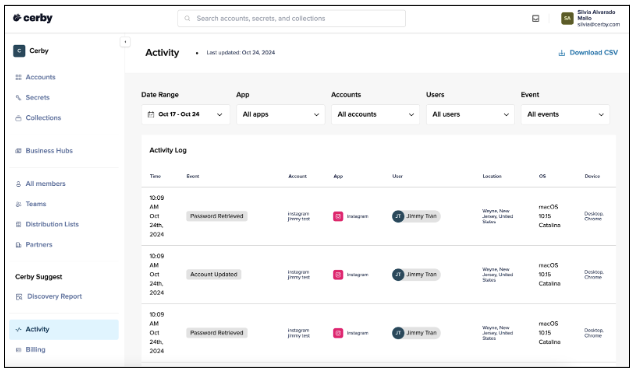
With the **Activity** page, you can monitor and analyze activity on your Cerby workspace in real time. This view contains information about events on accounts, partners, teams, integrations, secrets, and automated tasks.
The **Activity** page offers different filtering options, enabling you to customize displayed data to focus on specific events, accounts, or users, ensuring you only see the most relevant information.
The data displayed on the view is organized into the following columns:
* The time when each event was registered
* A description or category of the activity
* The associated account
* The application where the event occurred
* The user involved in the event
* The geographical location
* The operating system in use
* The originating device
You can monitor events in real time and get immediate insights that support quick, informed decision-making, enabling you to respond to potential issues as they arise, thus enhancing workspace security and control.
Furthermore, the **Activity** page also includes a report download feature to export activity data as a CSV file for deeper analysis, record-keeping, and sharing insights with team members or stakeholders, making it a powerful tool for maintaining and optimizing workspace performance.
**Figure 1** shows the **Activity** page that you can access from the left navigation drawer of the Cerby web app dashboard.
Figure 1. Activity page in the Cerby web app dashboard
***
## Related articles
Refer to the following articles to learn more about the **Activity** page:
* [Filter events in the Activity page](https://help.cerby.com/cerby-web-app/activity/filter-events-on-the-activity-page)
* [Monitor events in the Activity page](https://help.cerby.com/cerby-web-app/activity/monitor-events-in-the-activity-page)
---
# Agent Instructions
This documentation is published with GitBook. GitBook is the documentation platform designed so that both humans and AI agents can read, navigate, and reason over technical content effectively. Learn more at gitbook.com.
## Querying This Documentation
If you need additional information that is not directly available in this page, you can query the documentation dynamically by asking a question.
Perform an HTTP GET request on the current page URL with the `ask` query parameter, and the optional `goal` query parameter:
```
GET https://help.cerby.com/getting-started/concepts/audit-and-activity/activity.md?ask=&goal=
```
`ask` is the immediate question: it should be specific, self-contained, and written in natural language.
`goal` is optional and describes the broader end goal you are ultimately trying to accomplish on behalf of the user. GitBook uses it to tailor the answer towards what is most useful for that goal.
The response will contain a direct answer to the question and relevant excerpts and sources from the documentation.
Use this mechanism when the answer is not explicitly present in the current page, you need clarification or additional context, or you want to retrieve related documentation sections.