> For the complete documentation index, see [llms.txt](https://help.cerby.com/llms.txt). Markdown versions of documentation pages are available by appending `.md` to page URLs; this page is available as [Markdown](https://help.cerby.com/getting-started/concepts/credential-management/the-password-generator.md).
# Password generator
This article describes the key benefits of the Password Generator feature that enables you to generate strong and secure passwords anytime.
**Release date:** October 2, 2023
We already had it, and now you can use it whenever you want for your accounts. The Password Generator is here.
We eagerly counted the days until we released this feature, which enables you to generate strong and secure passwords anytime. Previously, the agent in charge of the password rotations via automation tasks was the only one using the Password Generator.
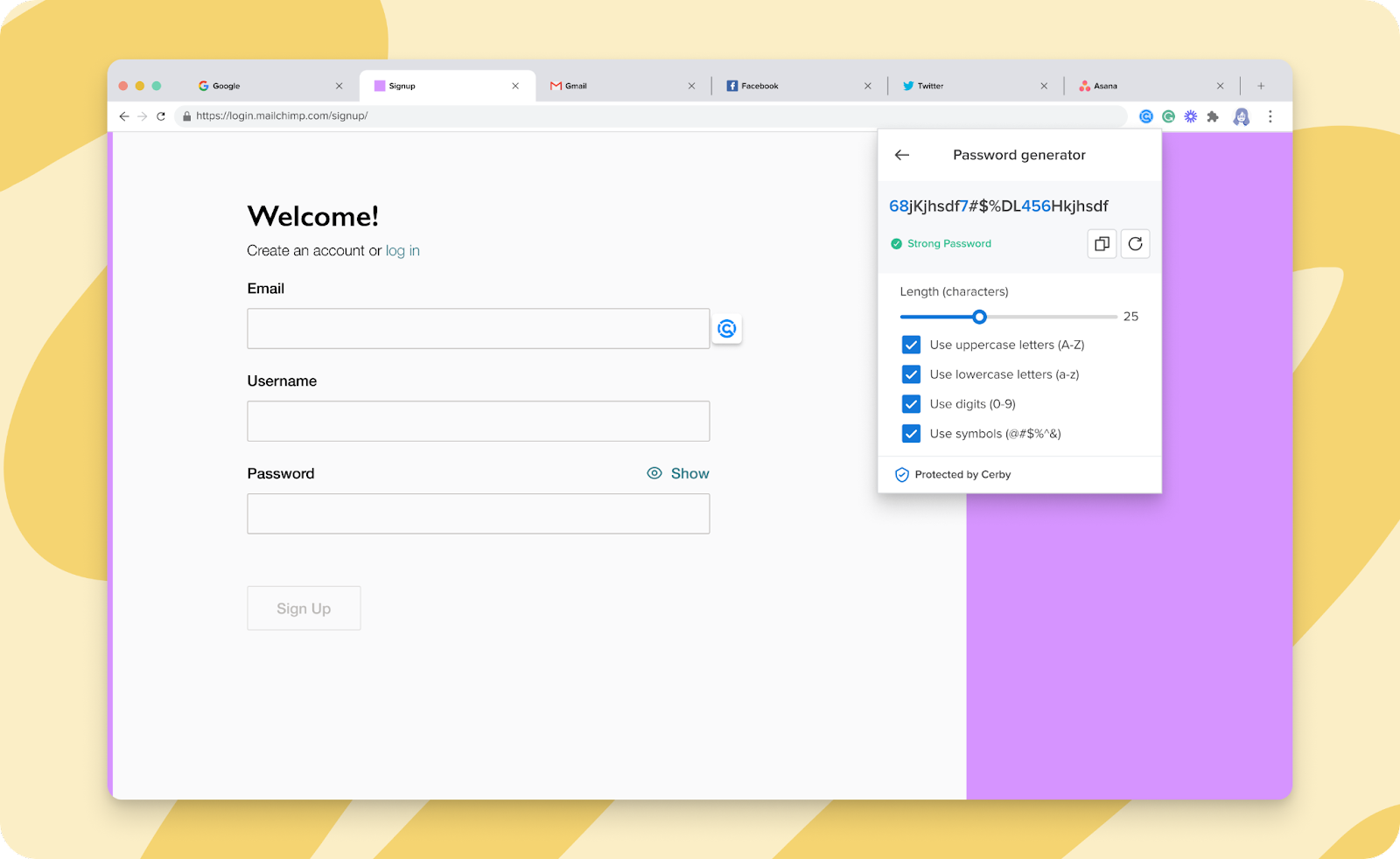
Now, you can use the Cerby browser extension to generate passwords that meet the password requirements of your applications and service providers. You only need to select the applicable password strength rules:
* Length
* Uppercase letters
* Lowercase letters
* Digits
* Symbols
Based on your selection, the Password Generator also lets you know how weak or strong the generated password is.
{% hint style="danger" %}
**IMPORTANT:** A password is stronger the more rules you select and the longer the password is. According to [Hive Systems](https://www.hivesystems.io/password), it would take 226 years to hack a 12-character password that comprises numbers, upper and lowercase letters, and symbols.
{% endhint %}
Check out the Password Generator in the Cerby browser extension, as shown in **Figure 1**.
Figure 1. Password generator page in the Cerby browser extension popup
***
## Can’t wait, let’s start
If you are as excited as us about this new feature, here’s what you have to do next:
1. Open the Cerby browser extension popup
2. Open the Password generator
3. Start generating passwords
For detailed instructions, read the [How to generate secure passwords using the Cerby browser extension](https://help.cerby.com/cerby-browser-extension/accounts/protecting-your-accounts/generate-secure-passwords) article.
***
## Hold on. There's more?
Sit tight. Our Development team is currently working on the following features to be released soon:
* The ability to generate passwords when saving your credentials at signup and login
* The ability to generate passwords via the inline extension
---
# Agent Instructions
This documentation is published with GitBook. GitBook is the documentation platform designed so that both humans and AI agents can read, navigate, and reason over technical content effectively. Learn more at gitbook.com.
## Querying This Documentation
If you need additional information that is not directly available in this page, you can query the documentation by asking a question.
Perform an HTTP GET request on the following URL with the `ask` and `goal` query parameters:
```
GET https://help.cerby.com/getting-started/concepts/credential-management/the-password-generator.md?ask=&goal=
```
`ask` is the immediate question: it should be specific, self-contained, and written in natural language.
`goal` is what the user is ultimately trying to achieve, the reason they need the answer. Sharing it helps GitBook give you a better, more relevant answer. A goal is most helpful when it describes the outcome the user wants rather than restating the question. For example, with `ask=how do I create an API token`, a goal like `automate deployments from our CI pipeline` lets GitBook tailor the answer to that use case.
The response will contain a direct answer to the question and relevant excerpts and sources from the documentation.
Use this mechanism when the answer is not explicitly present in the current page, you need clarification or additional context, or you want to retrieve related documentation sections.