> For the complete documentation index, see [llms.txt](https://help.cerby.com/llms.txt). Markdown versions of documentation pages are available by appending `.md` to page URLs; this page is available as [Markdown](https://help.cerby.com/updates-and-releases/feature-highlights/migrate-your-items-from-your-enterprise-password-manager-to-cerby.md).
# Migrate your items from your enterprise password manager to Cerby
This article describes the key benefits of the Password Manager Importer feature to safely migrate your items from your EPM to Cerby.
With Cerby, you can seamlessly transition from a traditional enterprise password manager (EPM) to our identity and access management platform with EPM capabilities.
Our **Password Manager Importer** feature ensures a smooth and secure migration from LastPass and 1Password to Cerby. Instead of manually saving each corporate account, you can effortlessly sync and import all your items into Cerby in one go.
Transitioning to Cerby offers significant advantages because we provide you with robust security features such as our Zero Knowledge architecture and multi-factor authentication (MFA) to confirm your identity when performing high-sensitive actions.
We also facilitate interoperability across your organization's ecosystem by integrating your workspace with your corporate Identity Provider (IdP), such as Okta and Entra ID (formerly Azure AD), and enabling you to manage your users, accounts, secrets, collections, business hubs, assets, and teams in a centralized hub.
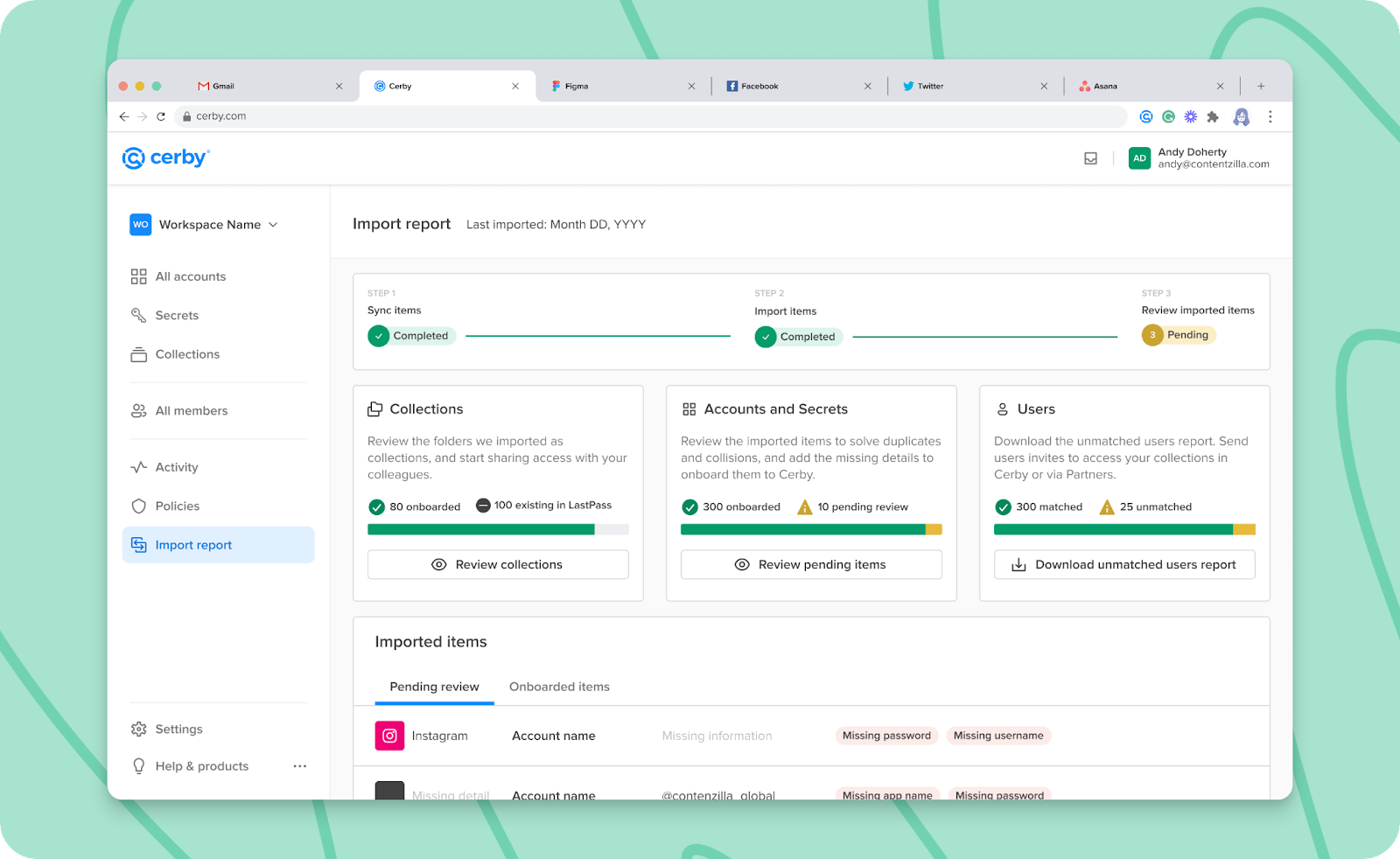
As part of your transition to Cerby, we offer you the **Import report** page in your Cerby dashboard. This view is displayed after you import the folders, vaults, and items from your password manager, as shown in **Figure 1**.
Figure 1. Import report page
***
## What can you do with the Password Manager Importer?
With the Password Manager Importer, you can do the following:
* Migrate from LastPass or 1Password to Cerby.
* Select your LastPass folders and 1Password vaults to import them to Cerby as collections with all of the items inside them.
* Import user access permissions for folders in LastPass and vaults in 1Password. For workspace members with an existing Cerby user account, these permissions automatically propagate to collections, accounts, and secrets.
* Match LastPass and 1Password users automatically to their Cerby user account.
* Keep a record of users who had access to your accounts through your EPM.
***
## Can’t wait, let’s start
If you are as excited as us about this new feature, here’s what you have to do next:
1. Sync items from your EPM.
2. Select the LastPass folders or 1Password vaults and import them to Cerby.
3. Take action on your onboarded items.
4. Start managing your items through Cerby
---
# Agent Instructions
This documentation is published with GitBook. GitBook is the documentation platform designed so that both humans and AI agents can read, navigate, and reason over technical content effectively. Learn more at gitbook.com.
## Querying This Documentation
If you need additional information that is not directly available in this page, you can query the documentation by asking a question.
Perform an HTTP GET request on the following URL with the `ask` and `goal` query parameters:
```
GET https://help.cerby.com/updates-and-releases/feature-highlights/migrate-your-items-from-your-enterprise-password-manager-to-cerby.md?ask=&goal=
```
`ask` is the immediate question: it should be specific, self-contained, and written in natural language.
`goal` is what the user is ultimately trying to achieve, the reason they need the answer. Sharing it helps GitBook give you a better, more relevant answer. A goal is most helpful when it describes the outcome the user wants rather than restating the question. For example, with `ask=how do I create an API token`, a goal like `automate deployments from our CI pipeline` lets GitBook tailor the answer to that use case.
The response will contain a direct answer to the question and relevant excerpts and sources from the documentation.
Use this mechanism when the answer is not explicitly present in the current page, you need clarification or additional context, or you want to retrieve related documentation sections.