# 2023

## November 30, 2023

## New Features

The following are the new features and improvements we released across the Cerby platform:

* We introduced the **Super Admin** role to our role-based access control (RBAC) system to provide you with more granularity on your management actions. Super Admins can do the following in a Cerby workspace:
* Manage product assignments to Cerby Protect and Cerby Automate.
* View the items to which all teams have shared access.
* Turn on **All-Access Mode** to view all accounts in a workspace.

For more information, read the [Roles and permissions](https://help.cerby.com/getting-started/concepts/user-management/roles-and-permissions) article.

* Based on your feedback, we now support accounts with IP addresses as the login URL.

### Cerby web app

Check out what's new in our Cerby web app:

* You spoke, and we listened! We changed the default one-click action of the account cards in your Cerby dashboard. Now, you are redirected to the account details page instead of initiating an automatic login.
* We made the following improvements and changes to the Password Manager Importer:
* The time to import items was substantially reduced due to code optimization.
* Long folder names synced with LastPass are now displayed with an ellipsis to make it easier to navigate through the list of folders to import.
* Imported folders can be reimported in case you have missing items or user access permissions.
* New to [Cerby Protect](https://github.com/cerbyinc/help-center/blob/main/.uncategorized/get-started-with-cerby-protect.md) and to the concept of trusted devices? We improved our messaging in the Cerby web app, in-context alerts, and the inline menu of the Cerby browser extension. We want to let you know clearly when you must set up a trusted device to access the accounts and secrets stored in your workspace vault. Remember that a trusted device can be only one of the three Cerby client apps: Cerby web app, browser extension, and mobile app.
* Did you ever feel hesitant when deleting an account from Cerby? We improved our confirmation message to let you know that you're deleting an individual account, not your entire Cerby account. Additionally, to shorten the account deletion process, we removed the push notification to confirm your identity with the Cerby mobile app. We value your time.
* You can now rename your self-managed teams by clicking the **Edit** icon next to the team name after selecting it from the list in the **Teams** view.
* We made it easier to invite external collaborators to join your Cerby workspace after an item import from LastPass. You can now invite multiple guest users by selecting them from the **Unmatched users** tab of an import report and clicking the **Invite as guests** button.
* Item **Owners** can now select multiple users from the **Members** tab to remove them in bulk from accounts and secrets. The table is automatically refreshed.

Our Tenants feature and business center integrations received some love:

* Admins of a Meta Business Manager integration can now select in Cerby the user management and login method for their users:
* **Username and password:** Users are prompted to save their login credentials in Cerby, and admins can secure access to the Meta Business Manager with multi-factor authentication (MFA) and password rotation.
* **Single sign-on (SSO):** Users authenticate to Meta Business Manager with their identity provider, which means they are not prompted to save their login credentials in Cerby.
* When you perform a check for updates, disabled users in your app are now skipped during the automatic account match in Cerby.
* You can now share tenants and business center integrations with self-managed teams, which triggers the corresponding user provisioning and invite tasks. This feature is available only to license-based and paid social media apps that support bulk actions.
* Tenant owners can now resend themselves an invite from Cerby to create their account and join the app. Just click the corresponding **Resend invite** button from the **Onboarded users** tab inside the **Members** tab of the tenant details page.
* Business center integration owners can now add an automation account that Cerby will use to perform RPA-based automation tasks. Just click the **Add account** button from the business center details page, and a dialog box will guide you through the process of selecting an existing account or adding a new one to Cerby.
* IT admins can now set up the **Share with assets** dialog box to be displayed when inviting users to a Pinterest Business Center integration.
* **Owners** of a Meta Business Manager integration can now revoke an invite sent to a user from the **Members** tab of the business center details page.

### Cerby browser extension

Our Cerby browser extension keeps evolving with the following features and improvements:

* You can now click a button in the extension popup to add an account and a secret. You are redirected to the corresponding dialog box in a new tab to complete the process through the Cerby web app. In a future release, you'll be able to do it directly on the browser extension.
* The inline menu of the Cerby browser now displays your accounts faster after you click the Cerby logo inside an input field.
* The password generator now keeps the same strength rules you set whenever you close the browser extension and come back to this feature.
* The **Accounts** tab of the Cerby browser extension popup now only displays active accounts. Previously, you could also view disabled accounts.
* The Cerby logo is now displayed inside the input fields of a login page even when you don't have an active session in the Cerby browser extension. When clicking on the logo, you are prompted to log in to Cerby.
* We've standardized the following actions that account Collaborators can perform through the inline menu of the Cerby browser extension in v1.0.243:
* Use the **Fill** button to fill in the password for managed accounts.
* Use the **Copy** icon or the **Fill** button to paste or fill in the password for self-managed accounts.

***

## Fixes

### Cerby web app

* The issue with redirecting external users to an unknown website when clicking the **Go to website** button of an account public link is fixed. Also, we are displaying the missing fields when sharing self-managed accounts.
* The issue with displaying "Mixed role" as the Cerby role in the **Members** tab of the account details page when users only have one role imported from LastPass is fixed. This value is only displayed when users have multiple **Collaborator** and **Owner** roles after importing their items.
* The issue with displaying a previous import report with pending items instead of the latest report is fixed. This issue was happening even when the latest import from LastPass was successful.
* The issue with skipping imported collections from LastPass is fixed. Sometimes, these collections were removed from Cerby before performing a new import.
* The issue with being unable to view a secret even after accepting the push notification to confirm the user's identity is fixed.
* The issue with the Password Manager Importer identifying LastPass passwords as subfolders when they have a forward slash in their names is fixed.
* The issue with encountering a loading process deadlock when switching between teams after navigating through different pages in the **Members** tab of the **Teams** view is fixed.
* The issue with performing an automated password rotation from a tenant in Cerby for the service account instead of a specific user account is fixed.
* The issue with displaying incorrectly the "Connect your account" message for a tenant card when using the top search bar of the Cerby dashboard is fixed.
* The issue with not refreshing the list of users in the **Members** tab after sharing a tenant asset in Cerby is fixed.

### Cerby browser extension

* The issue with not displaying the password generator in the inline menu when creating an account through a signup page is fixed in v1.0.239.
* The issue with not filling in the password when clicking the **Use password** button in the inline menu is fixed in v1.0.239.
* The issue with adding a self-managed account twice with the Save credentials at login feature is fixed in v1.0.239.
* The issue with opening multiple inline menus when switching between fields is fixed in v1.0.240.
* The issue with the inline menu not supporting IP or non-fully qualified domains is fixed in v1.0.240.
* The issue with not displaying the dialog box to update the login details of an existing account in Cerby when detecting a signup event is fixed in v1.0.242.
* The issue with displaying the workspace selection page instead of the login page when clicking the **Log in** button for a specific workspace through the inline menu is fixed in v1.0.243.
* The issue with being unable to collapse the inline menu after opening it is fixed in v1.0.243.
* The issue with not detecting a successful login through the Save credentials at login feature after an unsuccessful login due to incorrect credentials is fixed in v1.0.245.
* The issue with the inline menu disappearing outside of the visible browser view is fixed in v1.0.250.
* The issue with not detecting logins through the Save credentials at login feature when the website domain changes is fixed v1.0.252.

### Cerby mobile app

* The issue with not copying the MFA verification code after autofilling the login credentials for a Hootsuite account is fixed in iOS v1.0.99.

***

## Security Fixes

* We disabled the HTTP cache stored by mobile apps for requests with sensitive information in iOS v1.0.99 and Android v1.0.118.

***

## October 12, 2023

## New Features

* We're exhilarated to announce the release of Cerby Protect, a highly requested product that has been in development this year.

Cerby Protect is our enterprise password management offering designed to provide you with a seamless security experience when accessing your corporate sensitive data and collaborating with your coworkers and external parties.

With this product, Cerby introduces two main features to empower you to leverage a Zero Knowledge architecture, where Cerby has no knowledge or access to the decryption keys and the data stored in your vaults:

* Local encryption for the vaults you use to save your accounts and secrets.
* Trusted devices implementation to make sure only the Cerby client apps (web app, browser extension, and mobile app) registered by users can access and decrypt the encrypted vaults.

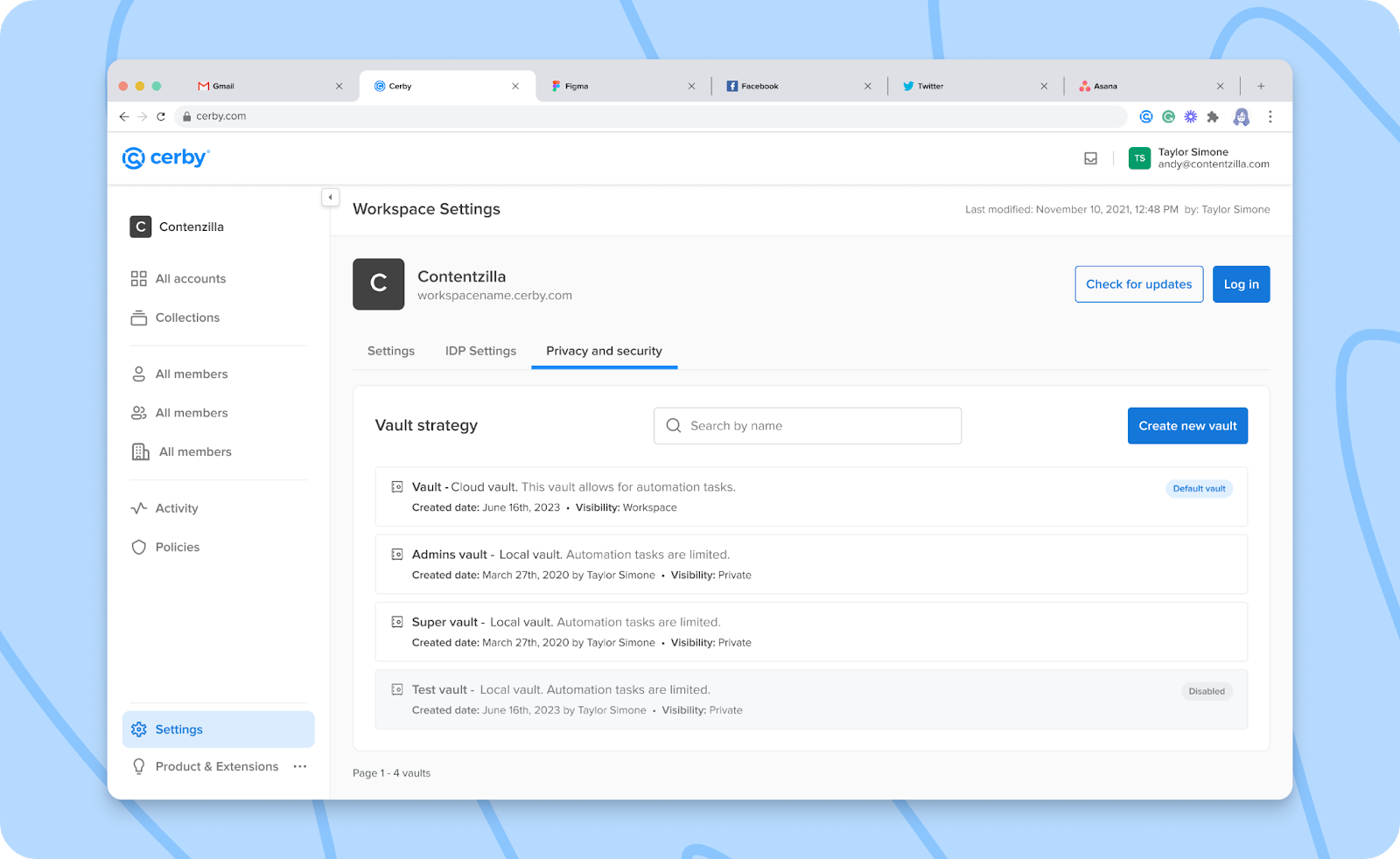
What are you waiting for? Take a look at the [Get started with Cerby Protect](https://github.com/cerbyinc/help-center/blob/main/.uncategorized/get-started-with-cerby-protect.md) article to learn more about the benefits and supported features. Also, check out the **Vault strategy** section in the **Privacy and security** tab of the workspace settings page, as shown in **Figure 1**.

<figure><img src="/files/b18zzMXAoYB8brn6qvg6" alt=""><figcaption><p>Figure 1. Vault strategy section in the Privacy and security tab</p></figcaption></figure>

* Good news never comes alone. You can access now the following features as part of the Cerby Protect release:
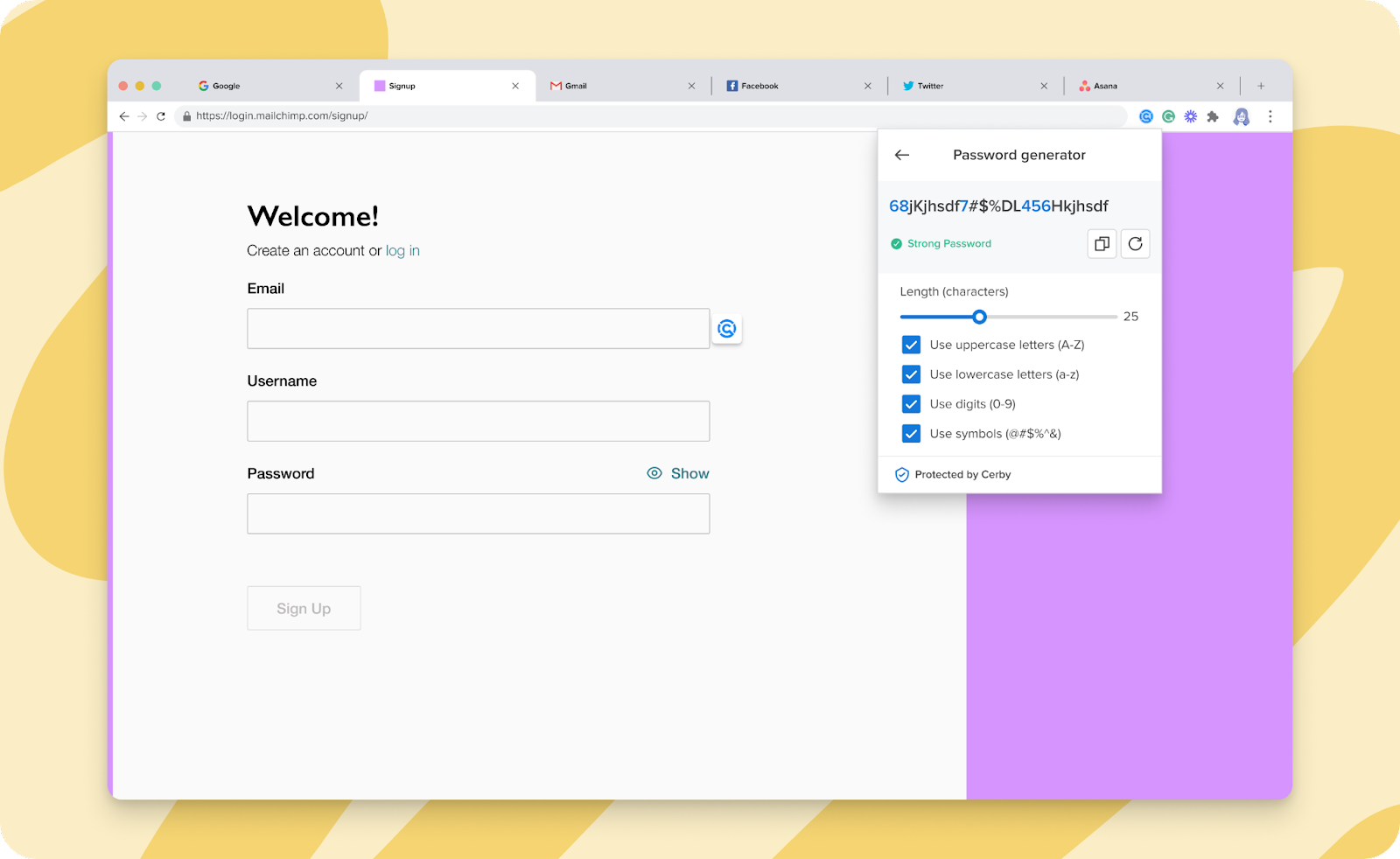
* A password generator is available through the Cerby browser extension, as shown in **Figure 2**. You can use it to generate secure customized passwords that meet the requirements of your applications or service providers by selecting the password strength rules.

<figure><img src="/files/HlVO392CXPbrVBbfaJCB" alt=""><figcaption><p>Figure 2. Password generator page in the Cerby browser extension popup</p></figcaption></figure>

For more information, read the [How to generate secure passwords using the Cerby browser extension](https://help.cerby.com/cerby-browser-extension/accounts/protecting-your-accounts/generate-secure-passwords) article.

* The **Add item** button is available through the **All accounts** view. With this button, a drop-down list is displayed with the following options to select the type of item to add to Cerby:
* **Account**
* **Secret**
* **Collection**
* **Import from password manager**

The goal is to save you steps when adding an item to Cerby. Each option takes you to the corresponding dialog box.

* Installing the Cerby browser extension is recommended but not required for Cerby Protect users. If you want to leverage the magic of the automatic login, you better install it.
* With the support for trusted devices, we introduce the user profile icon in the browser extension.
* With the release of trusted devices, we introduce the user profile icon in the Cerby browser extension with the following options:
  * **My trusted devices**
  * **Log Out**
* Cerby now supports automatic login through the Cerby browser extension on http\:// websites.
* **Workspace Admins** can now assign Cerby products to teams via the **Teams** view.
* We have recharged our Password Manager Importer based on your feedback and the needs of Cerby Protect users. Here's what's new:
* Only users with **Administrator** permissions on the LastPass shared folders can perform an import to Cerby.
* Shared folders can only be imported one time to avoid duplicate items.
* All items are imported, regardless if they have all of the item details.
* Batch imports are now supported to transfer multiple shared folders with numerous items.
* The importer provides more visibility on errors by displaying the error messages sent by LastPass. The goal is to make it easier to know what happened and solve the issue.
* Items are imported to the default vault, whether it is a cloud or local vault.
* The unavailability rules that you set in LastPass for specific recipients are applied to the imported items.
* We keep thinking about different ways to safeguard your information. Now, when you open any dialog box in your Cerby dashboard using the web app, the background is blurred.
* New to Cerby? This feature was crafted especially for you. Our Cerby browser extension now preloads the name of the workspace you have been assigned and logged in previously using the Cerby web app.
* We've been working on our flexibility. With the release of Cerby Protect and the changes to our Password Manager Importer, you can now add accounts with no passwords, and all the Cerby client apps support it.
* After creating a secret, you are now redirected to the secret details page.
* We wanted you to have the numbers and visibility you need to make informed decisions. **Workspace Admins** can now see the number of active users within a workspace through the **All members** view. Previously, this number included deactivated users.
* For a consistent user experience, we've tuned up the actions that users can perform on managed and self-managed accounts according to their roles:
* Owners
  * They can edit the account details, view passwords, and copy passwords through the Cerby web app.
  * They can edit the account details (after being redirected to the Cerby web app), view passwords, and copy passwords through the Cerby browser extension.
  * They can copy passwords through the Cerby mobile app.
  * They can view, copy, and fill in all the input fields for managed and self-managed apps using the inline menu.
* Collaborators

  * They can only copy passwords through the Cerby web app, browser extension, and mobile app.
  * They can only fill in the **Password** field for managed apps using the inline menu.
  * They can only copy and fill in the **Password** field for self-managed apps using the inline menu.

  **NOTE:** These changes were released in the Cerby browser extension v1.0.228 and the Cerby mobile app in iOS v1.0.95 and Android v1.0.111.
* We've streamlined the process of deleting an account. Now, you don't have to accept an identity challenge from a push notification on your Cerby mobile app.
* We did it for collections, and now it's the turn of accounts. The limit on the **Account label** when adding or editing an account for self-managed apps is now set to 100 characters.
* Our Tenants feature and business centers keep evolving to suit your needs:
* We've implemented a multi-step navigation for Pinterest Ads that takes you back to the tenant **Assets** page.
* Role updates now propagate when tenant admins invite members to multiple teams assigned via groups from the identity provider (IdP).
* Now, you can set up your authentication method and identity provider to support single sign-on (SSO). Cerby can redirect you to the corresponding login page and prevent the provisioning automation workflow from sending invites to users who belong to an IdP.
* You can now select multiple tenant assets to share them with other users. Previously, you had to select them one at a time.
* We've got you covered in case the account creator no longer has access to a business center. You can now run policy checks for updates as a tenant owner.

***

## Fixes

### Cerby web app

* The issue with being unable to find all the Google Workspace users assigned to Cerby when sharing an item is fixed. Previously, users had to log in to Cerby to be searchable.
* The issue with being unable to find new users added to a workspace when sharing a secret is fixed.
* The issue with sending a warning message box about a duplicate team name after adding users to a team, and not in the step where you enter the name, is fixed. Additionally, the list of users added to the team is preserved when navigating through the **Create team** wizard.
* The issue with deleted accounts being displayed in the **All accounts** view when changing from the grid to the list layout is fixed.
* The issue with displaying the **View** icon in all the fields inside the **Account details** section is fixed.
* The issue with the security widget in the account details page being displayed momentarily with the "Your account is protected" status instead of the real status is fixed.
* The issue with being unable to remove users from a Meta Pixel asset through a tenant is fixed.
* The issue with importing from LastPass the body of a secret without line breaks is fixed.
* The issue with not displaying the **All account collaborators** option when setting up the auto-forward feature for the messages you'll receive in a new Cerby-managed email address is fixed.
* Users with the **Collaborator** role on a secret can no longer access the secret details page from the **Teams** view.
* The issue with typing and at the same time retrieving the list of users from the corporate directory when sharing a secret is fixed. Previously, the "Something wrong happened" message was displayed.
* The issue with non-**Workspace Admins** being able to download the list of users from the **All Members** view is fixed.

### Cerby mobile app

* The issue with not clearing immediately the cache when logging out from a workspace and logging in to a different workspace is fixed in iOS v1.0.79 and Android v1.0.105. The Cerby mobile app no longer displays the accounts from the first workspace.
* The issue with WeChat accounts crashing the Cerby mobile app when accessing the account details screen is fixed in iOS v1.0.86 and Android v1.0.107.

***

## August 22, 2023

## New Features

* We heard you, IT and System admins. We now have a way to deploy the Cerby browser extension to your corporate computers using an MDM service and a configuration file.

With this solution, you can install the extension on MacOS and Windows for the following web browsers:

* Safari
* Microsoft Edge
* Mozilla Firefox
* Google Chrome

For more information, contact our Customer Support team by sending an email to <support@cerby.com> or a message through the help chat of the Cerby dashboard.

* Prepare the holding back tears emoji. We've tuned up the Tenants feature with the following releases:
* Application assets such as ad accounts, pixels, and pages are now supported, and you can manage access to them through Cerby:
  * Assign assets to a user
  * Edit the user's native role on assets
  * Remove the assets assigned to users

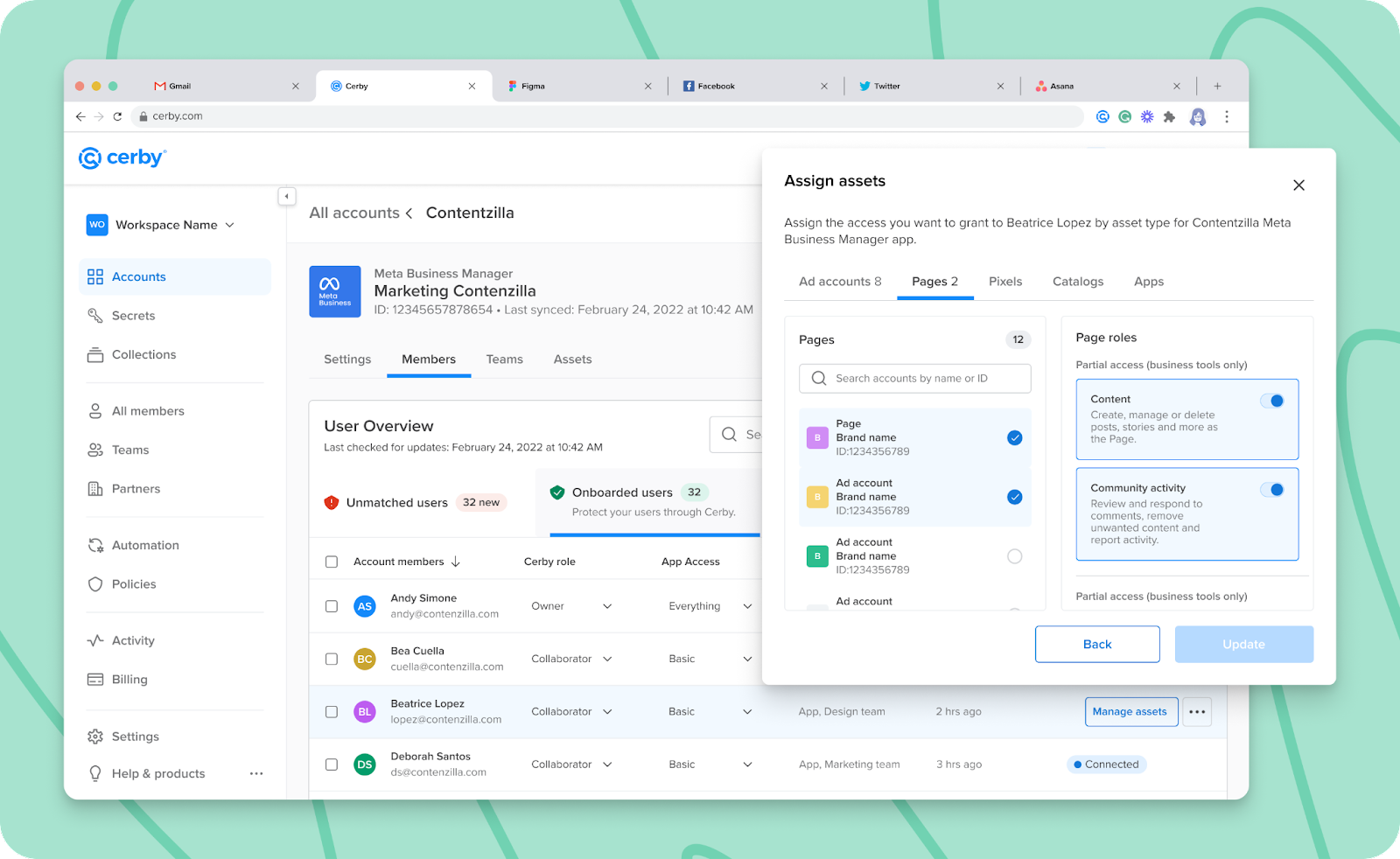
Just click the **Manage assets** button of the corresponding user in the **Members** tab of the tenant details page, and a dialog box will help you assign assets, as shown in **Figure 1**.

<figure><img src="/files/6jDHpmz26iykXFzXdDHz" alt="Screenshot of the Assign assets dialog box in front of the tenant details page, where you can assign tenant assets to a user and edit the user&#x27;s native role on assets."><figcaption><p>Figure 1. Assign assets dialog box</p></figcaption></figure>

* When logging in automatically, tenant service accounts now redirect users to the corresponding collaboration space.
* Great news for all the workspaces using Google as their identity provider and the GSuite directory. **Account Owners** and **Secret Owners** can now share items with users who have not yet logged in to the workspace. Cerby will send them an invite through email to ask them to log in.
* Have you ever looked for end-user documentation about Cerby? We made it easier to access our Help Center from the dashboard. Just click **Help and products** from the left navigation drawer, and a drop-down list will be displayed. Select the **Help Center** option, and we will open the Cerby Help Center on a new tab. Happy reading!

***

## Fixes

### Cerby web app

* The issue with viewing the password of an account twice and being shown the **Add MFA Backup Codes** dialog box in the second view attempt is fixed.
* The issue with the **Download CSV** button in the **Activity** view not performing the intended action is fixed.

### Cerby browser extension

* The issue with the Cerby browser extension falling into a loading loop when scrolling down and getting to the bottom of a list of accounts is fixed in v1.0.196.
* The issue with the automated task to log in to an account from the Cerby browser extension not being interrupted when the user closes the web browser tab is fixed in v1.0.197.
* The issue with the in-context alerts not being dismissed when clicking the **Close** icon is fixed in v1.0.197.

### Cerby mobile app

* The issue with the Cerby mobile app crashing at launch when users have poor network connectivity is fixed in Android v1.0.97.
* The issue with the Cerby mobile app not copying the time-based one-time password (TOTP) to the clipboard during login for Twitter is fixed in iOS v1.0.64 and Android v1.0.98.
* The issue with the Cerby mobile app for iOS crashing when fast-scrolling through the Password Autofill list of accounts is fixed in v1.0.64.
* The issue with the Cerby mobile app not launching when users tap a push notification is fixed in v1.0.99. In this case, the app was previously closed before receiving the push notification.
* The issue with push notifications logging users out of the Cerby mobile app is fixed in iOS v1.0.66 and Android v1.0.100.

***

## July 24, 2023

## New Features

* Remember how excited you were in April with the beta release of the [Save credentials at login](https://help.cerby.com/cerby-browser-extension/accounts/managing-account-autosave/autosave-an-account-at-login-or-signup) feature? Guess what!? We improved the experience, and now you can add accounts to Cerby whether you have an active session with the Cerby browser extension or not.

Just go to the login page of your application using your web browser and log in by entering your credentials, and the Cerby browser extension will do its magic.

If you don't have an active session, you'll be asked to log in to the Cerby browser extension before adding the account, as shown in **Figure 1**.

<figure><img src="/files/U7relTBu5MrzXUejcWzW" alt="Screenshot of the Sign in to Cerby to save your credentials for this account dialog box, where you are asked to sign in before adding an account to Cerby"><figcaption><p>Figure 1. Sign in to Cerby to save your credentials for this account dialog box</p></figcaption></figure>

After logging in, the experience is the same: Cerby will prefill the account details, and you just have to click the **Add account** button. Make sure you have the latest version of the Cerby browser extension installed ([Firefox](https://addons.mozilla.org/en-US/firefox/addon/cerby-s-browser-extension/),[ Google Chrome](https://chrome.google.com/webstore/detail/cerbys-browser-extension/clccplmaaeihbagbefjinmclielobnkb),[ Microsoft Edge](https://microsoftedge.microsoft.com/addons/detail/cerbys-browser-extension/bbaiiaogfdgpbapebajffliefkfipoif), and[ Safari](https://apps.apple.com/mx/app/cerby-web-extension/id1581820030?l=en\&mt=12)).

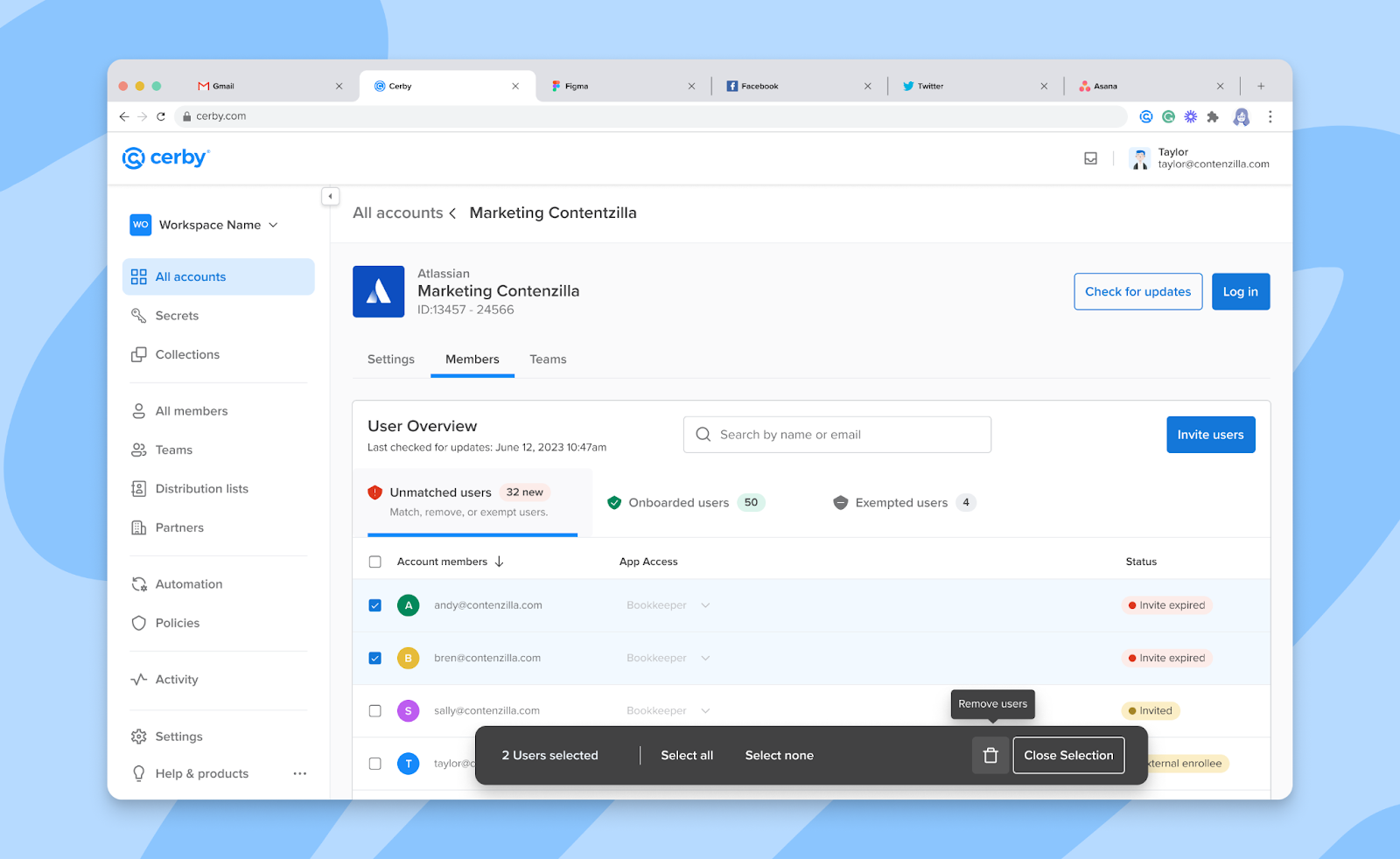
* Bulk actions to remove users from a tenant are now supported in the **Members** tab of the tenant details page. Just select the checkbox of the corresponding users in the table, and a selector will be displayed, as shown in **Figure 2**.

<figure><img src="/files/gWYptEFDYUmfRoX9vMTA" alt="Screenshot of the Members tab in the tenant details page, where you can remove multiple users from a tenant by selecting their corresponding checkboxes. A selector box is displayed at the bottom for bulk actions"><figcaption><p>Figure 2. Members tab of the tenant details page</p></figcaption></figure>

* Forget about those annoying messages from applications blocking the automation tasks you trigger for your accounts. We now run our automation engine in the locations you regularly access.

***

## Fixes

* The issue with **Account Collaborators** being able to remove accounts from collections after a migration via the Password Manager Importer is fixed.
* The issue with saving the information when editing the **Account label in Cerby** field in the account details page is fixed.
* The issue with the in-context alerts being cleared by some applications, like Uplynk, is fixed.

***

## July 6, 2023

## New Features

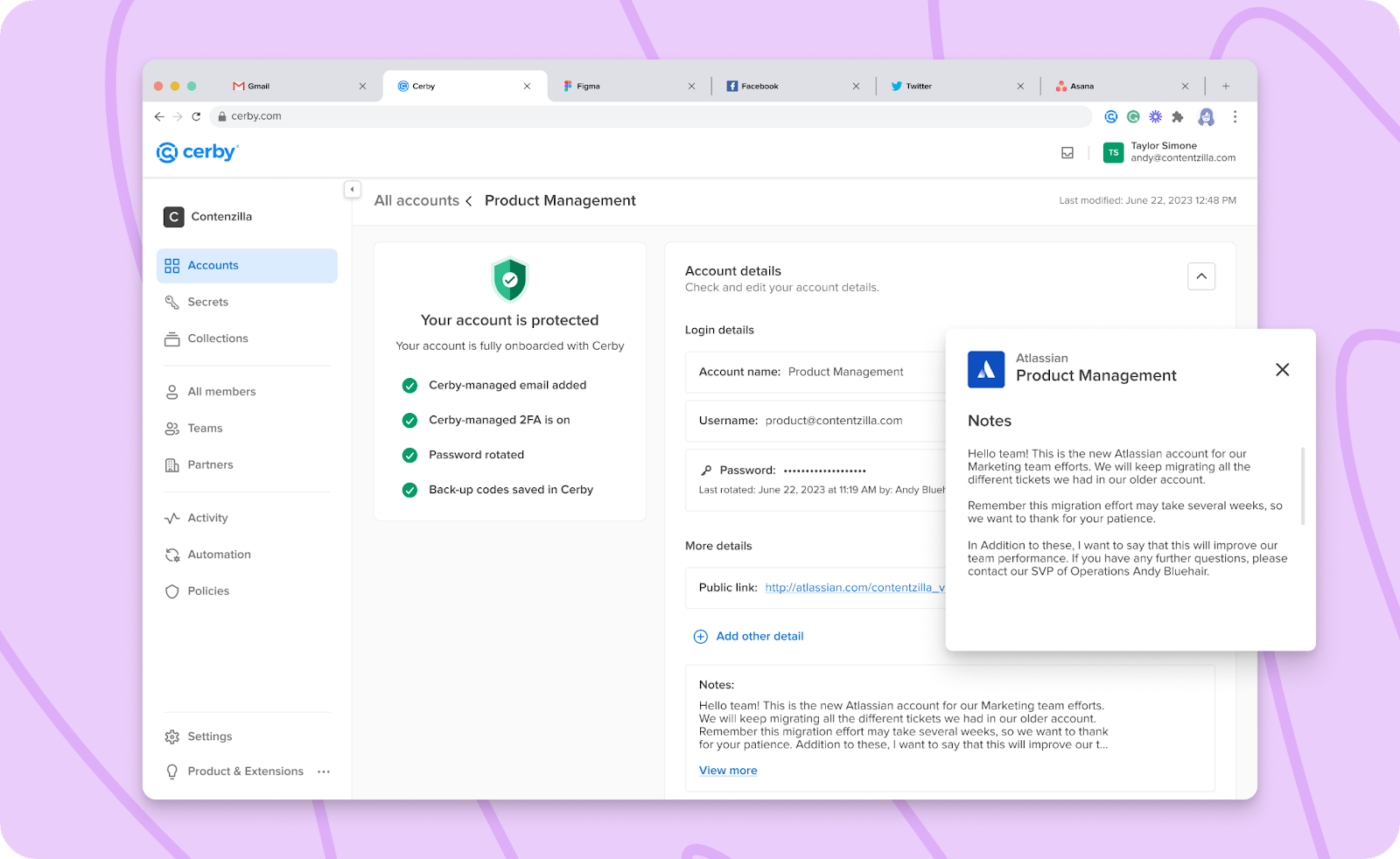
* We know you wanted to save additional information in your Cerby accounts. That's why the [Account Notes](https://help.cerby.com/cerby-web-app/accounts/managing-your-accounts/save-and-manage-account-notes) and [Custom Fields](https://help.cerby.com/cerby-web-app/accounts/managing-your-accounts/add-and-manage-custom-fields-for-your-accounts) features\*\*\*\* are now available on the account details page using the Cerby web app, as shown in **Figure 1**.

<figure><img src="/files/haS8svZ5YnRMDLWwQlIx" alt="Screenshot of the account details page, where you can manage your account and save information via the Notes field or new custom fields."><figcaption><p>Figure 1. Account details page with notes and custom fields</p></figcaption></figure>

Notes are a fixed space in all accounts where you can save additional information about your account, application, or service provider. Custom Fields are information fields you can create based on your needs and with a category name. In both features, users with shared access to the account can view the information.

Are you wondering what you can save in Account Notes or Custom Fields?

* Expiration dates for your licenses
* The point of contact for more information about licenses
* The tenant to which the account or license belongs
* Reminders
* Links for publicly visible accounts
* References to VPN access requirements
* Offline account credentials
* Need to be more thrilled? Cerby's Password Manager Importer can now transfer the notes you have stored in your LastPass passwords as Account Notes.
* Improvements keep coming to secrets. You can now preview the list of attachments and download them when viewing a secret.
* We've added more clarity on the status of users onboarded to a tenant. Instead of displaying the "Partial connection" status in the **Members** tab of the tenant details page, Cerby now displays the following:
* "Cerby onboarded"
* "Missing Cerby MFA onboarding"
* "Requires Cerby Password Update"
* We didn't want to keep you in the dark when an error occurred during a migration using the Password Manager Importer. The **Import report** view now displays an error message with a migration ID that you can share with the Cerby Customer Support team for troubleshooting. We also send you an email with this ID.

Additionally, we included a checklist in our [documentation](https://help.cerby.com/cerby-web-app/item-importer/migrate-from-lastpass-to-cerby#h-b02c825502) to ensure you have all you need before retrying the import.

* Talking about the Password Manager Importer, we fine-tuned our instructions to help you identify your multi-factor authentication (MFA) option for LastPass.

We included a tooltip in the **Enter your login credentials** dialog box of the import wizard. Also, we mention what to do when you have push notification MFA configured.

* Ever wanted to enter a long name for a collection? We removed the 50-character limit, and you can now write names of up to 1,024 characters. Let's say we did it for you to unleash your creativity, not only to support long folder names imported from LastPass.
* One more for the Password Manager Importer. Now, it's related to permissions:
* When users have access to a folder in LastPass but without a native role assigned, they are now granted the **Account Collaborator** role on the Cerby collection.
* When users are invited to a folder, password, or secure note in LastPass but haven't accepted the invite, they are not granted permission in Cerby.
* When importing subfolders from LastPass, they inherit the permissions from the parent folder and are migrated as individual collections.
* Our Development team is on fire! Enjoy the new [tenants](https://help.cerby.com/setup-and-admin/business-hubs/business-hub-catalog) we support:
* [Android Developer](https://www.google.com/aclk?sa=l\&ai=DChcSEwjwjaKF6Pr_AhWCFq0GHRixCz8YABAAGgJwdg\&sig=AOD64_2qVvxA5NSxLiQ3ntWemD0xiJYvjw\&q\&adurl\&ved=2ahUKEwjkgZmF6Pr_AhUyJEQIHe09CswQ0Qx6BAgIEAE)
* [GitHub](https://github.com/)
* [LinkedIn Sales Manager](https://business.linkedin.com/sales-solutions/sales-navigator)
* [Smartlead](https://www.smartlead.ai/)

***

## Fixes

* The issue with not rotating the time-based one-time password (TOTP) after scanning the QR code with the Cerby mobile app (iOS v1.0.40 and Android v1.0.90) is fixed.
* The issue with displaying management actions for distribution lists to all users in the **More options** (...) drop-down list is fixed. Management actions are now enabled only for the owners of distribution lists, and they are accessible through the **Distribution Lists** view.
* The issue with displaying an incorrect number of items in the **Pending review** tab of the **Import report** view is fixed. This issue happened after a migration using the Password Manager Importer.
* The issue with the "Please enter a valid domain" error message when updating the information for the **Allowed login domains** field on the account details page is fixed.
* The issue with the broken link to the Partners documentation in the **Enter Your Partner's Information** dialog box when trying to add a partner is fixed.
* The issue with users being able to see the **Remove from this Collection** option for other collection members who were granted access via a team is fixed. The removal action is displayed through the **More options** (...) drop-down list in the **Members** tab of the collection details page.
* The issue with the email notifications for incomplete automation tasks not redirecting users to the corresponding workspace is fixed.
* The issue with being unable to migrate passwords from LastPass with the same name as an account in Cerby is fixed. The Password Manager Importer validations now only consider the username, password, and service provider or application.
* The issue with the pagination in the **Matched users** and **Unmatched users** tabs after a migration using the Password Manager Importer is fixed.

***

## June 26, 2023

## New Features

* We keep improving our automation to make your work easier. The checks for updates and data syncs for tenants and business centers now automatically match users with their Cerby accounts.
* Talking about improvements, we continue refining our roles to provide you with the best experience and control. Now, users with the **Account Collaborator** role on an account can only see the **Log in** button on the account details page.
* We don't want to annoy you with never-ending prompts. The feature to save your credentials at login via the Cerby browser extension now only asks three times if you want to add an account to Cerby.
* We've given a makeover to the table of users in the **Members** tab of a tenant. Enjoy the improved user experience!
* The pagination in the **Activity** view is now collapsed. So, forget about seeing multiple pages listed.
* The auto-generated user profile avatars for teams no longer support special characters. Get ready to see only letters.
* An improvement for collections to provide visibility about teams. The **Teams** tab is now available on the collection details page, where you can share or remove collections from teams, as well as change the role of the team on the collections.

***

## Fixes

* The issue with being unable to request access to an account after an import from LastPass is fixed.
* The issue with the business ID of a Meta Business Manager account not being updated on the account details page after editing it is fixed.
* The issue with displaying "Never" in the **Last Used** column of the **Members** tab inside the collection details page is fixed.
* The issue with being unable to enter URLs longer than 50 characters when adding an account through the **Add account** wizard is fixed.
* The issue with entering an incorrect secret key when setting up multi-factor authentication (MFA) for an account and still seeing a success message box is fixed.
* The issue with displaying a loading skeleton for empty teams through the **Teams** view is fixed.
* The issue with editing the body of a secret and not updating the text is fixed.
* The issue with the Cerby web app breaking when a migration error occurs is fixed. We also extended the waiting time for an import to be performed to avoid timeout errors.
* The issue with not identifying by domain the non-supported accounts after an import from LastPass is fixed. We now display the domain.

***

## May 15, 2023

## New Features

* Love keeps coming to our Cerby mobile app. With the versions [v1.0.89](https://play.google.com/store/apps/details?id=com.cerby\&hl=en\&gl=US) for Android and [v1.0.39](https://apps.apple.com/us/app/cerby/id1533747684) for iOS, you can now do the following:
* View secrets configured with an identity challenge. Behind the scenes, Cerby ensures that only the device requesting to view the secret can open it.
* Know when you reached the end of the list of accounts and secrets when you scroll down. Cerby the dog will let you know, wink.
* Access secrets inside collections.
* View the teams with shared access to your secrets. Previously, you could only view the team members individually.
* Identify easily if an email address or phone number is managed by Cerby. We added a tag in the account details screen.
* A secret without a text body is still a secret. That's why we support them now.
* Talking about improvements, you can now benefit from the following using the Cerby web app:
* A **Shared via** column was implemented in the **Members** tab of an account, secret, and collection details page. The goal is to let you know how an item is shared with you.
* The grid view is available to display the accounts and secrets in their corresponding tab inside the collection details page.
* A button is available to add accounts or secrets when you are on the account or secret details pages. Just activate the **Accounts** or **Secrets** tab and click the corresponding **Manage accounts** or **Manage secrets** button.
* We take information security seriously. In compliance with the SOC 2 Type II certification, we've implemented a **Terms of service agreement** dialog box for all our users. Please take a minute to review and accept it when it appears.
* The remaining pieces of the [Password Manager Importer](https://help.cerby.com/cerby-web-app/item-importer/migrate-from-lastpass-to-cerby) feature are in their place. Here's what you can import now:
* Folders and subfolders of secure notes with and without attachments to collections
* Missing team members in bulk with a CSV file.
* Account- and secret-level permissions for users.
* Tenant admins, rest assured. Now, Cerby got you covered with automatic daily checks for updates for Apple and Verizon [tenants](https://help.cerby.com/setup-and-admin/business-hubs/business-hub-catalog).

***

## Fixes

* The issue with being unable to change the role of a team on an account via the **Teams** tab on the account details page is fixed.
* The issue with displaying long account names on the **Add Accounts** page of the **Create a Collection** wizard is fixed.
* The issue with deleting collections and accounts from the **Teams** view is fixed. Now, they disappear immediately.
* The issue with displaying a previously selected team when selecting a different team in the **Teams** view is fixed.
* The issue with matching, removing, or exempting users from a tenant is fixed. Now, the **User Overview** section is refreshed automatically after performing any of these actions.
* The issue with refreshing the list of saved versions of a secret whenever you reach the bottom of the list on the **Secret history** dialog box is fixed.
* The issue with the in-field Cerby icon disappearing from the **Update your password** dialog box for Discord is fixed.
* The issue with the number of billable accounts that involved Meta in the **Billing Report** view is fixed.
* The issue with the button for our LinkedIn profile on the [www.cerby.com](http://www.cerby.com) site redirecting to an incorrect page is fixed. Report credit: Milan Jain.
* The following issues in our newest version of the Cerby mobile app are fixed:
* The app kept loading when tapping an empty collection.
* The keyboard blocked the **Message** field when sharing an account and entering a message, making it difficult to know what you were writing.

***

## April 25, 2023

## New Features

* Our platform keeps getting even more user-friendly. The Cerby browser extension v1.0.172 ([Firefox](https://addons.mozilla.org/en-US/firefox/addon/cerby-s-browser-extension/), [Google Chrome](https://chrome.google.com/webstore/detail/cerbys-browser-extension/clccplmaaeihbagbefjinmclielobnkb), [Microsoft Edge](https://microsoftedge.microsoft.com/addons/detail/cerbys-browser-extension/bbaiiaogfdgpbapebajffliefkfipoif), and [Safari](https://apps.apple.com/mx/app/cerby-web-extension/id1581820030?l=en\&mt=12)) is now available with the feature to [save your credentials at login](https://help.cerby.com/cerby-browser-extension/accounts/managing-account-autosave/autosave-an-account-at-login-or-signup). You now have an easy and secure way to add accounts to Cerby when accessing an application manually through a login page using a web browser. Stay tuned because this is just the beginning.
* Talking about improvements. After reading these release notes, you'll surely want to update your Cerby mobile app. The versions v1.0.79 for Android and v1.0.23 for iOS are now available with the following features:
* A brand new account details screen where you can see the following:
  * Your login credentials
  * The verification codes when multi-factor authentication (MFA) is configured and managed by Cerby
  * The QR code scanner to configure MFA managed by Cerby
  * The members and teams with access to the account
  * The option to share an account with other workspace members and teams
* Secrets are here! You can now view the secret details screen with the following information:
  * The name and body of the secret
  * The file attachments
  * The members with access to the secret
  * The last modified and added dates

With Secrets supported, you can also:

* Download and view attachments.
  * Share a secret with other workspace members and teams.
* We have good news for IT admins! They can now automatically invite new users to join a [tenant](https://help.cerby.com/setup-and-admin/business-hubs/business-hub-catalog) or remove them by performing provisioning and deprovisioning events in their identity provider (IdP). These events propagate from group assignments in the IdP to teams in Cerby.
* We've been busy flexing our security muscles and have implemented the Proof Key for Code Exchange (PKCE) protocol in the Cerby browser extension and mobile app. The goal is to protect all of our users against authorization code interception attacks. This protocol is available in the following versions:
* Cerby browser extension v1.0.167 and subsequent versions
* Cerby mobile app v1.0.79 for Android and v1.0.23 for iOS, and subsequent versions

So, next time you use the Cerby browser extension or mobile app, know that an additional security layer is in place for the authorization process. This way, we ensure that login credentials are securely managed and protected from potential threats without affecting your user experience.

***

## Security Fixes

* A potential hijacking vulnerability in the Cerby mobile app for Android is fixed.

***

## April 6, 2023

## New Features

* The Password Manager Importer is now available in the Cerby web app. This feature enables you to sync and import to Cerby, in one go, the following items you have saved in your password manager:
* Folders as collections
* Password as accounts
* Secure notes and their attachments as secure notes
* User access permissions for shared folders

After the import, you can start managing, protecting, and sharing your items through Cerby.

* Secrets are now available in the Cerby web app. This feature enables you to save important information and attachments securely in Cerby, in an encrypted environment, and share them with your colleagues.
* The Cerby mobile app [v1.0.23](https://apps.apple.com/us/app/cerby/id1533747684) for iOS and [v1.0.79](https://play.google.com/store/apps/details?id=com.cerby\&hl=en\&gl=US) for Android are now available with features such as the following:
* Improvements to the login process
* Users can log back in with saved credentials
* Improvements in the user interface for large screens
* A message is now displayed in the Cerby browser extension about notifications sent to an **Account Owner** when help is needed to log in to an account automatically.
* Users who receive an email about a request to share access to their account via a partnership are now redirected to the **Members** tab within the account details page.

***

## Fixes

* The following issues were fixed in the latest release of the Cerby mobile app for iOS and Android:
* Being unable to tap the **Scan code** button using an iOS iPhone 13 Pro Max.
* A network error screen appearing briefly.
* Displaying verification codes in two lines in the account details screen (iOS).
* The content not centered in the onboarding screens.
* The related tenant screen breaking when displaying multiple tenants.
* The issue with not displaying a date in the **Last Used** column of the table in the **Members** tab of an account details page is fixed.
* The issue with the sender being unable to see if the receiver has accepted an invite to access a tenant, as well as the option to rotate the password, is fixed. This information is displayed in the **Members** tab of the tenant details page.
* The issue with accessing the email settings from the account details page is fixed.
* The issue with events in the **Automation** view not being correctly grouped by date is fixed.
* The issue with entering a long name for a collection in the **Share Collection** wizard is fixed.

***

## Security Fixes

* Potential email flooding vulnerabilities in the [Pricing](https://www.cerby.com/pricing) and [Contact Us](https://www.cerby.com/about-us/contact-us) pages of the Cerby website are fixed. Report credit: Milan Jain and Love Yadav.

***

## February 22, 2023

## New Features

* The new look of the account details page is now available. It's easier to identify the recommended security actions for your accounts. Also, we condensed and improved the information and actions of every section.
* The following apps are now supported as tenants:
* Atlassian
* Calendly
* Meta Business Suite
* Mailchimp
* NetComponents and Calendly are now supported with automatic login and password rotation.
* Office 365 is now supported with the following automation:
* Login
* Turning on and off MFA
* Password rotation
* All users, no matter their role, can now see the existing teams and team members within a workspace through the **Teams** view.

***

## Fixes

* The issue with the **Inbox** in the account details page of the Cerby web app only displaying emails and not SMS is fixed.
* The following issues related to Partners in the Cerby web app are fixed:
* **Workspace Admins** being unable to see the shared accounts via a partnership, even when the accounts were shared with them.
* **Workspace Admins** not receiving a partnership request via email.
* The same **Workspace Admin** creating a partnership and approving the partnership request.
* The guest contact partner information displaying an unrelated email address.
* **Workspace Admins** being unable to share accounts into the partnership.
* The issue with the "Connect your account" status in the Cerby web app not changing on the account card for a tenant after connecting an account is fixed.
* The alert issues for Atlassian and Fortinet are fixed by catching TOTP form submissions and sleeps.

***

## Security Fixes

* Potential click-jacking vulnerabilities in the <https://www.cerby.com/> site and [Contact us](https://www.cerby.com/about-us/contact-us) page are fixed. Report credit: Pavan Vyas and Milan Jain.

***

## January 24, 2023

## New Features

* The Tenants feature is now available to help our customers simplify user and access management for tenants. We define tenants as apps with collaboration spaces, such as workspaces, teams, and dashboards, where each user has login credentials. With a tenant connected to Cerby, customers can centrally and securely manage all users from Cerby by mapping them to their corporate directory.
* The **Team Admin** role is now available for the Teams feature when a team is created manually in Cerby.
* The **Shared Inbox** is now available in the pop-up and inline Cerby browser extension.
* Collections now have their own tab in the **Teams** view.
* In-context alerts now identify automation workflows that need a CAPTCHA to be resolved for the following apps:
* Emplifi
* Shutterstock
* TikTok
* The time-based one-time password (TOTP) page is now handled when automatically turning on multi-factor authentication (MFA) for a Shopify account.
* Collapsible sections in the Cerby web app now remain open when switching screens and until users close them.
* Pagination and infinite scroll are now implemented in the account listing in the Cerby browser extension's inline menu and pop-up screen.
* The list of users in the **Unknown users** tab for a business center account is now sorted alphabetically.
* The **Reason for request** field is now implemented in the **Add new partner** dialog box.
* The list view is now supported for displaying account assets.
* Collections now have their own tab in the **Teams** view.
* The issue with users being unable to share or invite users to a business center account is fixed.

***

## Fixes

* The issue with the list of teams not being sorted by name in the **Teams** view is fixed.
* The issue with apps not being properly identified for some accounts in a password manager migration is fixed.
* The issue with users being unable to share or delete accounts of non-supported apps that were imported from LastPass is fixed.
* The issue with the Cerby browser extension being able to open multiple automation workflows simultaneously is fixed.
* The issue with the pagination when listing members of a team is fixed.
* The issue with the success message displayed after removing a partner's access to an account from the **Members** tab of the account details page is fixed.
* The issue with guest workspace members not being deleted from the list in the **Members** tab of a partner when they have pending requests to share access to a deleted account is fixed.
* The issue with **Account Managers** being able to edit the account-level role over an account shared via a partnership for users in the host workspace is fixed.
* The issue with the **Account manager** tooltip being difficult to see in the **Share accounts** wizard for a partnership is fixed.
* The issue with displaying an account shared via a partnership after removing access to the only member is fixed.
* The issue with guest workspace members being able to choose the **Account Manager** role in the **Request share access** dialog box is fixed.
* The issue with the **Add a new partner** dialog box still being displayed after clicking the **Back** button of the browser is fixed.
* The issue with **Workspace Admins** being unable to see members of Facebook Business Manager (FBM) assets to which they don't have a direct access grant is fixed.
* The issue with the automatic login not filling in the MFA verification code for a Slack account is fixed.
* The issue with not displaying account information in the **Activity** view when adding or removing accounts from a collection is fixed.
* The issue with the in-context alerts screen not fully expanded when logging in automatically to a TikTok account is fixed.
* The issue with displaying the same account two times in the Cerby browser extension for Edge is fixed.
* The issue with users being able to duplicate partnership access requests is fixed.
* The issue with users being unable to update FBM roles from Cerby is fixed.
* The issue with the list of teams not being sorted by name in the **Teams** view is fixed.
* The issue with the account filter not working properly in the **Share accounts** wizard for a partnership is fixed.


---

# Agent Instructions: Querying This Documentation

If you need additional information that is not directly available in this page, you can query the documentation dynamically by asking a question.

Perform an HTTP GET request on the current page URL with the `ask` query parameter:

```
GET https://help.cerby.com/updates-and-releases/whats-new/2023.md?ask=<question>
```

The question should be specific, self-contained, and written in natural language.
The response will contain a direct answer to the question and relevant excerpts and sources from the documentation.

Use this mechanism when the answer is not explicitly present in the current page, you need clarification or additional context, or you want to retrieve related documentation sections.