# 2024

## December 30, 2024

## New features

The following are the new features and improvements we released across the Cerby platform:

* Potential partners, external collaborators, and developers brace yourselves! We've made one of the first moves toward opening the Cerby platform to you. The [**Cerby developer portal**](https://developer.cerby.com/) is now live, providing you with the tools and resources to build powerful integrations. The following are the available collections in our public API, and we're aiming for more in 2025:
* [Accounts](https://developer.cerby.com/#accounts)
* [Secrets](https://developer.cerby.com/#secrets)
* [Collections](https://developer.cerby.com/#collections)
* [Users](https://developer.cerby.com/#users)
* [Teams](https://developer.cerby.com/#teams)
* [Integrations](https://developer.cerby.com/#integrations)
* [Jobs](https://developer.cerby.com/#jobs)

We can't wait for you to start building innovative and powerful solutions with our public API and [Cerby CLI](https://help.cerby.com/developer-tools/cerby-cli/explore-the-cerby-cli).

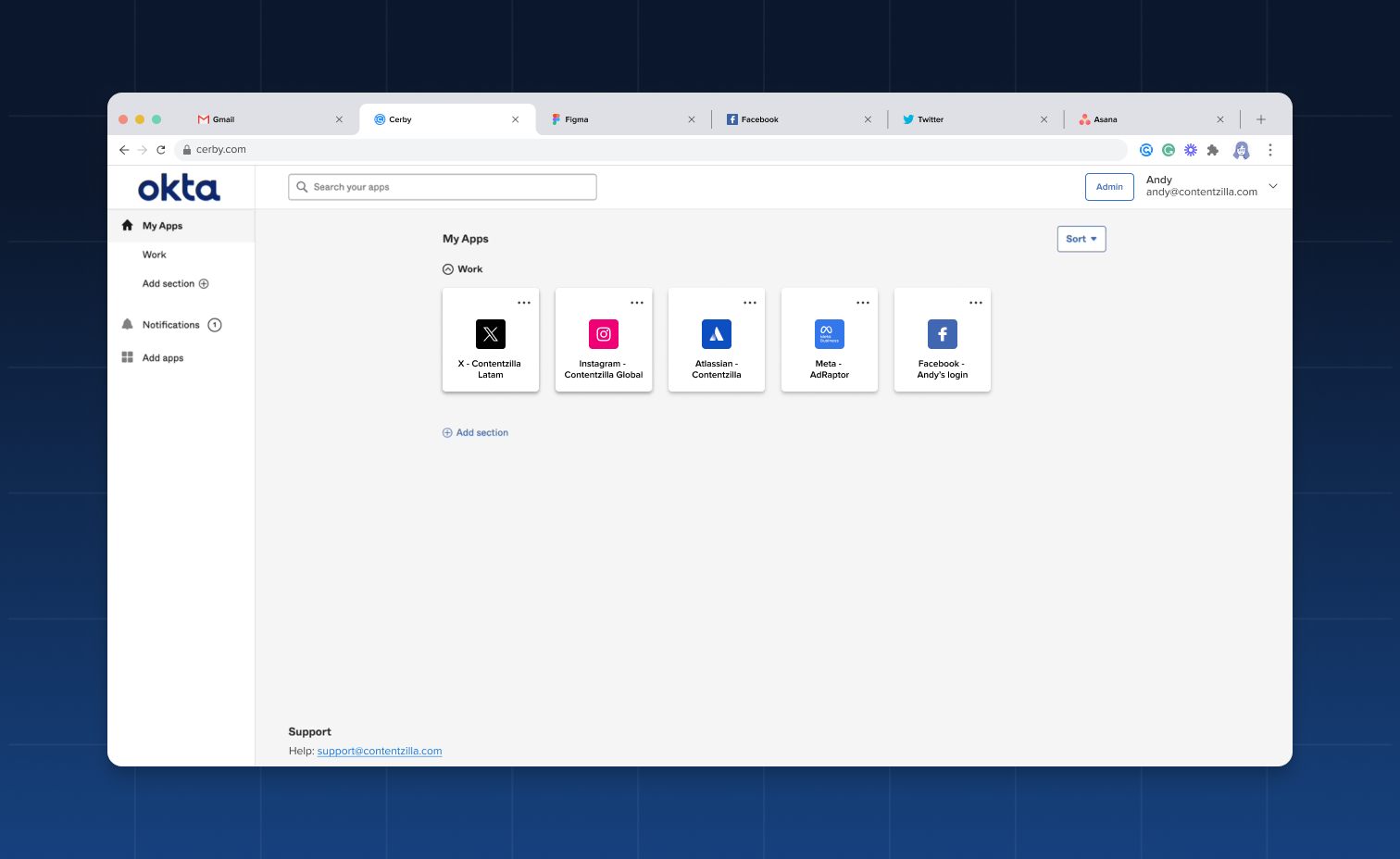
* You know we've been partners with Okta to secure nonstandard applications for more than one year. Well, our collaboration keeps bearing more fruit! We're excited to announce **Extended account access**, a feature that enables organizations to enjoy a seamless login experience to their disconnected apps from Okta powered by Cerby's automation. If you want to centralize access in your identity provider (IdP) instead of using an additional external dashboard, look no further. Just extend your Cerby accounts to your Okta dashboard, and let the Cerby browser extension do all the heavy lifting of autofilling the login credentials and verification codes when Cerby manages multi-factor authentication (MFA).

For more information, read the article [Extended account access](https://help.cerby.com/getting-started/concepts/credential-management/extended-account-access). **Figure 1** shows how your accounts are displayed as chiclets in the Okta dashboard.

<figure><img src="/files/3n8oTeracZrO3T3bSbpl" alt=""><figcaption><p>Figure 1. Chiclets in the Okta dashboard extended from Cerby accounts</p></figcaption></figure>

### Cerby web app

Check out what's new in our Cerby web app:

* Ever heard about forgetting a password? We know it happens, and that's why workspace **Admins** can now reset the password of a guest user. Here's how you can do it:

1. Select the **All members option** in the left navigation drawer.
2. Activate the **Guest** tab.
3. Click the More options icon.
4. Select the **Force Password Reset** option from the drop-down list.

* If you manage complex and numerous permissions through a Cerby business hub, we have good news! We've added a scroll interaction to the list of app roles displayed in the **Members** tab of the business hub details page. That way, you can navigate through them seamlessly.
* Business hub **Owners** can now move users from the **Exempted** table back to **Unmatched users**. This action can be performed from the **Members** tab in the business hub details page as follows:

1. Activate the **Exempted** table.
2. Click the **More options** (...) icon of the corresponding user.
3. Select the **Remove exemption** option.
4. Click the **Confirm** button.

* All accounts, including business hubs, now have the **Copy bookmark URL** button available on the account details page. With this URL, you can trigger automated logins with the Cerby browser extension from the dashboard of your identity provider (IdP).

### Cerby browser extension

Explore the latest features in our Cerby browser extension:

* We've improved the login experience for your accounts with two features:
* After a successful login to our extension, we now close the browser tab we open for the process. This way, you can get back to what you were doing. If the login is unsuccessful, we keep the browser tab open so you can retry.
* The account details screen in the Cerby browser extension popup now displays the **MFA Code** section and a **Copy** icon so you can copy the verification codes without navigating to an additional screen.

### Cerby mobile app

Dive into the newest additions to our Cerby mobile app:

* We now track the following analytic events according to the operating system (OS):
  * iOS v1.0.221 and v1.0.222
    * Onboarding
    * Login
    * Profile interactions
    * Secret details
    * Collection details
  * Android v1.0.180 and v1.0.181, with full coverage in v1.0.182
    * Onboarding
    * Login
    * Home
    * Collection details
    * Secret details
    * Account details
    * Profile
    * Application settings
    * Trusted devices
* Keychain data is now completely removed on fresh installs of the Cerby mobile app from iOS v1.0.218 onwards. Some user sessions were not terminated when uninstalling the app.
* The Cerby mobile app no longer validates the workspace name while the user types the name for logging in purposes. Also, lowercase is enforced. These features were released in iOS v1.0.218 and Android v1.0.181.
* Restricting workspaces for login through a mobile device management (MDM) platform is now supported in Android v1.0.181.
* The login credentials of the last accessed account are now preselected when launching an app from the account details screen in iOS v1.0.216.
* From versions iOS v.1.0.215 and Android v1.0.179 onwards, the Cerby mobile app requires Android 11 and iOS 16 as the minimum supported OS due to security updates and performance improvements. For more information, read the article [Troubleshooting: Older operating systems no longer supported by the Cerby mobile app](https://help.cerby.com/tips-and-troubleshooting/troubleshooting/cerby-mobile-app/troubleshooting-older-operating-systems-no-longer-supported-by-the-cerby-mobile-app).

***

## Fixes

Take note of the issues addressed and resolved by the Development team behind the Cerby platform:

* The issue with workspace **Super Admins** being unable to see the items shared with a team, even when they are not part of the team, was fixed.

### Cerby web app

* The issue with not displaying the **More options** (...) drop-down list for a guest user invited to a business hub is fixed. Now, you can perform actions such as removing guest users through the **Members** tab of the business hub details page.
* The issue with not redirecting users to the corresponding team from the **Teams** tab of the user details page was fixed. Users were redirected to the main **Teams** view after selecting the **View team** option in the **More options** (...) drop-down list.
* The issue with not displaying accounts shared via a public link in the **Activity** view was fixed.
* The issue with not redirecting users to the secret details page when opening a secret from an email message was fixed. Cerby sends an email whenever a user shares a secret, and it contains a button to open the secret.
* The issue with not displaying the **More options** (...) drop-down list of a secret within an expanded collection in the **Collections** view was fixed.
* The issue with being unable to connect a business hub when selecting different vaults for the business hub account and automation account was fixed.
* The issue with not preserving the text inputs when moving back or forward in the wizard for connecting a business hub was fixed.
* The issue with being able to update the YouTube Studio Owner role of a user in the **Members** tab of the business hub details page was fixed. This action is now disabled because YouTube Studio doesn't support updating an Owner role in any scenario.

### Cerby mobile app

* The issue with not filtering business hubs in the app catalog when adding an account via the Cerby mobile app was fixed in iOS v1.0.222.
* The issue with displaying an account password before the user manually tapped to view it was fixed in Android v1.0.193.
* The issue with the Cerby mobile app sometimes crashing when navigating to the **Secrets** screen was fixed in Android v1.0.188.
* The issue with being incorrectly redirected to the latest autofilled app when launching it from the Cerby mobile app was fixed in Android v1.0.181.
* The issue with not displaying the password of some Cerby accounts for Instagram after deleting the time-based one-time password (TOTP) configuration was fixed in iOS v1.0.215 and Android v1.0.180.

***

## New supported managed apps

The following are the latest additions to the list of managed apps with supported automated tasks:

* [Acsense](http://acsense.com/)
* [Aha!](http://aha.io/)
* [Anedot](http://anedot.com/)
* [Anthropic](http://console.anthropic.com/)
* [Apollo](http://studio.apollographql.com/)
* [Appbot](http://app.appbot.co/)
* [Your App Domain](http://yourappdomain.com/)
* [BiliBili](http://bilibili.com/)
* [Bluesky](http://bsky.app/)
* [BrandBastion](http://app.brandbastion.com/)
* [Brandly](http://brandly.com/)
* [Brightspace](http://anahuac.brightspace.com/)
* [Chaos](http://chaos.com/)
* [Checkr](http://checkr.com/)
* [CloudAlly](http://cloudally.com/)
* [DeepL](http://deepl.com/)
* [Dock](http://dock.us/)
* [DoorDash](http://doordash.com/)
* [Dovetail](http://dovetail.com/)
* [Egnyte](http://egnyte.com/)
* [Embed.ly - API](https://embed.ly/)
* [Explorium](https://app.explorium.ai/)
* [FAMIS360](https://www.accruent.com/products/famis-360)
* [Gitlab](http://gitlab.com/)
* [Humata](http://app.humata.ai/)
* [Kinsta](http://kinsta.com/)
* [Kuaishou](http://kuaishou.com/)
* [Massive.io](http://massive.io/)
* [Mi Plan A](http://www.miplana.mx/)
* [Mixpanel](http://mixpanel.com/)
* [NJHIN](http://njhin.info/)
* [PayPal](http://paypal.com/)
* [PayPal Business Sandbox](http://sandbox.paypal.com/)
* [Payper](http://dashboard.payper.ca/)
* [Planview](http://login.leankit.com/login/)
* [Playable](http://playable.video/)
* [Readme](http://readme.com/)
* [Rival IQ](http://app.rivaliq.com/)
* [Schwab](http://stockplanservices.schwab.com/)
* [Shippo](http://apps.goshippo.com/)
* [SIU](http://siu.anahuacmayab.mx/)
* [Snappy](http://snappy.com/)
* [Squarespace](http://squarespace.com/)
* [Stifel Bank](http://stifel.olbanking.com/)
* [Superwise](http://superwise.ai/)
* [testapp.io](http://testapp.io/)
* [TikTok Shop](https://seller-us-accounts.tiktok.com/account/login)
* [User Interviews](http://userinterviews.com/)
* [Vista Social](http://vistasocial.com/)
* [Voices](http://voices.com/)
* [Vonage](http://vonage.com/)

***

## September 28, 2024

## New features

The following are the new features and improvements we released across the Cerby platform:

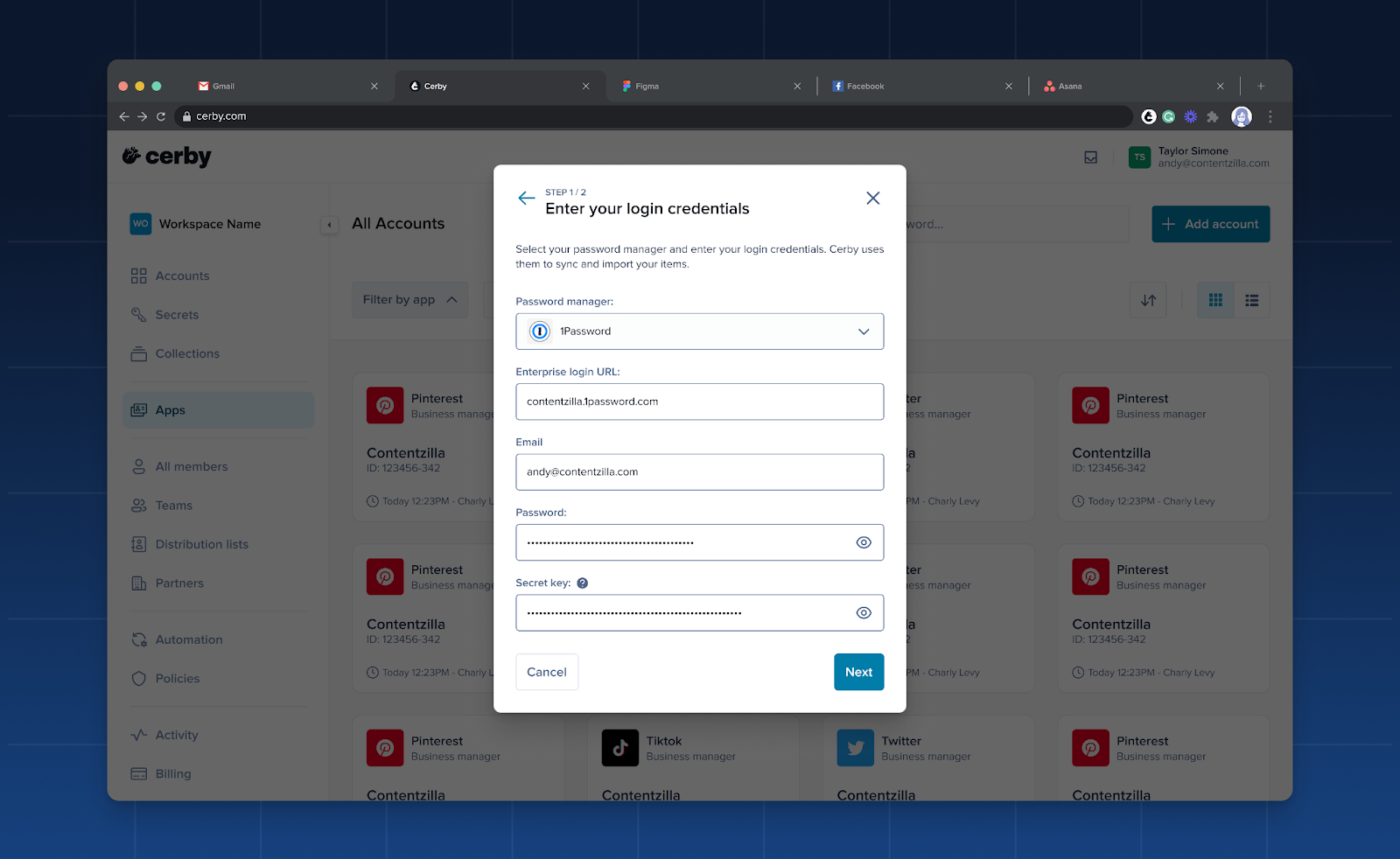
* Looking for another reason to use Cerby? We've expanded the capabilities of our Password Manager Importer, and we now support migrations from 1Password. With just a few clicks, you can transfer your vaults and items to start protecting and managing them from Cerby. For more information on the import rules and item correspondences, read the article [Migrate from 1Password to Cerby](https://help.cerby.com/cerby-web-app/item-importer/migrate-from-1password-to-cerby). **Figure 1** shows how the import starts when you select 1Password.

<figure><img src="/files/kIpy21bvC0SeEZrgvgqX" alt=""><figcaption><p>Figure 1. Enter your login credentials dialog box of the Password Manager Importer</p></figcaption></figure>

* If you manage or access a business hub through Cerby, we have good news!
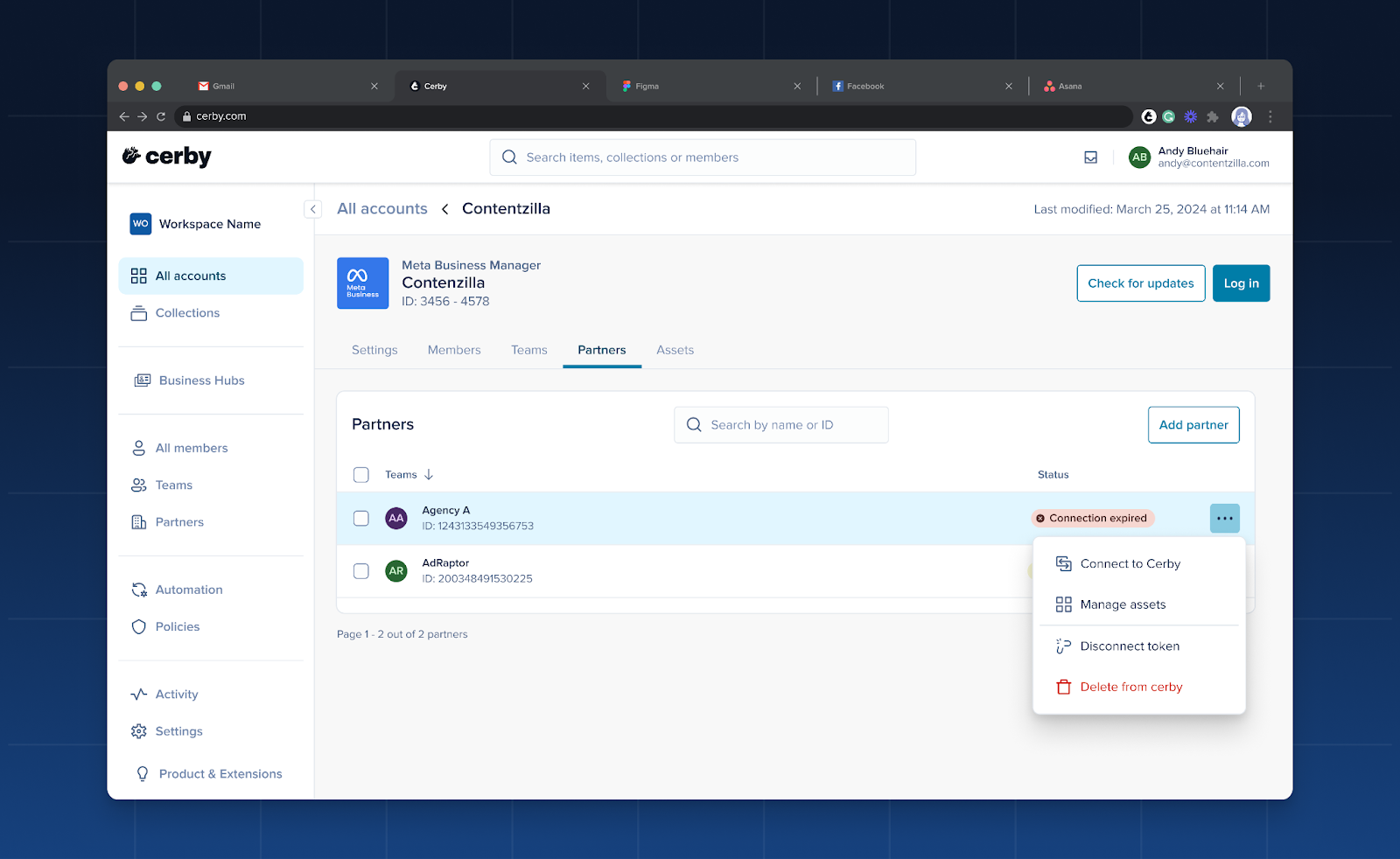
* Users of the [native partners](https://help.cerby.com/getting-started/concepts/user-management/partners#h-e7fa9c355c) feature, keep reading. As an integration **Owner**, you can now disconnect the token you have created for this feature and use a different token to continue collaborating with agencies, media planners, or consultants. This feature is helpful for scenarios where the token expires, the token is incorrect when connecting the native partner, or your external collaborator changes. Just go to the **Partners** tab of the integration details page, click the **More options** (...) icon of the corresponding native partner, and select **Disconnect token**, as shown in **Figure 2**.

<figure><img src="/files/TUMwXtwJr5D2n5y9LRCA" alt=""><figcaption><p>Figure 2. Partners tab of the integration details page</p></figcaption></figure>

* We now support duplicated assets existing in multiple integrations. With this improvement, the number of assets in Cerby matches the assets you have in your seat-based and paid social apps.
* User accounts created by Cerby through an automated task are now removed from your workspace when the user is deprovisioned.

### Cerby web app

Check out what's new in our Cerby web app:

* As relative as it could be, we know time is vital for you. That's why we changed how we display the last accessed date on the account cards of the **Accounts** view. Instead of quarters, we now measure time in weeks, months, and years. The same happens in the **Last used** column within the **Members** tab inside the account details page.
* Our global search, located at the top of the Cerby web app dashboard, has been upgraded to provide a more comprehensive search experience. Previously, business hubs and accounts connected to an integration were not included in the search results. Now, you can search across all account types, making finding the information you need easier.
* We keep improving our Password Manager Importer to smooth your transition to Cerby. After selecting the LastPass folders or 1Password vaults to import, you can now deselect all of them to start all over again.
* With security in mind, we've restricted the ability to download the CSV report with the complete list of workspace members. Only workspace **Owners**, **Super Admins**, and **Admins** can now generate and download this information.
* To avoid misinterpretations, we've fine-tuned the message when deleting an account. Now, it's clear that you are deleting a specific account saved in Cerby instead of your user account.
* Another one about messages in the user interface. When you have just created an account, we stopped displaying password rotation data to avoid giving the impression that the password was recently updated.

### Cerby browser extension

Explore the latest features in our Cerby browser extension:

* We've enhanced the user experience and ensured compliance with quality extension guidelines by adding a workspace selector to the extension popup. You can now enter or select your workspace before logging in to the extension through a new browser tab with your identity provider's login page. This improvement was released in v1.0.298.
* Check out the following improvements we released in the extension v1.0.381:
* The account cards have a new behavior. Now, when you click a card, the account details screen is displayed instead of triggering an automated login. You can start the automated login by clicking the expandable **Auto-login** button.
* We now display feature presentations as soon as you log in to Cerby to inform you about the latest extension additions. **Figure 3** shows how it looks.
* The inline menu now has a three-dotted (<img src="/files/P2limxZJxSEbCOKyNvbH" alt="" data-size="line">) icon instead of a question mark to display the actions of turning off Cerby for a field or getting help through the support chat.

### Cerby mobile app

Dive into the newest additions to our Cerby mobile app:

* Unenthusiastic about re-entering your workspace name every time you log in to Cerby? We've got you covered! Now, when you open the welcome screen in the Cerby mobile app, we provide a list of your frequently used workspaces for you to select. Then, you are redirected to your identity provider's login page to authenticate. This handy feature was released on iOS v1.0.201 and Android v1.0.172, as shown in **Figure 4**.
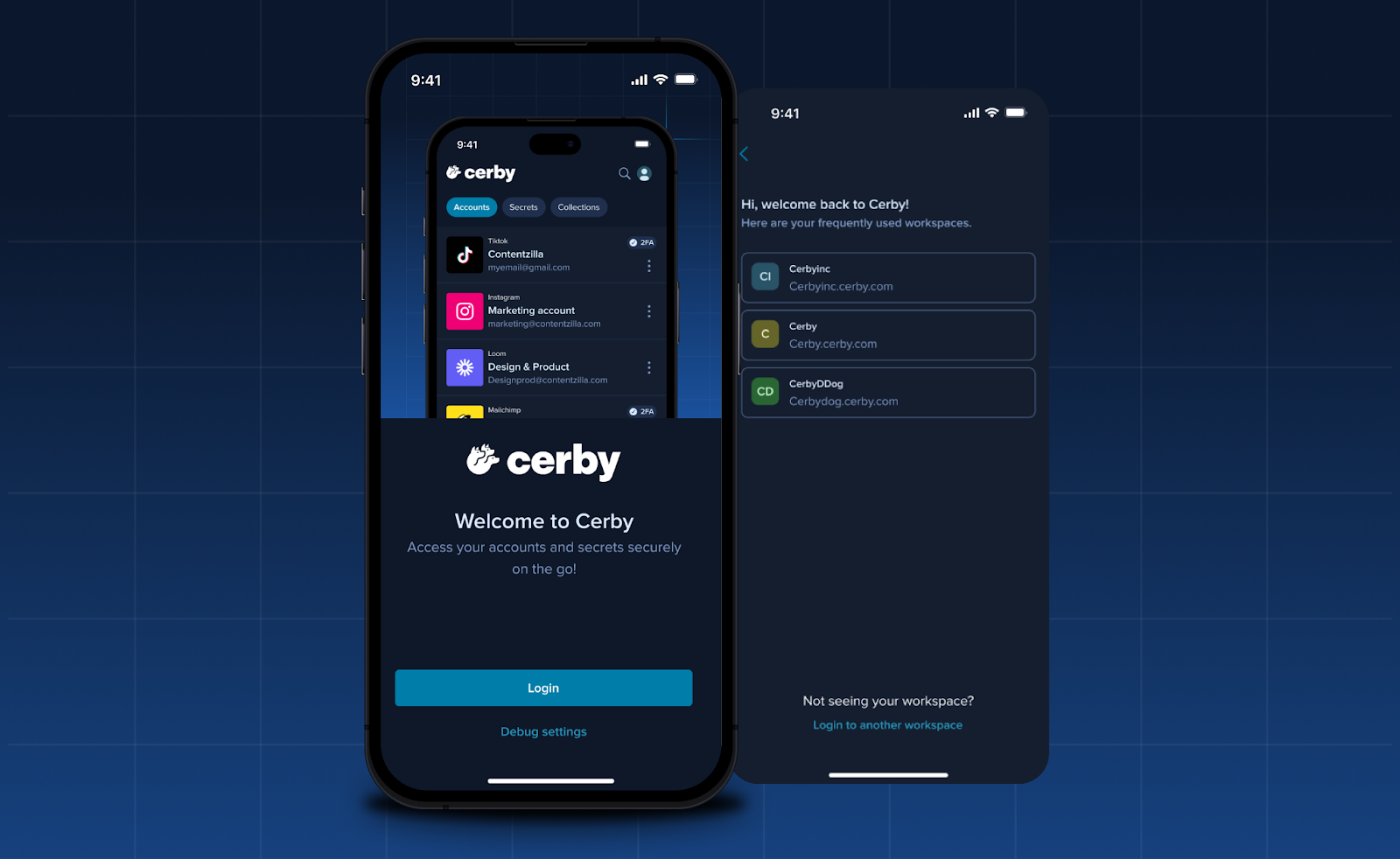
<figure><img src="/files/4lskgan8Q007IkIloWmR" alt=""><figcaption><p>Figure 4. Welcome screen with frequently used workspaces</p></figcaption></figure>

* Let us provide you with more details about the Android v1.0.172 release:
* Talking about saving you some time, we have implemented suggestions in the autofill feature so you can see a list of recently used accounts.
* We now support adding or removing custom fields when editing an account. By the way, from v1.0.173 onwards, you can add custom fields when creating an account using the Cerby mobile app.
* Here's one for iOS users. In v1.0.197, we started supporting the deletion of secrets.
* Keep the improvements coming! With the releases of iOS v1.0.204 and Android v1.0.176, you can now experience the following:
* The new look of the home screen.
* A new full-screen view when tapping your profile icon, with the following options:
  * Settings
  * Trusted devices
  * Theme
  * Contact support
  * Help Center
  * Log Out

Yes, you read it right. You can now open the support chat through the Cerby mobile app and access our knowledge base to find answers to your questions.

***

## Fixes

Take note of the issues addressed and resolved by the Development team behind the Cerby platform:

* The issue with not assigning the workspace **Owner** role correctly in some cases when creating a workspace is fixed.

### Cerby web app

* The issue with the **Change role type** dialog box not being displayed when updating a user's role on an account through the **Members** tab was fixed. This issue happened when the account was shared with the user individually and via a team.
* The issue with the persistent loading state when entering a nonexistent workspace name in the Cerby web app login page or in the address bar was fixed. Now, the web app shows an error message and redirects the user to the URL <https://app.cerby.com/>.
* The issue with being unable to delete an account with multi-factor authentication (MFA) turned on after selecting the **Reset account settings** option was fixed. This issue happened because the automated task to turn off MFA was not triggered.
* The issue with not finding workspace members through search bars was fixed. This issue happened, for example, in the dialog box for sharing an account or when adding members to a team, even when the user existed in the workspace.
* The issue with displaying an identity confirmation challenge different from the predetermined multi-factor authentication (MFA) method was fixed. The available MFA methods are push notifications to the Cerby mobile app and email magic links.

### Cerby browser extension

* The issue with suggesting autofilling the user's work email even when the email is already in the input field of a signup page was fixed in v1.0.321.
* The issue with not displaying the password generator on signup forms for Apple and Apple Business was fixed in v1.0.333.
* The issue with the inline menu not being displayed in some multi-step login forms and MFA code fields was fixed in v1.0.324.
* The issue with displaying the inline menu in an input field even when a user has disabled it for this field was fixed in v1.0.324.
* The issue with incorrectly showing the offline status in the extension icon even when some users have an active session was fixed in v1.0.337.

### Cerby mobile app

* The issue with Instagram and Facebook not recognizing the username when using autofill was fixed in Android v1.0.172.
* The issue with the Cerby mobile app crashing after disabling an unnamed trusted device was fixed in Android v1.0.173.
* The issues with the following role updates were fixed in iOS v1.0.198 and Android v1.0.173:
* The team's role on an account, a secret, and a collection.
* The guest user's role on an account, a secret, and a collection.
* The issue with having to select a collection when creating a secret was fixed in iOS v1.0.194.
* The issue with being unable to copy the verification code after scanning the QR code was fixed in iOS v1.0.195.

***

## New supported managed apps

The following are the latest additions to the list of managed apps with supported automated tasks:

* [ADP Workforcenow](http://online.adp.com/)
* [A-SCEND](https://a-scend2.com/)
* [Autodesk](https://www.autodesk.com/)
* [Backslash](https://www.backslash.security/)
* [ChatGPT](https://openai.com/)
* [Computershare](https://issueronline.com/)
* [Entra ID](https://www.microsoft.com/)
* [Iterable](https://iterable.com/)
* [JP Morgan Chase](https://secure.chase.com/web/auth/?treatment=jpo)
* [Litmus](https://www.litmus.com/)
* [Make](https://www.make.com/en)
* [Microsoft Advertising](https://login.microsoftonline.com/)
* [ngrok](http://ngrok.com/)
* [Productboard](https://app.productboard.com/)
* [Secure Trust](http://managepci.com/)
* [Smartsheet](http://smartsheet.com/)
* [Yotascale](http://yotascale.io/)

***

## July 10, 2024

## New features

The following are the new features and improvements we released across the Cerby platform:

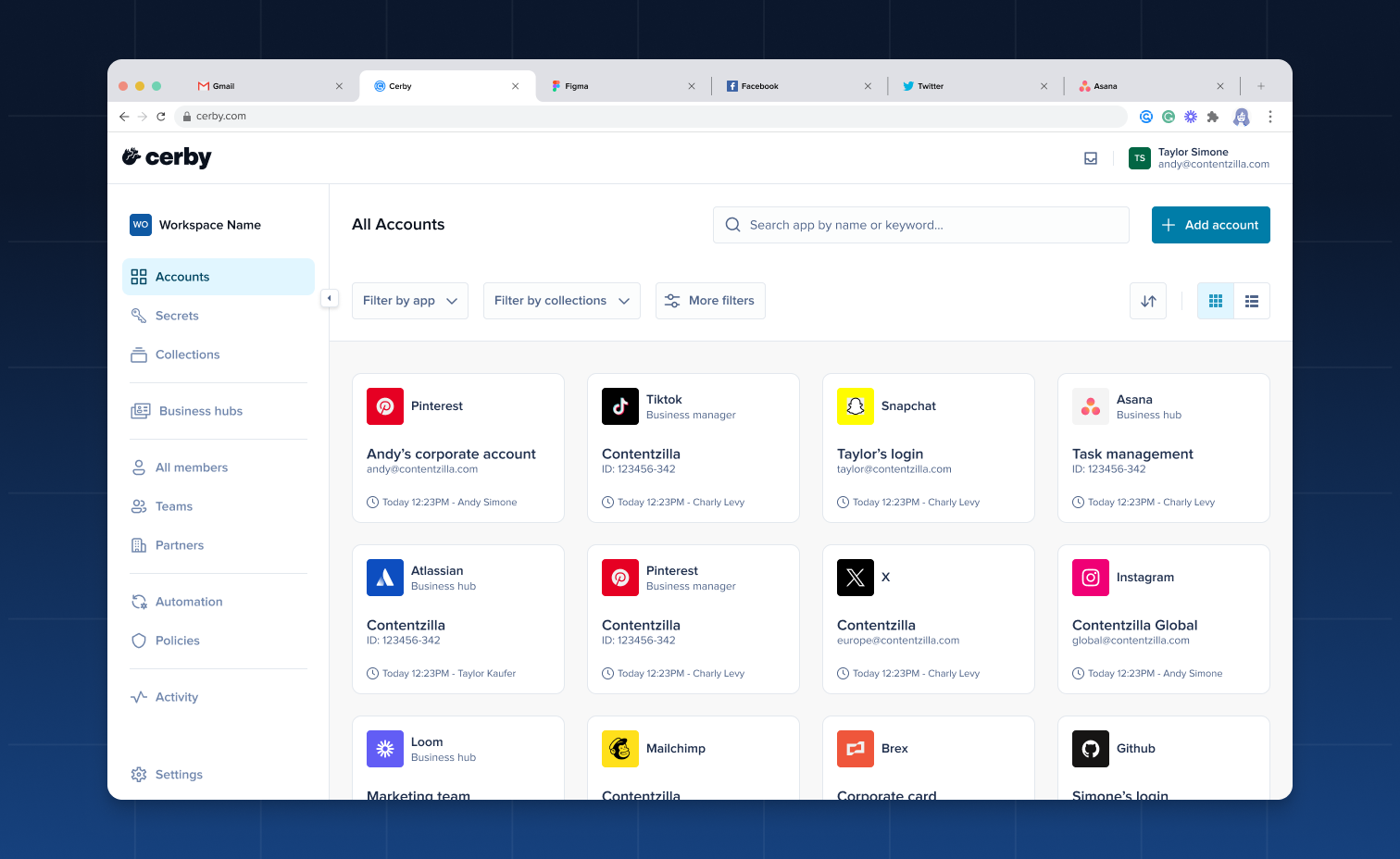
* We're thrilled to unveil our brand-new look as part of our ongoing evolution! You'll notice our new logo and refreshed interactions across the Cerby platform, which aim to make your journey with us even more enjoyable. We can't wait for you to explore these changes, so make sure you have the latest versions of our client apps:
* Cerby browser extension v1.0.331
* Cerby mobile app v1.0.190 for iOS and v1.0.168 for Android

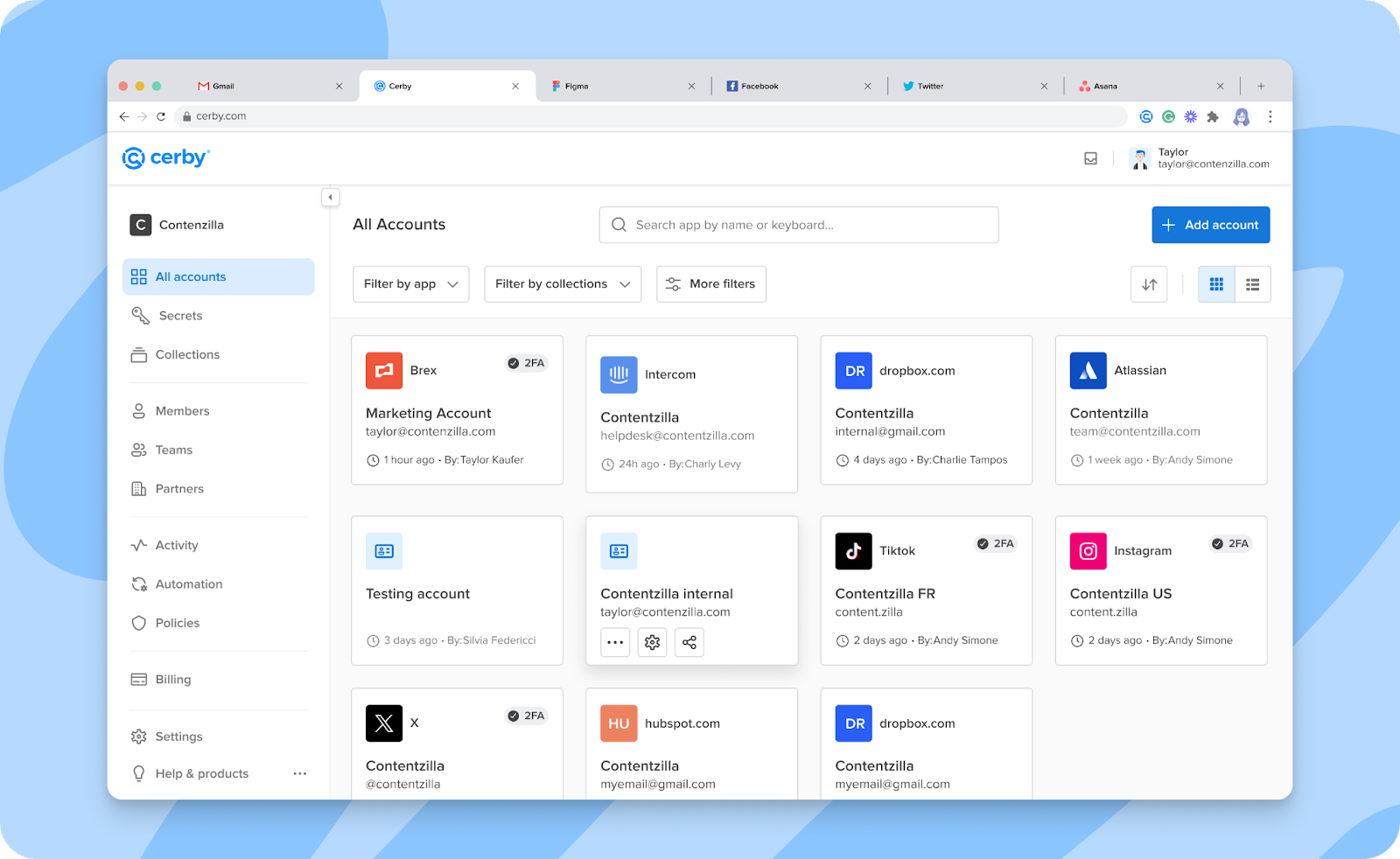
Want to take a peek? **Figure 1** shows the revamped look of your Cerby web app dashboard.

<figure><img src="/files/9QsqoanAWFy0VBocCsX8" alt=""><figcaption><p>Figure 1. Cerby web app dashboard</p></figcaption></figure>

Welcome to a new chapter in your Cerby experience.

* Let's keep you hyped with good news. We've been sniffing new ground, leading to the successful deployment of our cloud infrastructure in Singapore, Hong Kong, and Tokyo! With this strategic move, we can provide top-notch service to our valued customers across Asia with enhanced performance and reliability.
* Talking about suiting customer needs, we've also released a new multi-factor authentication method (MFA) for you to confirm your identity for sensitive actions, such as viewing or editing a secret.

In addition to push notifications sent to the Cerby mobile app, you can now receive a magic link in your email address.

For more information, read the article [Confirm your identity with Cerby's MFA methods](https://help.cerby.com/tips-and-troubleshooting/best-practices/mfa/set-up-your-identity-with-cerby-s-mfa-methods).

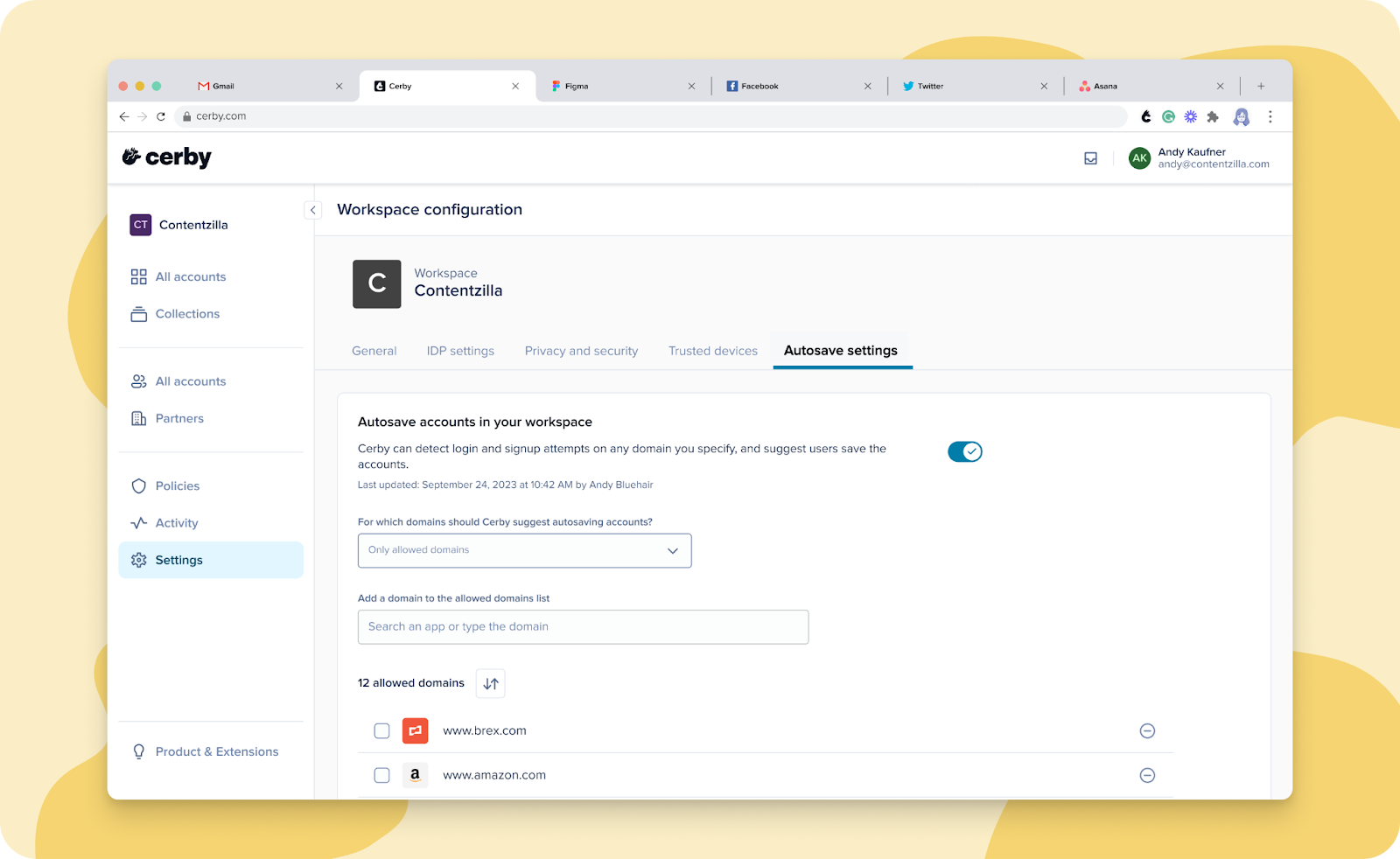
* Ready for a long-awaited release? Well, we've launched the second phase of the account autosave feature, improving the seamless experience of saving your login and signup credentials in Cerby with the browser extension.

In addition to the current individual experience, workspace **Admins** and **Super Admins** can now manage which website domains are allowed or excluded for all workspace users. All configuration is done through the Cerby web app, as shown in **Figure 2**.

<figure><img src="/files/w1W1idi8dsSuJS0hFYzQ" alt=""><figcaption><p>Figure 2. Autosave settings tab in the Workspace Configuration page of the Cerby web app</p></figcaption></figure>

For more information, read the article [account autosave](https://help.cerby.com/getting-started/concepts/credential-management/account-autosave).

* We know you wanted to have more visibility in your App integrations. That's why we released a feature that enables workspace **Super Admins** in **All-Access Mode** to search and view the assets of their SaaS and paid social apps connected to Cerby.
* Regarding App integrations, we have an update for your Meta Business Manager. Now, you don't need a connected account to perform a check for updates from the Cerby web app. Also, you can control from the app details page if you want to request users to save their username and password in Cerby; it's just a matter of activating the corresponding switch.

### Cerby web app

Check out what's new in our Cerby web app:

* We've fine-tuned the report you can export from the **All members** view to provide you with more information to take action on the security of your workspace and users.

You can now see a column in the CSV file with the status of each user's Cerby account related to multi-factor authentication (MFA).

* When you trigger an automated task to log in to your accounts from the Cerby web app, but don't have the browser extension installed, you are now prompted to install it.
* We've trained our Cerby platform to automatically refresh your web app when we release a new version of it, even when you leave your web browser open with an active session. Rest assured, as you'll always have the latest features and updates.
* This one goes to all of our users who could potentially have "checkmarkophobia." We have stopped showing the security widget for all of the accounts that don't support or don't have the following features enabled to protect them:
* Cerby-managed phone number
* Cerby-managed email address
* Multi-factor authentication (MFA) managed by Cerby as an authenticator app
* Password rotation
* Saving backup codes

Now, we show the widget on the account details page if at least one of the aforementioned features is enabled.

### Cerby browser extension

Explore the latest features in our Cerby browser extension:

* The in-context alerts received some love to provide you with a better user experience.

We'll still guide you through the automated login to your accounts with the Cerby browser extension but in a less intrusive way. Now, we only display messages when your intervention is required or when you need to know what's happening.

**Figures 3** and\*\* 4\*\* show how the new in-context alerts look.

<figure><img src="/files/IcFCQcaoSxHaizxwmEQZ" alt=""><figcaption><p>Figure 3. In-context alert when performing an automated login</p></figcaption></figure>

<figure><img src="/files/c2mFetvPQfL4mxWtlvJA" alt=""><figcaption><p>Figure 4. In-context alert displaying a message when manual intervention is required</p></figcaption></figure>

* We don't want you to lose your password when signing up for an account and using the password generator through the inline menu of the Cerby browser extension. In v1.0.312, we added a Copy icon to the inline menu so you can copy to the clipboard the password you generate.

### Cerby mobile app

Dive into the newest additions to our Cerby mobile app:

* Collaboration with external parties is now a reality when using the Cerby mobile app. You can now share your accounts with a [local partner](https://help.cerby.com/getting-started/concepts/user-management/partners#h-7e4add33a2).

The process is the same as sharing accounts with other users or teams: through the account details screen after tapping the **Share** icon. This feature was released in v1.0.167 for Android.

* Here's another one on account management in v1.0.167 for Android. You can now view the different roles a user has been granted on an account, whether a direct share or via a team. Just tap the right arrow icon from the **Sharing** section of the account details screen to display the **View members** screen. There, select the user from the list to display the **Update Roles** screen with the details of each role grant.

As a bonus, you can also update the user role or remove user access from the **Update Roles** screen.

* For your convenience, we've added a **Download** icon for you to save the attachments of a secret on your mobile phone both for iOS and Android.

***

## Fixes

Take note of the issues addressed and resolved by the Development team behind the Cerby platform.

### Cerby web app

* The issue with not deleting a device when canceling the setup of a trusted session through the Cerby web app was fixed.
* The issue with workspace **Super Admins** and **Owners** being able to view the button to share an account, even when they only have the **Collaborator** role on the account, was fixed.
* The issue with being able to interact with a native partner user's list of roles was fixed. It's not possible to update these roles from the app details page on the Cerby web app.
* The issue with displaying the **Connect account** dialog box after clicking the **Check for updates** button from the **More options** (...) drop-down list of a TikTok Business Center app card, even when an account is already connected, was fixed.
* The issue with displaying the "There was an unexpected error" message instead of redirecting users to the Cerby web app dashboard when trying to access an account through the URL was fixed.

### Cerby browser extension

* The issue with displaying empty results after using the global search bar of the Cerby browser extension when having only one account was fixed in v1.0.316.
* The issue with restricting access to the settings page of Instagram when the user role on an account is updated from **Collaborator** to **Owner** in Cerby was fixed in v1.0.317.
* The issue with not restricting access to the settings page of X (Twitter) when the user role on an account is **Collaborator** in Cerby was fixed in v1.0.318.
* The issue with being unable to trigger an automated task to log in to an account through the inline menu of the Cerby browser extension for Firefox was fixed in v1.0.319.

### Cerby mobile app

* The issue with opening browser tabs instead of the TikTok and Twitch apps when clicking the **Log in** icon in the corresponding account details screen was fixed in iOS v1.0.179.
* The issue with pasting email addresses when sharing an account and not being able to find the existing user was fixed in iOS v1.0.188.
* The issue with being prompted to set up a trusted session again for the Cerby mobile app after clearing caché and local data from the mobile phone's storage was fixed.
* The issue with being unable to scan the QR code to set up Cerby as an authenticator app for Twitch was fixed in v1.0.188 for iOS and v1.0.167 for Android.

***

## June 14, 2024

## New features

The following are the new features and improvements we released across the Cerby platform:

* We're always listening to your feedback and looking for ways to keep your teams focused and efficient while enhancing security and compliance. With our newest **Login-only** workspace role, you have more options to implement the principle of least privilege. You can now grant these users permission to log in to your accounts and view secrets only, ensuring that account creation is restricted to designated individuals. For more information about what you can or cannot do with this role, read the article [Roles and permissions](https://help.cerby.com/getting-started/concepts/user-management/roles-and-permissions). ​
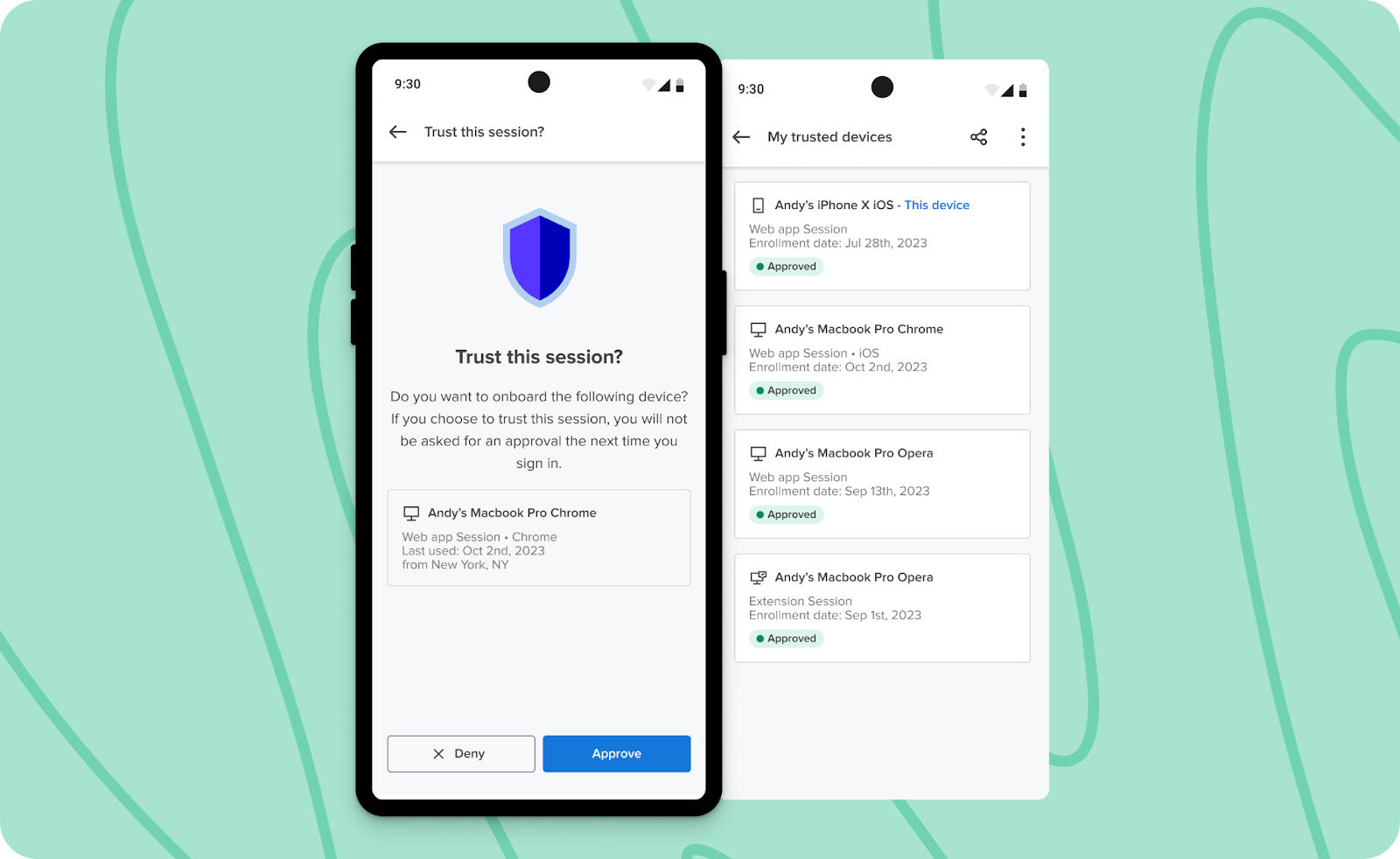
* We took a step forward in your experience with trusted sessions and devices. You can now set up a trusted session on a new device by approving it through an already registered device, as shown in **Figure 1**.

<figure><img src="/files/qb5ybvVsPyyG5G1kL6zu" alt="Screenshot of the"><figcaption><p>Figure 1. Trust this session? screen in the Cerby mobile app</p></figcaption></figure>

Additionally, if you use the Cerby browser extension on a new device but have already set up the Cerby web app with the same browser, your session will be automatically registered as trusted. Pretty neat, right?

By the way, we also doubled your capacity for secure access. You can now register trusted sessions on up to 20 devices.

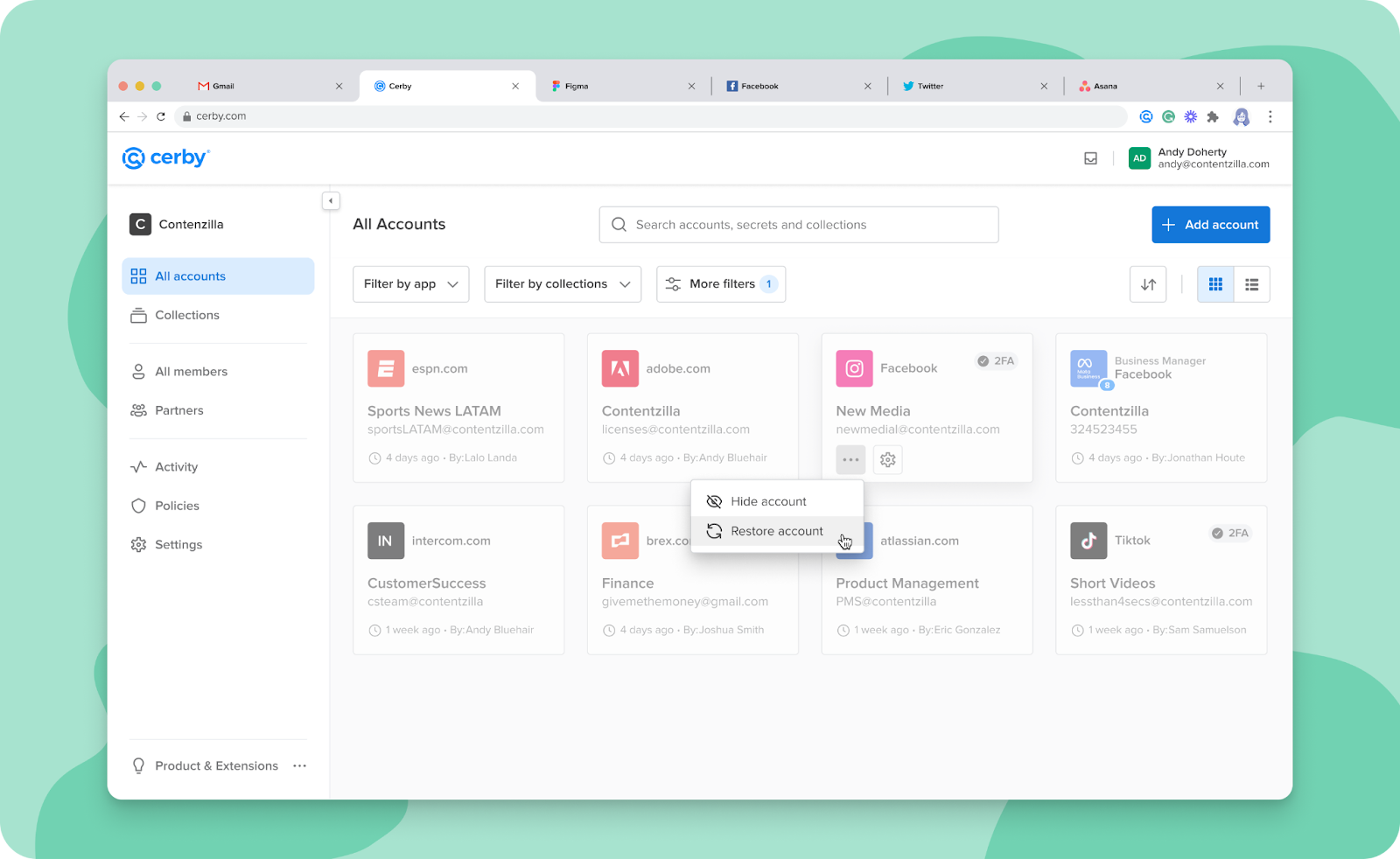
* Who says you have to wait for Halloween to experience a good resurrection? You can now restore an account you previously deleted from your workspace, as shown in **Figure 2**.

<figure><img src="/files/XT2NoJ4hvV6OyiVi8SFG" alt="Screenshot of the Cerby web app dashboard with multiple deleted account cards. You can select the"><figcaption><p>Figure 2. Deleted accounts in the All accounts view of the Cerby web app dashboard</p></figcaption></figure>

You just have to complete the following ritual in the Cerby web app to make your account rise from the ashes:

1. Look for the account using the **Deleted accounts** filter in the **All accounts** view.
2. Click the **More options** (...) icon of the ghost account card.
3. Select the **Restore account** option.

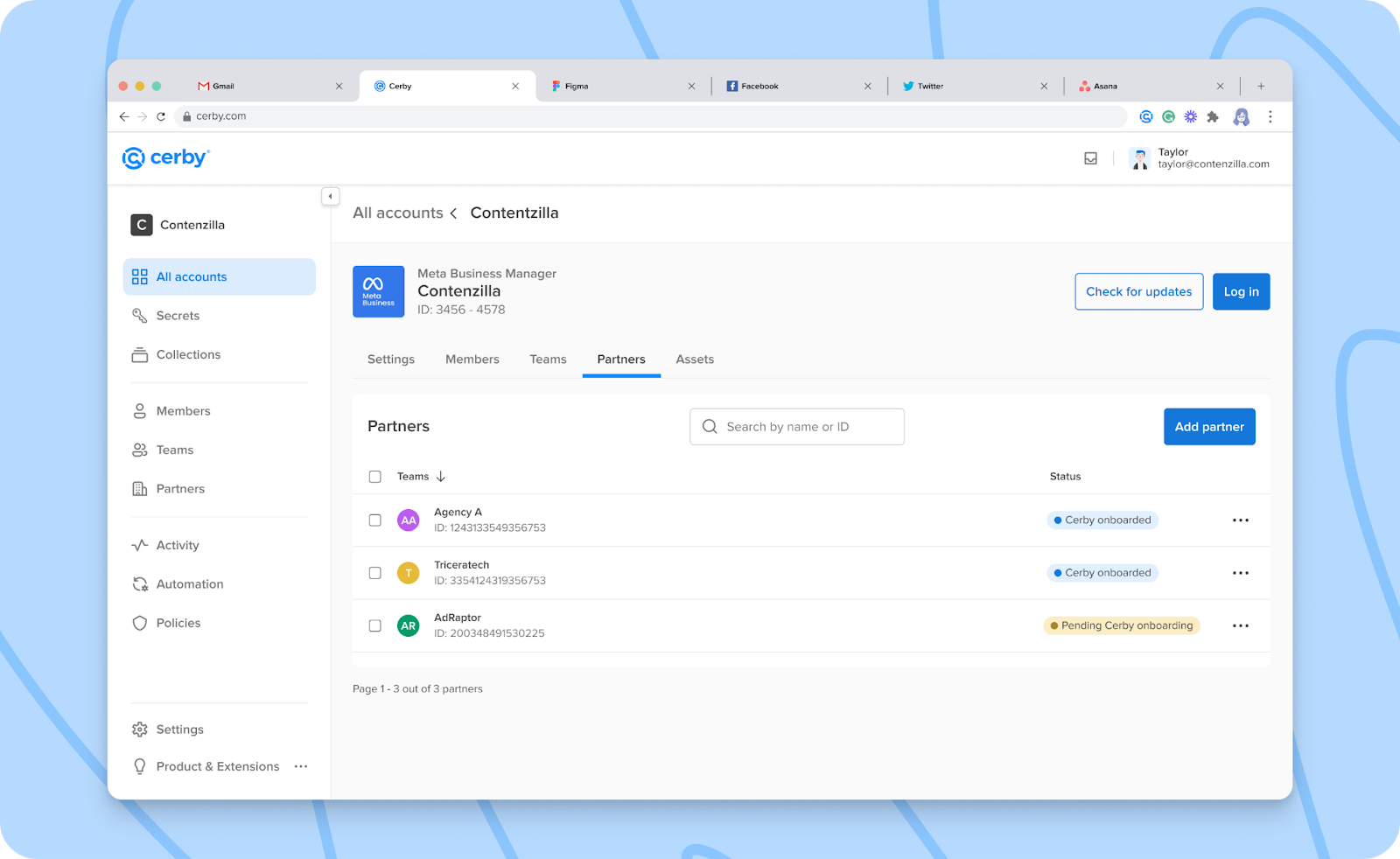
* We're about to dive into some detailed information but bear with us. It'll be worth it, especially if you're an admin of a Meta Business Manager or a TikTok Business Center connected to Cerby. We now support sharing app integrations with Cerby teams for these paid social apps. You may have already used this feature in other app integrations to invite multiple users simultaneously. However, Meta and TikTok differ because our integrations work with them based on data requests through application programming interfaces (API) instead of automated tasks. Our Development team worked hard to make that feature a reality through APIs.
* Now that we're talking about Meta Business Manager, we have good news. When using **All-Access Mode**, you can now view all of the Meta Business assets that were synchronized in Cerby. Full visibility mode on!
* Keep the welcome mat rolled out a bit longer for your guest users. The invitations you send for external collaborators to join your Cerby workspace now expire after three days instead of 24 hours. Give your guests plenty of time to accept and get in on the action!
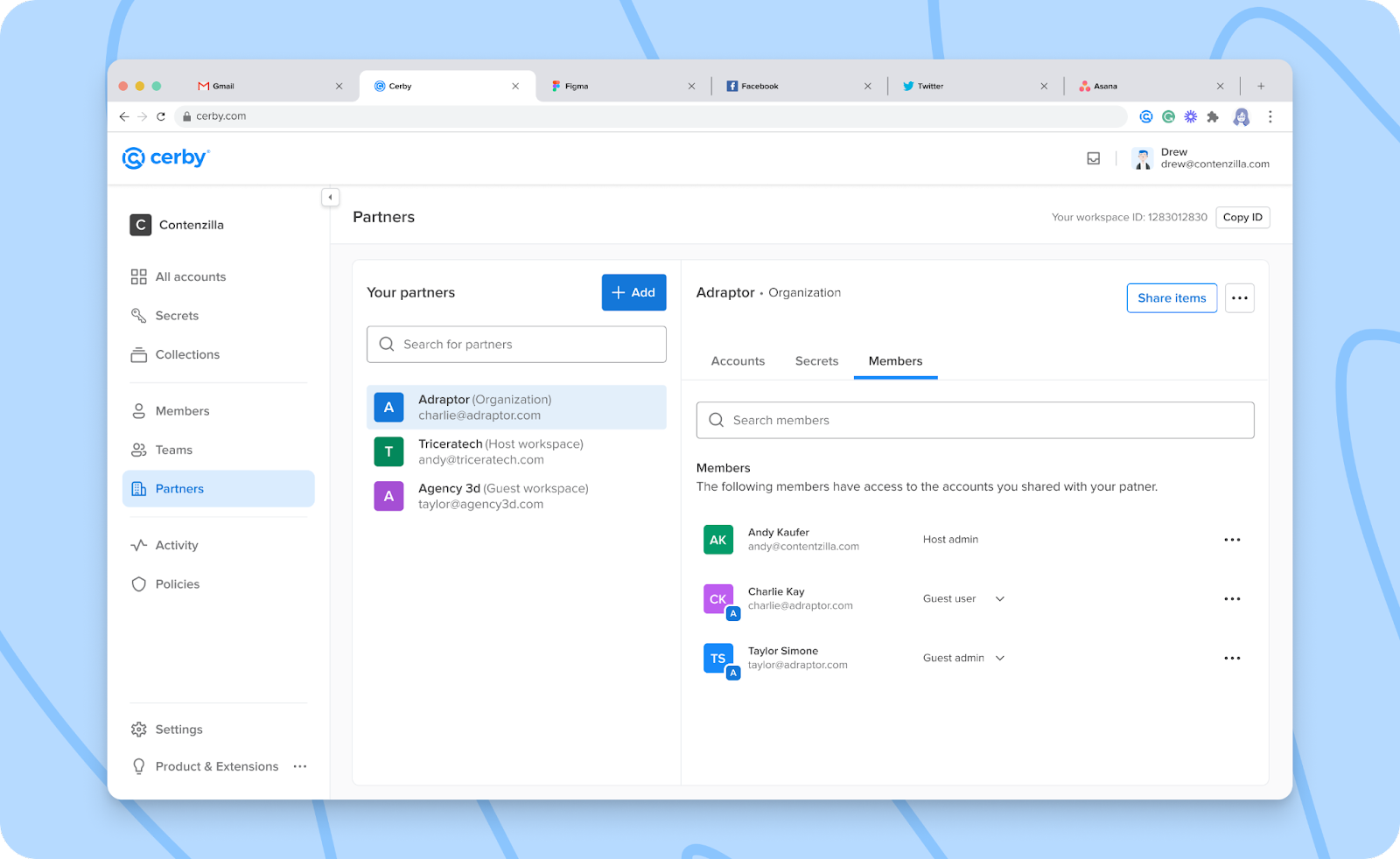
* We've enhanced our [Local Partners](https://help.cerby.com/getting-started/concepts/user-management/partners#h-7e4add33a2) feature to help you with the management of **Guest Users** :
* Guest admins can now resend invites, reset multi-factor authentication (MFA), and force password resets for guest users from the **Members** tab of the **Partners** view.
* Workspace members cannot invite other employees from the same organization as **Guest Users**. We've introduced an email verification to filter out invitations sent to users with your corporate domain. If you want them to access your workspace, ask your IT admin to assign them to Cerby.
* Stop holding back when saving important information in Cerby. You can now enter up to 40,000 characters in the **Notes** field of a new [custom item](https://help.cerby.com/cerby-web-app/secrets/managing-your-secrets/add-a-custom-item). Say goodbye to the 255 characters that might have been limiting your documentation needs.

### Cerby web app

Check out what's new in our Cerby web app:

* You know we're in when it comes to transparency, auditability, and compliance. We now provide workspace **Admins** more information in the downloadable CSV report of the **All members** view, such as:
* The user ID of all workspace users.
* The role of all users on all the accounts and collections they have saved or to which they have shared access.
* The status of multi-factor authentication (MFA) that is managed by Cerby.
* We revamped the experience of viewing a secret. Whether you click the secret card or the **View** button, now you are redirected to the secret details page instead of a dialog box. In addition to being consistent with the behavior of accounts, we wanted to accommodate long secrets, including a **View more** button, and reduce the number of clicks in case you want to make edits. Moreover, we added a **Copy** button for the secret name and body. ​
* As an app integration Owner who shares access to Pinterest Business and triggers an invite from Cerby, you can now select the assets to share with the users and their corresponding permissions. ​
* Talking about accessibility and other ways to interact with the Cerby web app, you can now navigate through the drop-down list of the **Add item** button using your keyboard. Also, you can keep using the keyboard to move through the input fields of the dialog boxes to add accounts and secrets.

### Cerby browser extension

Explore the latest features in our Cerby browser extension:

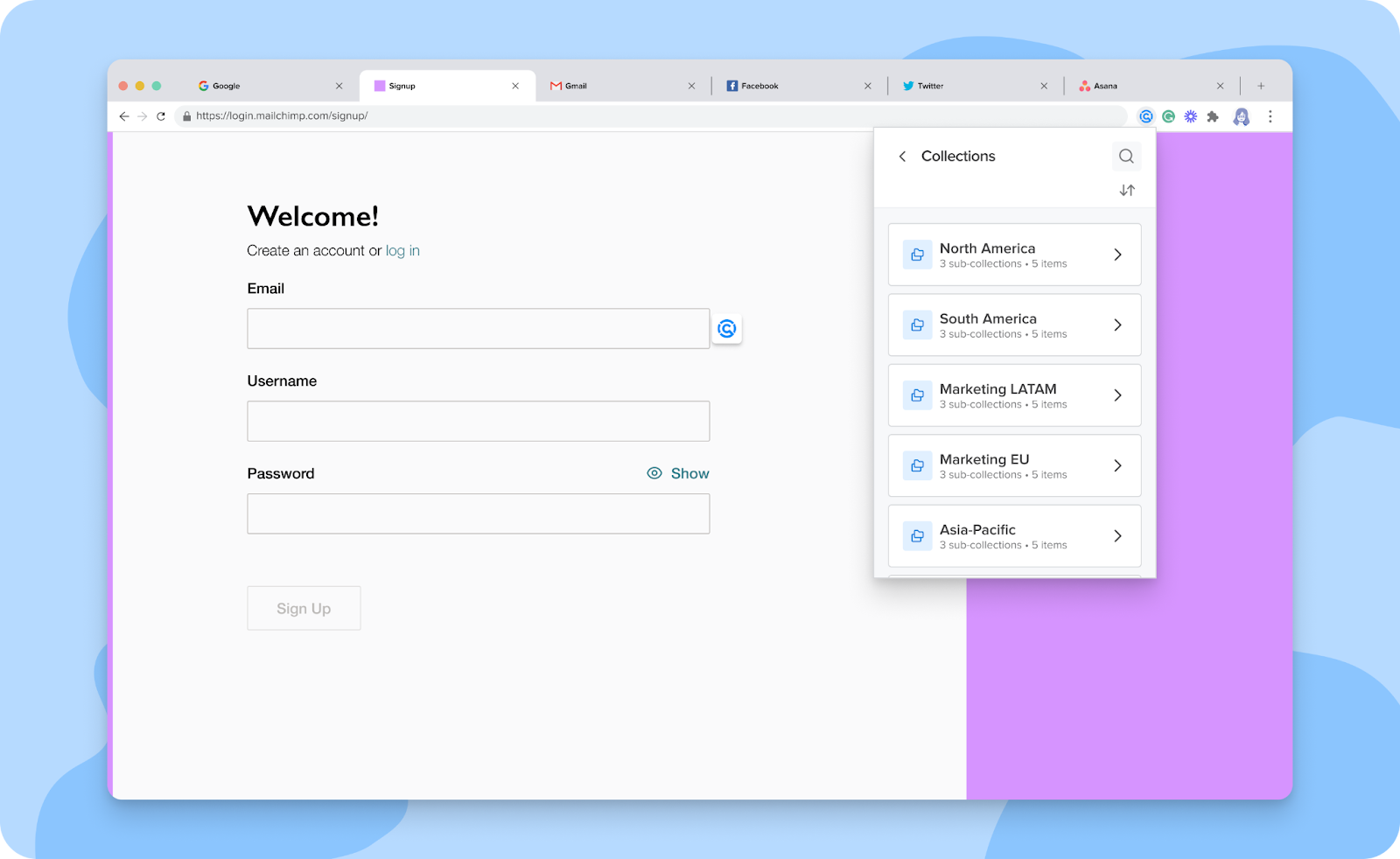
* Now, you can view your collections and subcollections and navigate through them by clicking the **Collections** icon located next to the new global search bar. **Figure 4** shows how the **Collections** screen looks.

<figure><img src="/files/NRbUvmCDPxbl1ceyGxAZ" alt="Screenshot of the"><figcaption><p>Figure 3. Collections screen in the Cerby browser extension popup</p></figcaption></figure>

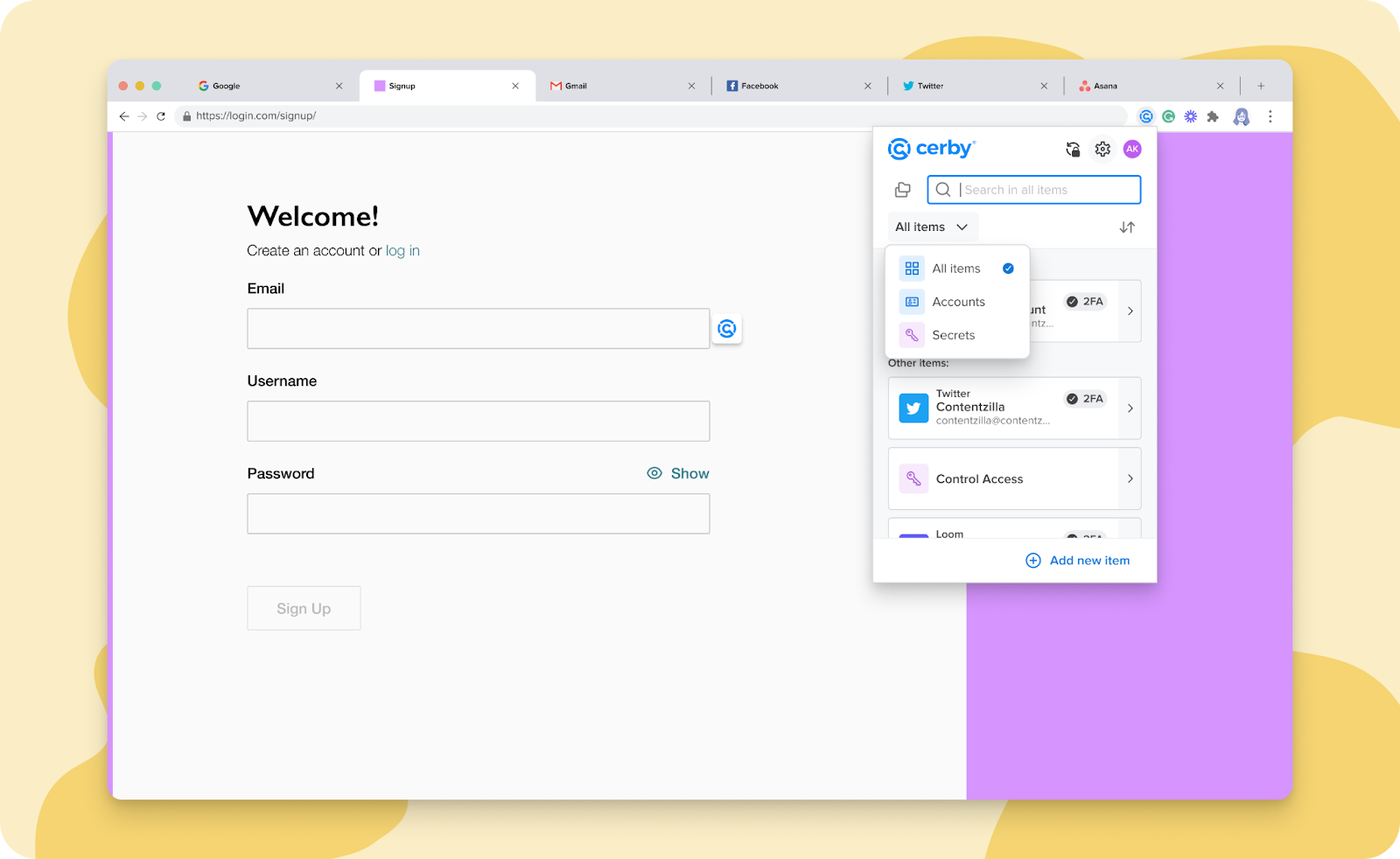
And yes, you read it correctly. We've also released a global search bar that enables you to look for any item. But don't worry, you can still filter the items in the extension popup by accounts and secrets.

Take a look at the global search in **Figure 4**.

<figure><img src="/files/Oqvufth68EKSaKnb2TyK" alt="Screenshot of the global search bar in the Cerby browser extension popup. You can filter your search by all items, accounts, and secrets."><figcaption><p>Figure 4. Global search bar in the Cerby browser extension popup</p></figcaption></figure>

* Feel like a celebrity when using the Cerby browser extension. When you have saved accounts or secrets with long names, you can now view the entire name when hovering over the cards on the extension popup. Almost instantly, the name will start to scroll from right to left, just as billboards do. This feature is available from version v1.0.297 onwards.
* We know you love Cerby the Dog but want a more streamlined login process. That's why we made a few changes to the process. Now, after you log in to the Cerby browser extension by entering your credentials on a new browser tab, a revamped success page is displayed, and you are automatically redirected to the Cerby web app dashboard instead of staying on the **All set** page.

### Cerby mobile app

Dive into the newest additions to our Cerby mobile app:

* Another one is about feature parity between client apps. Now, you can do the following with the Cerby mobile app:
  * Add an account and edit account details
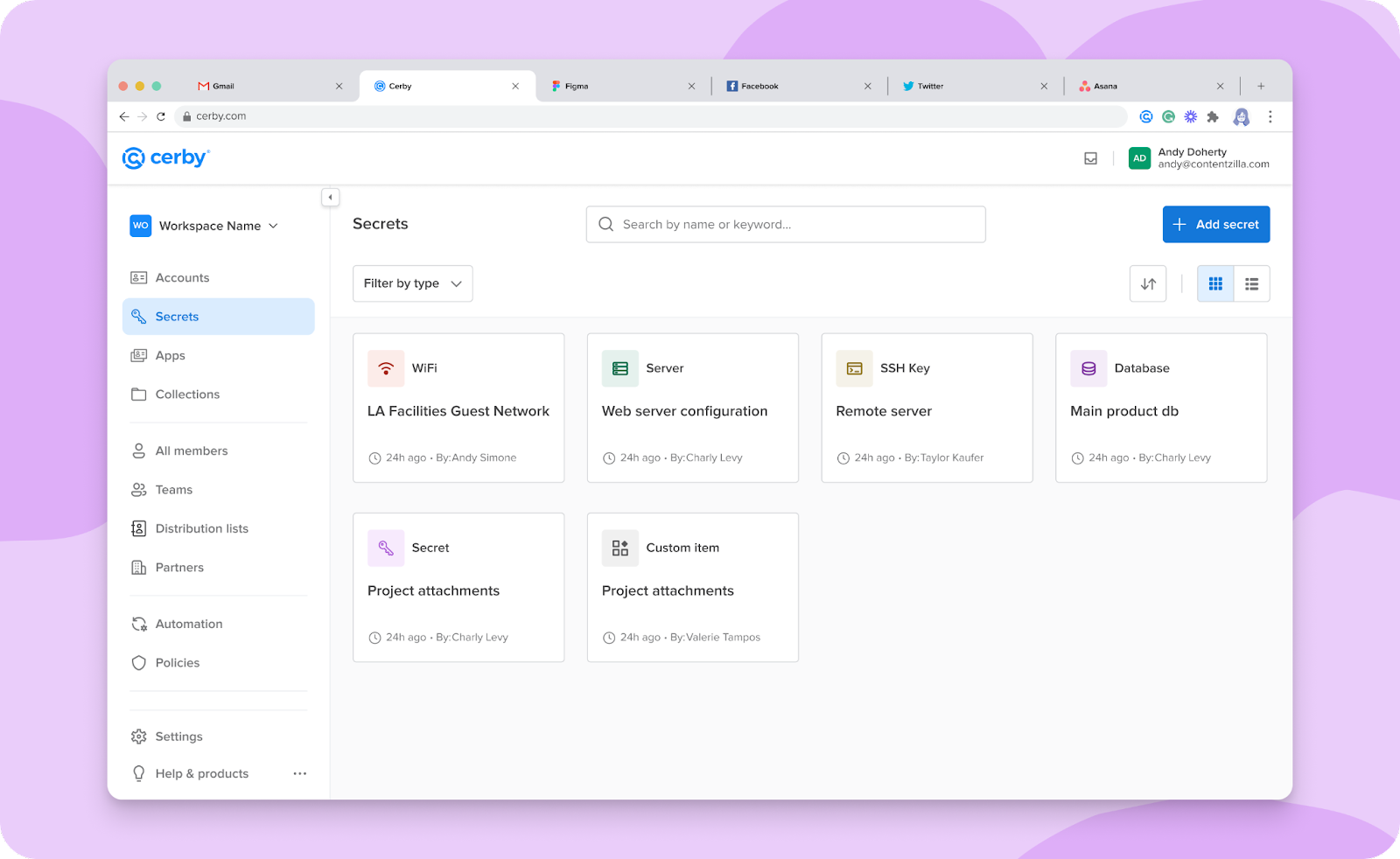
  * Add secrets and secret items (such as WiFi, SSH keys, database, server, and custom item) and edit secret details
  * Share accounts, secrets, and collections with other workspace members, guest users, and teams
* Your time is valuable, and that's why we always look for ways you can save it. In iOS v1.0.168, we released improvements to the AutoFill suggestions. Now, the Cerby mobile app suggests the last used accounts when you attempt to log in to your apps using AutoFill.
* To save you one tap when copying a value from the account details screen, we implemented the tap and hold interaction. Before versions 1.0.156 for Android and v1.0.159 for iOS, you had to tap the **More options** (...) icon to select the **Copy** option.
* Don't worry if you dismiss the prompt to set up a trusted session with your Cerby mobile app. We now display a banner on top of the screen for you to set up the session whenever you want.

***

## Fixes

Take note of the issues addressed and resolved by the Development team behind the Cerby platform.

### Cerby web app

* The issue with being unable to attach KEY and CERT files when creating a secret was fixed.
* The issue with collection **Collaborators** being able to view other collections to which they have not been granted access when searching for a subcollection was fixed.
* The issue with displaying the "Unable to load" error message when checking for updates for a TikTok Business Center app integration was fixed.
* The issue with not displaying Pinterest Business assets synchronized with Cerby after a check for updates was fixed.
* The issue with not displaying line breaks in the content of a secret when sharing it via a public link was fixed. The original formatting is now preserved, including line breaks.
* The issue with not filtering results when searching for a team through the search bar of the **Teams** view was fixed.
* The issue with displaying the incorrect number of teams a user can access via the **Teams** view was fixed.
* The issue with the **Shared Inbox** falling into a loading loop when the inbox is empty was fixed.
* The issue with sharing an account with two workspace members as **Collaborators** even when users select the **Owner** role, was fixed.

### Cerby browser extension

* The issue with displaying the save accounts at login feature even when the account was already saved in Cerby was fixed in v1.0.285.
* The issue with being unable to auto-login to an account due to not having a trusted session was fixed in v1.0.306. The extension was not clearing out the state of a disabled device; therefore, it was not asking users to set it up again.
* The issue with displaying the Cerby browser extension icon with a logged-out status even when users have an active session was fixed in v1.0.288.
* The issue with not detecting signup activity when the user is logged out of the Cerby browser extension was fixed in v1.0.284.

### Cerby mobile app

* The issue with being unable to clear the input field of the login URL when adding an account was fixed in Android v1.0.156. Users had to tap outside the field and tap again the field to be able to delete the inputted text. The issue with being unable to view Instagram accounts as Autofill options due to changes in the internal app identifier of Instagram was fixed in iOS v1.0.172.

***

## Security fixes

* The issue with only rotating the passwords of accounts when they were shared directly with a deprovisioned user, not the ones shared via a collection, was fixed.

***

## New supported managed apps

The following are the latest additions to the list of apps with supported automation tasks:

* [Aetna Vision](http://aetnavision.com/)
* [Allied Telecom](http://connection.alliedtelecom.net/)
* [Amazon Ads](http://amazon.com/)
* [American Strategic](http://americanstrategic.com/)
* [AnyBill](http://secure-platform.anybill.com/)
* [Apple Search Ads](http://app.searchads.apple.com/)
* [ARIN](http://arin.net/)
* [Atkins](http://atkins.com/)
* [AWS IAM User Account](https://signin.aws.amazon.com/)
* [Axis](http://axiswg.com/)
* [Axis Background](http://axis.chyron.com/)
* [BH Photo Video](http://bhphotovideo.com/)
* [Brainstorm Force](http://brainstormforce.com/)
* [BRiweb](http://participant.briweb.com/)
* [California Fair Plan](http://cfpnet.com/)
* [CapitalOne](http://capitalone.com/)
* [CBS Sports](http://cbssports.com/)
* [Citi](http://citi.com/)
* [CityVU](http://cityvu.co/)
* [Claris](http://my.claris.com/)
* [Claris FileMaker](http://community.claris.com/)
* [CNET](http://cnet.com/)
* [Coda](http://coda.io/)
* [Comic Con Portal](http://comic-con.configio.com/)
* [Connection](http://connection.com/)
* [Consumer Affairs](http://consumeraffairs.com/)
* [CSC Global](http://weblogin.cscglobal.com/)
* [Cultivate Learning](http://cultivatelearning.ca/)
* [CVS](http://cvs.com/)
* [Cyber Source](http://businesscenter.cybersource.com/)
* [Datorama](http://platform.datorama.com/)
* [Dell](http://dell.com/)
* [Delta](http://delta.com/)
* [Delta Dental](http://deltadentalins.com/)
* [Disney Plus](http://disneyplus.com/)
* [Dmarcian](http://dmarcian.com/)
* [DMV](http://dmv.ca.gov/)
* [eBay](http://ebay.com/)
* [EEG Cloud TV](http://eegcloud.tv/)
* [Elementor](http://elementor.com/)
* [Empower Teams](http://portal.empowerteams.io/)
* [Etrade](http://us.etrade.com/)
* [Evercast](http://app.evercast.us/)
* [Fantastapack](http://fantastapack.com/)
* [Flat](http://flat.io/)
* [Fox Affiliate](http://foxaffiliateportal.com/)
* [Geico](http://ecams.geico.com/)
* [Google Ads](http://google.com/)
* [ID.me](http://id.me/)
* [Imagn](http://imagn.com/)
* [Inspira Financial](http://inspirafinancial.com/)
* [Larkin](http://thelarkincompany.com/)
* [Learning Bridge](http://learningbridge.com/)
* [Little Caesar - Call of Duty Sweepstakes](http://r09513callofdutylittlecaesars-reviewtool-prod.azurewebsites.net/)
* [LiveRamp](http://liveramp.com/)
* [LiveU central](http://lu-central.liveu.tv/)
* [MediaCloud](http://mediacloud.fox/)
* [Megaphone TV](http://megaphonetv.com/)
* [Merkle](http://eprize.net/)
* [Microsoft Live](http://login.live.com/)
* [Microsoft Partner Hub](http://partnerhub.msn.com/)
* [Midco Sports Plus](http://midcosportsplus.com/)
* [Mobbin](http://mobbin.com/)
* [MorganStanley AtWork](http://atwork.morganstanley.com/)
* [MotorTrend](http://motortrend.com/plus/)
* [National General Agency](http://natgenagency.com/)
* [Neptune Agent Portal](http://neptuneflood.com/)
* [NGP VAN](http://ngpvan.com/)
* [OneTrust](http://onetrust.com/)
* [Pacific specialty](http://pacificspecialty.com/)
* [Pandora](http://pandora.com/)
* [Pendo](http://pendo.io/)
* [PL Rating](http://rating.vertafore.com/)
* [Progressive](http://progressive.com/)
* [QuickBase](http://quickbase.com/)
* [QuickBooks](http://quickbooks.intuit.com/)
* [Rebrandly](http://rebrandly.com/)
* [Resources For Living](http://resourcesforliving.com/)
* [RunZero](http://runzero.com/)
* [S\&S Active Wear](http://ssactivewear.com/)
* [SageSure](http://agents.sagesure.com/)
* [Santander Empresas](http://empresas3.gruposantander.es/)
* [SkillJar](http://skilljar.com/)
* [Small Improvements](http://app.small-improvements.com/)
* [Southwest](http://southwest.com/)
* [State Auto](http://stateauto.com/)
* [Tealium](http://my.tealiumiq.com/)
* [TicketsAtWork](http://ticketsatwork.com/)
* [Travel Tracker Security](http://tracker.travelsecurity.com/)
* [TripSource](http://mytrips.tripsource.com/)
* [Trustwave](http://trustwave.com/)
* [UScellular](http://uscellular.com/)
* [Vanity Fair](http://vanityfair.com/)
* [WhenToWork](http://whentowork.com/)
* [Workmatters](http://workmatters.workcare.com/)
* [Zoho](http://zoho.com/)
* [ZoomShift](http://zoomshift.com/)

***

## March 21, 2024

## New features

Here are the new features and improvements we released across the Cerby platform:

* Ever wanted to work seamlessly and closely with agencies or other external partners without jumping through password-sharing and other hoops? Now Cerby gives you more options! We're thrilled to announce **Local Partners**! This is another offering for secure collaboration with external parties. With Local Partners, you can invite external collaborators directly to your existing Cerby workspace, streamlining access to accounts, secrets, and collections. Ready for more? Read the article [Add a local partner to your workspace](https://help.cerby.com/cerby-web-app/partners/local-partners/add-a-local-partner-to-your-workspace) to learn how you can benefit from this feature. ​**Figure 1** shows how Local Partners are presented within our **Partners** view.

<figure><img src="/files/1f0NQIxXDbp5WpwQvIJa" alt=""><figcaption><p>Figure 1. Partners view in the Cerby web app dashboard with a list of guest users from a local partner</p></figcaption></figure>

* Talking about partners, here's another collaboration booster. We have a new feature you cannot even find in your paid social apps, such as Meta Business Manager or TikTok for Business. We are talking about **Native Partners**, an extended functionality of our App integrations that enables you to gain visibility on the users who access the assets you have shared with your paid social partners to collaborate in ad campaigns. Interested? Read the [Native partner](https://help.cerby.com/getting-started/concepts/user-management/partners#h-e7fa9c355c) section of the article [Partners](https://help.cerby.com/getting-started/concepts/user-management/partners) for an overview of this feature. ​**Figure 2** shows the table of partners connected to an App integration for Meta Business Manager.

<figure><img src="/files/k6mhaUjnSdlMKTgtQdL2" alt=""><figcaption><p>Figure 2. Partners tab in the app details page of the Cerby web app dashboard with a list of connected native partners</p></figcaption></figure>

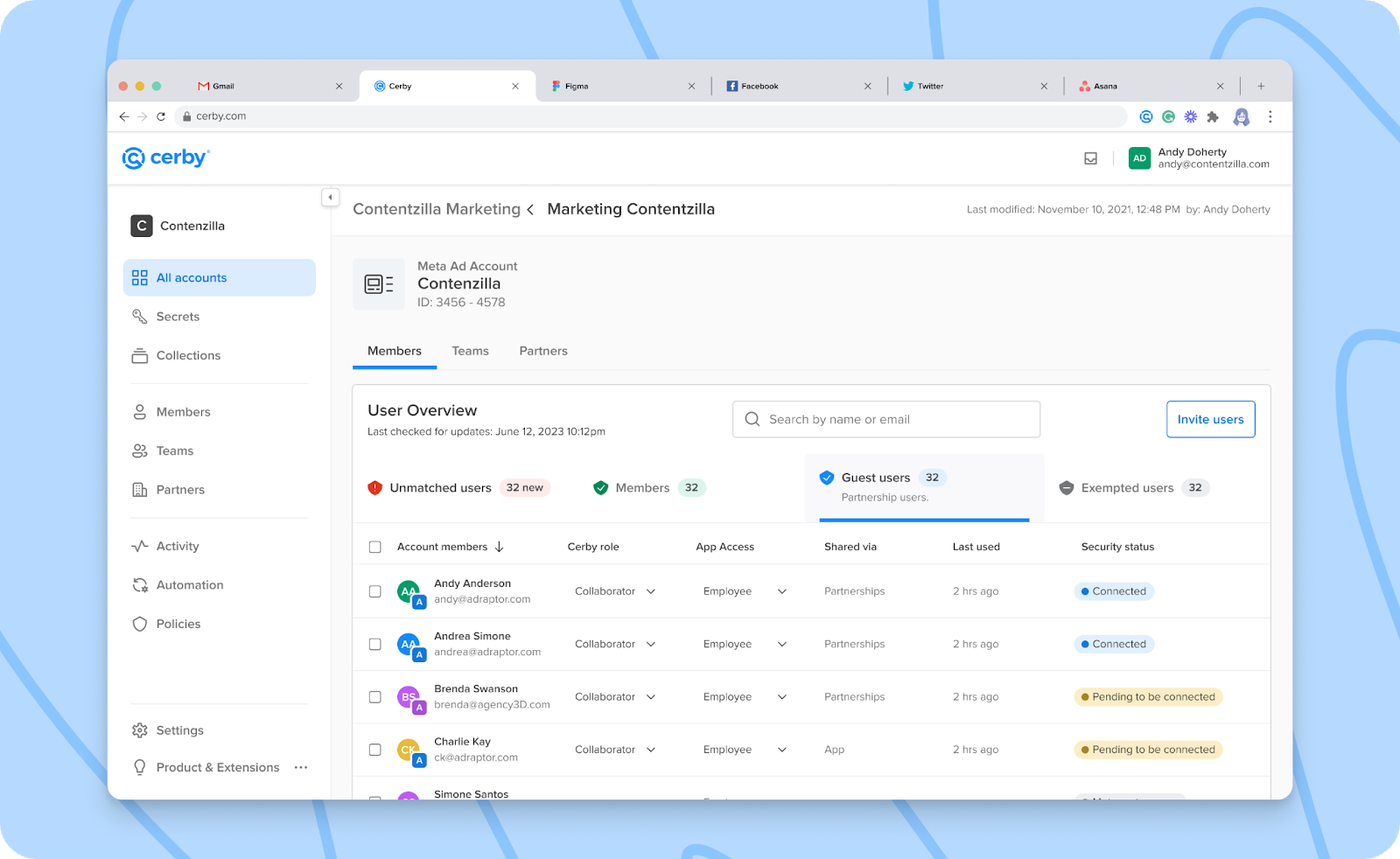
Before you jump to the next feature, take a look at the **Guest users** tab we've added to the app details page. Here, you can see all external users who have access to your Apps, including the ones with shared access to your assets via a native partner. Don't miss this table to gain more control over who has access to your items, their onboarding journey, and how they got into your workspace.

**Figure 3** shows the **Guest users** tab of an App integration.

<figure><img src="/files/VwqnA1YnZCuOlnHlKQ6J" alt=""><figcaption><p>Figure 3. Guest users in the Members tab of an App</p></figcaption></figure>

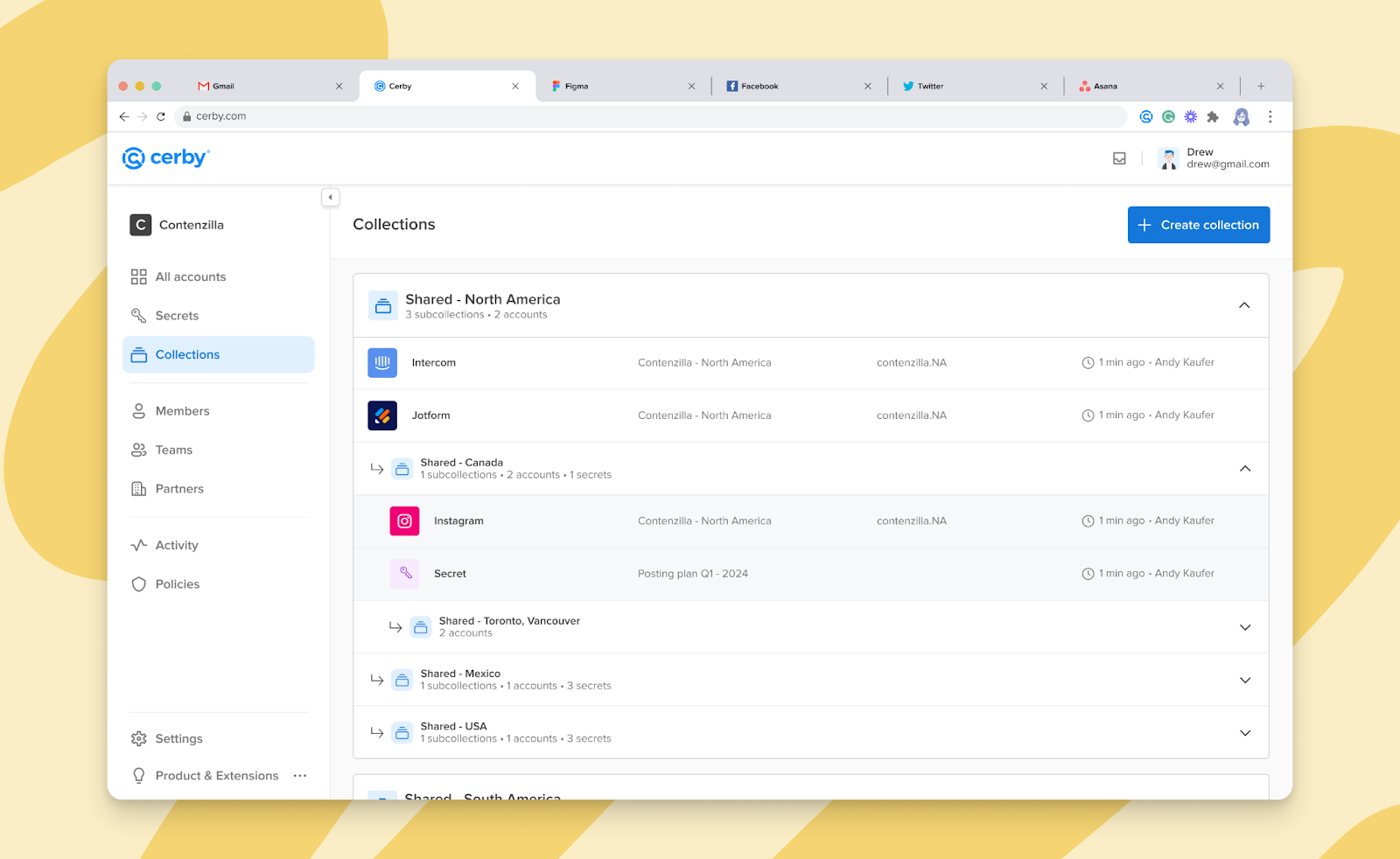
* Get ready for a powerful way to organize your accounts and secrets in a nested way! Cerby's **Subcollections** makes sharing your entire item structure with other members easier. Not only that! With this feature, you can swiftly switch from LastPass to Cerby with our Password Manager Importer (wink, wink), securing your data migration and saving you time and frustration. Subcollections are also supported by the Cerby mobile app for Android in v1.0.147 and iOS. Want to unlock your account and secret organization skills? Check the article [Subcollections](https://help.cerby.com/getting-started/concepts/credential-management/subcollections) at our help center. Meanwhile, see a preview of our Subcollections view in **Figure 4**.

<figure><img src="/files/l04NFi8trs6sDa353aRn" alt=""><figcaption><p>Figure 4. Collection and subcollection structure in the Collections view</p></figcaption></figure>

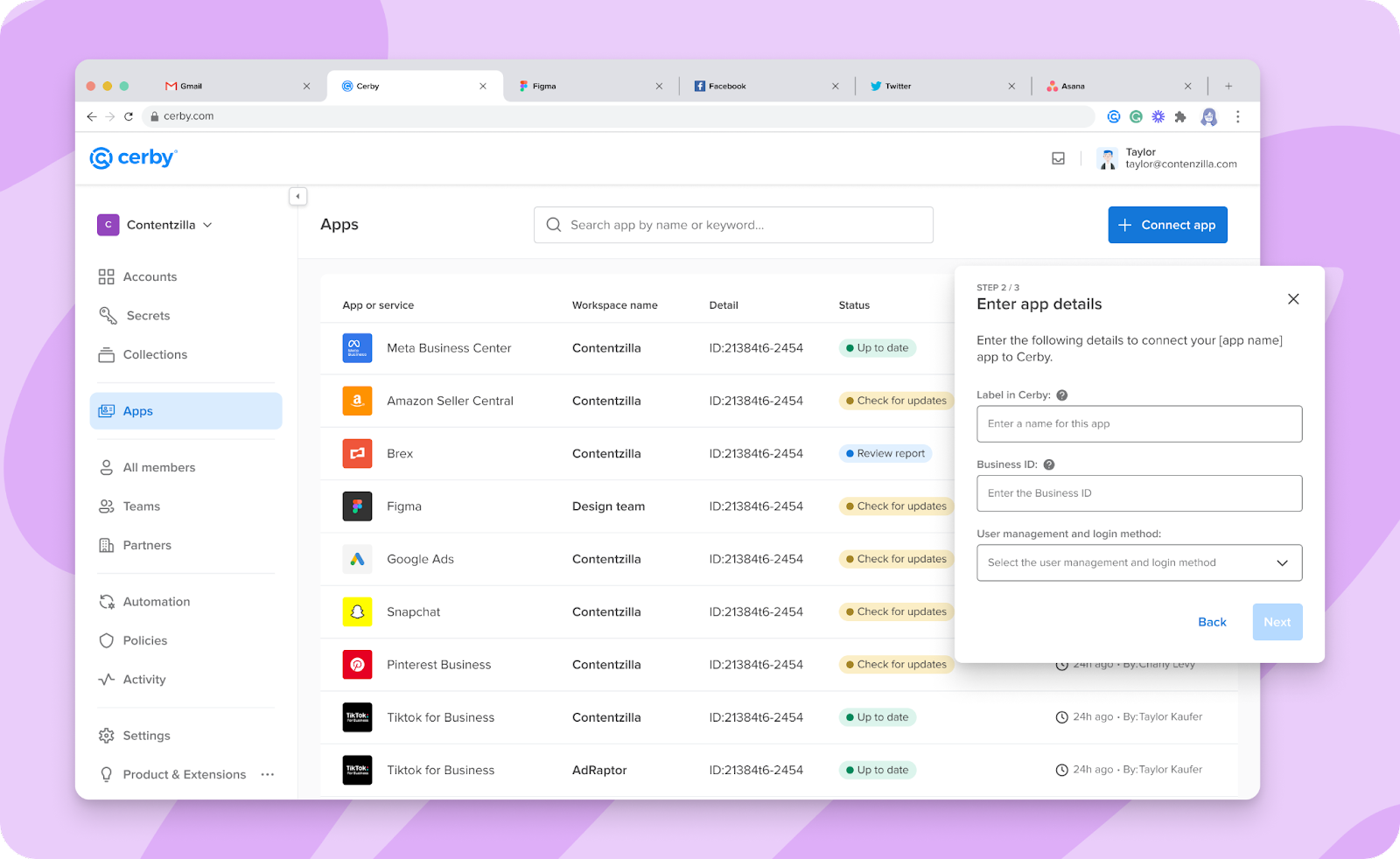
* Heads up: **Tenants** are now **Apps**, and they have a brand new house! All of your integrations with seat-based and paid social apps are displayed in the **Apps** view, making it easier to identify and access them from the Cerby web app dashboard. Keep centrally managing your apps, users, and assets like a pro through Cerby, and continue collaborating with your partners. Take a look at our article [Explore Apps](https://help.cerby.com/setup-and-admin/business-hubs/business-hub-catalog) to know more about this redesign. ​**Figure 5** shows the **Apps** view with a table of app integrations, such as Meta Business Manager, Amazon Seller Central, Brex, and TikTok for Business.

<figure><img src="/files/LH4ThVB2ZfBBW7pzSOD3" alt=""><figcaption><p>Figure 5. Table of app integrations in the Apps view of the Cerby web app dashboard</p></figcaption></figure>

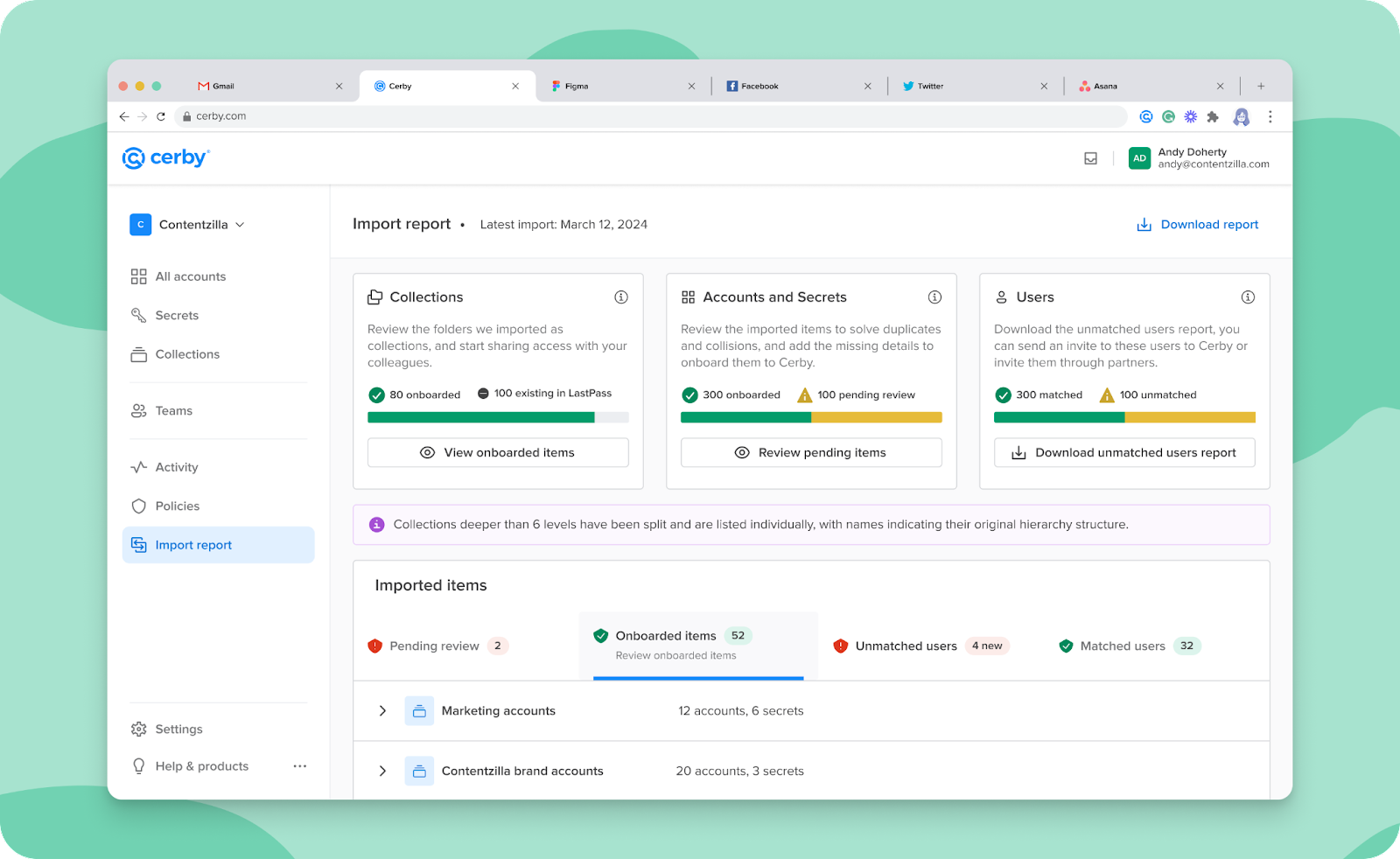
* Now, you can get your import details at your fingertips with the downloadable **CSV report**! This report gives you a detailed breakdown of all your imported collections, subcollections, accounts, and secrets from LastPass. Enjoy the effortless download with a single click. The CSV report is perfect for verifying data accuracy and completeness, identifying import errors or inconsistencies, and fostering transparency and collaboration within your team. We have prepared the [How to interpret the downloadable import report](https://help.cerby.com/cerby-web-app/item-importer/migrate-from-lastpass-to-cerby#how-to-interpret-the-downloadable-import-report) section in our article [How to use the Password Manager Import](https://help.cerby.com/cerby-web-app/item-importer/migrate-from-lastpass-to-cerby#h-f692674294) to guide you through the status of each imported item. ​**Figure 6** shows the **Import report** view, where you can see the **Download report** button at the top right.

<figure><img src="/files/0nGiLKtP6MHflrJoCyOE" alt=""><figcaption><p>Figure 6. Import report view in the Cerby web app dashboard with the Download report button</p></figcaption></figure>

If you are interested in any of these new features but don't see them in your workspace, contact our Customer Support team via email at <support@cerby.com>.

***

## Cerby web app

Check out what's new in our Cerby web app:

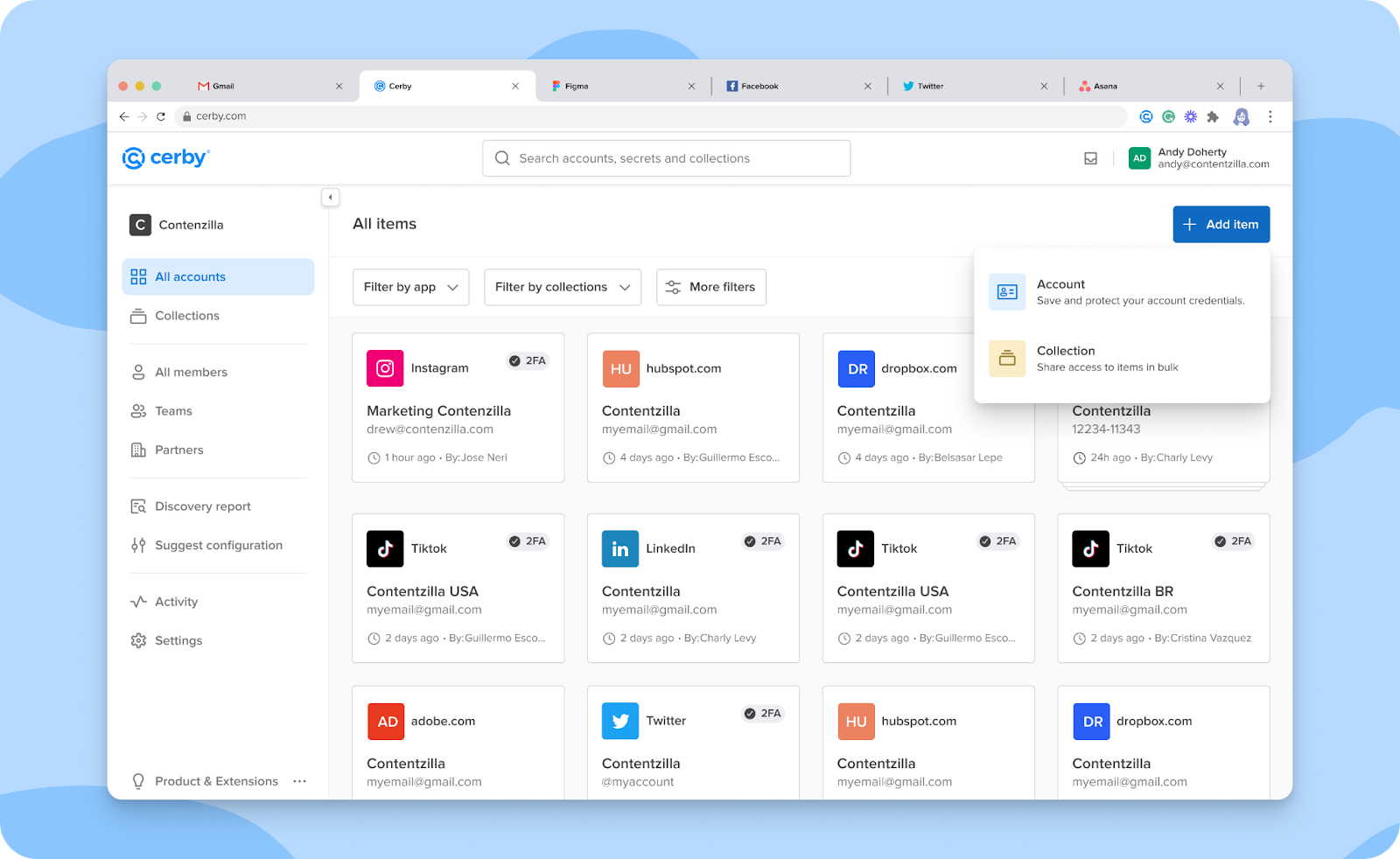
* You spoke, and we listened! We've included the **Add item** button in the **All accounts** views to enable you to add or import to Cerby any of the different supported items: account, secret, and collection, as shown in **Figure 7**.
* We are all in with saving you some clicks. The experience of adding an account using the Cerby web app is now simpler and shorter. Previously, in our **Add account** wizard, you first had to select the app from a catalog and then enter the account details. Now, we've condensed the process into one dialog box. That's it. Pretty cool, right? If you want instructions, read the article [Add an account](https://help.cerby.com/cerby-web-app/accounts/managing-your-accounts/add-an-account).
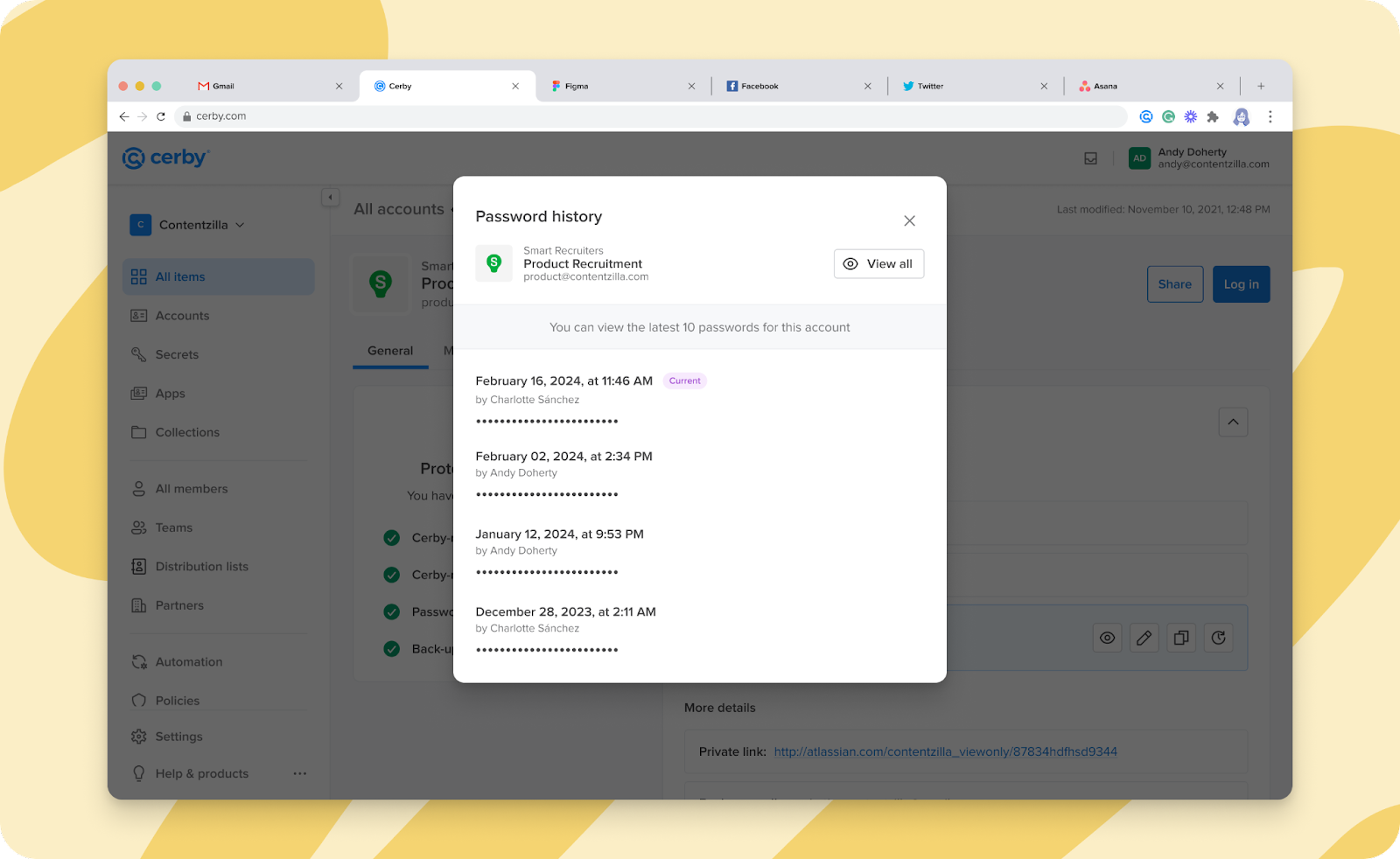
* We're excited to share that Cerby now gives you more control over your password journey! With the **Password History** feature, you can see the latest 10 passwords saved in Cerby and associated with your account. Quickly identify who performed a password update and when, including automated password rotations from Cerby, and revert it if necessary. You can also identify reused and weak passwords to take action. Remember that you can always use the Cerby browser extension to manually generate secure passwords in Cerby, strengthening your password hygiene and keeping your data safe! ​ ​**Figure 8** shows the **Password history** dialog box that is displayed after clicking the **Password History** icon from the account details page.

<figure><img src="/files/38gOgR0J9c1n0klUrdwk" alt=""><figcaption><p>Figure 8. List of passwords in the Password history dialog box</p></figcaption></figure>

* Want to declutter your collections easily? We have the bulk deletion of items for you! When you delete a collection, you can choose whether to delete all the items inside the collection or keep the item-level access permissions for the users and teams with shared access to them. This feature saves time and effort, enabling you to focus on more productive tasks. It's essential to note that when bulk deletion is employed for all items, they are permanently deleted.
* We've added an extra layer of protection to your account by requiring a trusted device when triggering an automatic login.

***

## Cerby browser extension

Explore the latest features in our Cerby browser extension:

* We are overly enthusiastic about securing your accounts, but we know you may not want Cerby to be displayed in some input fields. That's why we released in v1.0.283 a way for you to tell us where to disable the inline menu. Just click the Cerby icon inside the input field to display the inline menu of the Cerby browser extension, and click the **Help** icon. You'll see two options:
* **Turn off Cerby for this field:** Select this option to remove the Cerby icon and inline menu interactions in this field for future interactions.
* **I need help:** Select this option to be redirected to the Cerby web app support chat.
* We've fine-tuned your experience with new informative in-context alerts for errors, logouts, and expired sessions.

***

## Cerby mobile app

Dive into the newest additions to our Cerby mobile app:

* Take control on the go! Easily update your account details using your mobile phone through the **Edit** option on the Cerby mobile app. No more needing to switch to the web app. It's all at your fingertips in Android v1.0.147! Keep your information accurate and up-to-date with the Cerby mobile app, wherever you are, as shown in **Figure 9**.
* If you are a fan of dark mode, this one's for you. The Cerby mobile app for iOS in v1.0.140 now supports dark mode to offer a comfortable and battery-friendly viewing experience.
* Remember the big milestone we achieved in January with the fully native version of the Cerby mobile app for Android? Well, we have now accomplished the same for iOS in v1.0.131.
* We've streamlined the **Secrets** design for a more intuitive and enjoyable experience in iOS v1.0.126 and Android v1.0.137.
* We're giving you a smoother experience, making our Cerby mobile app run quicker.

Fixes

Take note of the issues addressed and resolved by the Development team in each Cerby client app.

### Cerby web app

* The issue with the breadcrumb navigation when accessing a business center asset details is fixed.
* The issue with pagination in the **Collections** view is fixed.
* The issue with message boxes not closing when another modal is displayed is fixed.
* The issue of not showing when a user has reached the maximum number of trusted devices is fixed.
* The issue with showing an error message after the user has left the workspace open for some time is fixed.

### Cerby browser extension

* The issue with showing a different popup after the user changes the tab when the **Enter verification code** dialog window is shown is fixed.
* The issue with the Twitter MFA option not opening from the right screen is fixed.
* The issue with the password generator not closing at signup is fixed.
* The issue with the verification code closing when the tab is changed is fixed.
* The issue with the inline menu opening while the auto login workflow is running is fixed.
* The issue with some menus displaying incorrectly after installation or before login has been fixed.

### Cerby mobile app

* The issue with labels showing for offline accounts is fixed in iOS v1.0.129 and Android v.1.0.139.
* The issue with the focus kept on the fields when the keyboard closes is fixed in iOS v1.0.130 and Android v.1.0.139.
* The issue with the fixed keyboard when sharing items is solved in iOS v1.0.130 and Android v.1.0.139.
* The issue with the secret categories rendering is solved in iOS v1.0.132 and Android v1.0.144.
* The issue with white spaces in the secret information is solved in iOS v1.0.132 and Android v1.0.144.
* The issue with a success message being displayed despite a device onboarding being rejected is solved in Android v1.0.152 and iOS v1.0.149.

***

## New supported managed apps

The following are the latest additions to the list of apps with supported automation tasks:

* [Abnormal](https://abnormalsecurity.com/)
* [Accurint](https://www.accurint.com/)
* [Accredible](https://www.accredible.com/)
* [Act-on](https://act-on.com/)
* [AdPharm](https://adpharm.net/login.php)
* [ADP](https://www.adp.com/)
* [Ad Standards](https://adstandards.com.au/)
* [AgVerdict Next](http://agverdict_next)
* [Airbnb](https://www.airbnb.com/)
* [Airfirst](http://foxnews.manager.airfirst.tv)
* [airship](https://www.airship.com/)
* [Akky](https://www.Akky.mx/)
* [Akta](https://www.akta.tech/)
* [Alamy](https://www.alamy.com/)
* [Alaska Airlines](https://www.alaskaair.com/)
* [AliExpress](https://es.aliexpress.com/?gatewayAdapt=glo2esp)
* [Allianz Travel Insurance](https://www.allianztravelinsurance.com/)
* [American Airlines](https://www.aa.com/)
* [American Express](https://www.americanexpress.com/)
* [Anaplan](https://www.anaplan.com/)
* [ANY.RUN](https://anyrun.uk/)
* [Aol](https://www.aol.com/)
* [AON CyQu](http://aon_cyqu)
* [Apptio](https://www.apptio.com/)
* [Arista](https://www.arista.com/en/)
* [AS/400](http://as400.com)
* [Assured Partners](https://www.assuredpartners.com/)
* [Athena Health](https://www.athenahealth.com/)
* [Athletics](http://mlb.com/athletics)
* [ATT Business](https://www.business.att.com/)
* [Audience](http://platform.audience.io)
* [Auth0](https://auth0.com/)
* [Avalara](https://www.avalara.com/us/en/index.html)
* [Bayer](https://www.bayer.com/en/)
* [Bazaarvoice](https://www.bazaarvoice.com/)
* [BBC](https://www.bbc.com/)
* [Benefit Solver](https://www.benefitsolver.com/benefits/BenefitSolverView)
* [Beyond Trust](https://www.beyondtrust.com/brand?utm_source=google\&utm_medium=cpc\&utm_campaign=8685479461\&utm_content=534562464902\&utm_term=beyondtrust\&gad_source=1\&gclid=CjwKCAjw17qvBhBrEiwA1rU9w9GzSe0IajJp0vD7oN9K0Phed4VPjjHtj6vqfc-zHAuKbQRzgzmLCBoCjwcQAvD_BwE)
* [Big Ten Plus](https://www.bigtenplus.com/)
* [Bitbucket](https://bitbucket.org/product?\&aceid=\&adposition=\&adgroup=146989386670\&campaign=18815940604\&creative=632894031594\&device=c\&keyword=bitbucket\&matchtype=e\&network=g\&placement=\&ds_kids=p74128740641\&ds_e=GOOGLE\&ds_eid=700000001551985\&ds_e1=GOOGLE\&gad_source=1\&gclid=CjwKCAjw17qvBhBrEiwA1rU9w0uhoI5t0jvJo76joq0hjfzEV6KCPd6-YLSMWAmxqy7_5hzyxIN9OxoCVsoQAvD_BwE\&gclsrc=aw.ds)
* [Bitly](https://bitly.com/)
* [Blackbaud](https://www.blackbaud.com/)
* [Bladder Chatter](https://www.bladderchatter.com/)
* [Bloomberg](https://www.bloomberg.com/)
* [Boomi](https://boomi.com/)
* [Braintree PayPal](https://www.braintreepayments.com/)
* [Branch](https://www.branch.io/)
* [Brandwatch](https://www.brandwatch.com/p/suite-overview/)
* [Brightcove](https://www.brightcove.com/en/)
* [Broadcastify Mobile](https://www.broadcastify.com/)
* [Business Insider](https://businessinsider.mx/?r=US\&IR=T)
* [Caffeine TV](https://www.caffeine.tv/)
* [Cake NET-Chef](https://cake.net-chef.com/standalone/modern.ct#Login)
* [Canny](https://canny.io/)
* [Carta](https://carta.com/)
* [CashPro](https://online3.cashpro.bankofamerica.com/cpoauthweb/cpo/#/login/public/signin)
* [CBS](https://www.cbs.com/)
* [CDW](https://www.cdw.com/)
* [Celayix](https://www.celayix.com/)
* [CentralReach](https://centralreach.com/)
* [Chartbeat](https://chartbeat.com/)
* [Chatmeter](https://www.chatmeter.com/)
* [Chicago Switch](https://www.thechicagoswitch.net/)
* [ClearScale](https://www.clearscale.com/)
* [CNN](https://edition.cnn.com/)
* [CodeShip](https://app.codeship.com/)
* [CodeSignal](https://codesignal.com/learn/)
* [Cognito Forms](https://www.cognitoforms.com/)
* [CollegePressBox](https://collegepressbox.com/)
* [comScore](https://www.comscore.com/)
* [Contentful](https://www.contentful.com/)
* [Convera](https://convera.com/)
* [Cookiebot](https://www.cookiebot.com/es/)
* [The Coral Project](https://coralproject.net/)
* [Corner Stone](https://www.cornerstonecoralsprings.com/)
* [Courtside 1891](https://www.courtside1891.basketball/)
* [Criteo](https://www.criteo.com/)
* [Cronofy](https://www.cronofy.com/)
* [Crowdstrike Falcon Platform](https://www.crowdstrike.com/falcon-platform/?utm_campaign=brand\&utm_content=crwd-brand-amer-mx-en-psp-x-trl-x-tct-x_x_x_product-x\&utm_medium=sem\&utm_source=goog\&utm_term=crowdstrike%20falcon\&cq_cmp=19634246332\&cq_plac=\&gad_source=1\&gclid=Cj0KCQjw-r-vBhC-ARIsAGgUO2DzGNa6s-fivH_bZdQ6r_M60fc3sXpWOAUiQLaMJofHkRlcEmI8I_8aAsynEALw_wcB)
* [CrowdTangle](https://www.crowdtangle.com/)
* [Crunchbase](https://www.crunchbase.com/)
* [CTV News](https://www.ctvnews.ca/)
* [Cvent](https://www.cvent.com/)
* [Cypress](https://www.cypress.io/)
* [DAC](https://www.dacgroup.com/)
* [DailyMail](https://www.dailymail.co.uk/home/index.html)
* [Darktrace](https://darktrace.com/)
* [Dashlane](https://www.dashlane.com/)
* [Dataminr](https://www.dataminr.com/)
* [DAZN](https://www.dazn.com/)
* [Delicious Brains](https://deliciousbrains.com/)
* [DHL](https://www.dhl.com/)
* [Digital Planet Creative](https://www.digitalplanetcreative.com/)
* [DirecTV](https://www.directv.com/)
* [Discord](https://discord.com/)
* [Disney](https://thewaltdisneycompany.com/)
* [Ditto Music Official](https://dittomusic.com/es?utm_source=google\&utm_medium=cpc\&utm_campaign=UK_//_Brand_//_Ditto_//_EM\&utm_adgroup=UK_//_Brand_//_Ditto\&gad_source=1\&gclid=Cj0KCQjw-r-vBhC-ARIsAGgUO2A_leEpkbx241nB3yYfVas1s75W6l7-CWU73jdtPAi3y14ynbdWM6MaAtt9EALw_wcB)
* [DNSimple](https://dnsimple.com/)
* [DocuSign](https://www.docusign.com/)
* [Dodgers](https://www.mlb.com/dodgers/)
* [Doppler](https://www.fromdoppler.com/en/)
* [Douyin](https://www.douyin.com/)
* [DraftKings Sportsbook](https://sportsbook.draftkings.com/)
* [Drata](https://drata.com/)
* [Drawbridge](https://drawbridgeco.com/)
* [Dropbox](https://www.dropbox.com/)
* [Dynamo](http://dynamosoftware.com)
* [Ecobici](https://ecobici.cdmx.gob.mx/)
* [EE Distribution](https://www.eedistribution.com/)
* [Email on Acid](https://www.emailonacid.com/)
* [Entrust](https://www.entrust.com/)
* [Epic Vendor Systems](https://vendorservices.epic.com/)
* [Epiphany](https://epiphanyinc.net/)
* [ESPN](https://www.espn.com)
* [DP Tour](https://www.europeantour.com/dpworld-tour/)
* [ExecuTime](https://executime.ci.killeen.tx.us/ExecuTime/Index.do)
* [ExitCertified](https://www.exitcertified.com/)
* [Extreme Reach](https://www.xr.global/)
* [ezCater](https://www.ezcater.com/)
* [Factal](https://www.factal.com/)
* [Falcon.io](http://falcon.io)
* [Fanatiz](https://fanatiz.com/es/live-colombian-soccer-games?gad_source=1\&gclid=Cj0KCQjw-r-vBhC-ARIsAGgUO2CJMaGD2YpdFMRrd5LxL2K4ecpV4MmhJ0TvSOCQPsBdsQRpi6czMU0aAuHOEALw_wcB)
* [Fanpage Karma](https://www.fanpagekarma.com/)
* [Fantasy National](https://www.fantasynational.com/)
* [FedEx](https://www.fedex.com/)
* [Fidelity.com](http://fidelity.com)
* [Figma](https://www.figma.com/)
* [First Advantage](https://fadv.com/)
* [Fivetran](https://www.fivetran.com/)
* [Flatfile](https://flatfile.com/)
* [FloLive](https://www.flolive.tv/)
* [Forcepoint](https://www.forcepoint.com/)
* [Formstack](https://www.formstack.com/)
* [Fort Worth Star-Telegram](https://www.star-telegram.com/)
* [Fox](https://www.fox.com/)
* [Fox Flash](https://www.foxflash.com/)
* [Fox Nation](https://nation.foxnews.com/geo-block)
* [Fox News](https://www.foxnews.com/)
* [Fox Pass](https://www.foxpass.com/)
* [Fox Sound](https://www.foxsound.com/)
* [Fox Sports](https://www.foxsports.com/)
* [Front](https://front.com/)
* [Dbt Labs](https://www.getdbt.com/)
* [Glassdoor](https://www.glassdoor.com.mx/index.htm)
* [GoDaddy](https://www.godaddy.com/es)
* [Gong](https://www.gong.io/home/)
* [Greyscalegorilla](https://greyscalegorilla.com/)
* [GuestXM](https://guestxm.com/)
* [Haaretz](https://www.haaretz.com/)
* [Haivision Support](https://www.haivision.com/support/)
* [Max](https://www.max.com/) (Ex HBO Max)
* [Highspot](https://www.highspot.com/)
* [Hik-Connect](https://ius.hik-connect.com/views/login/index.html#/main/overview)
* [HireRight](https://www.hireright.com/)
* [Homeowners of America](https://hoaic.com/)
* [Hootsuite](https://www.hootsuite.com/)
* [HotSchedules](https://www.hotschedules.com/hs/login.jsp)
* [Hotjar](https://www.hotjar.com/try-hotjar-today3/)
* [Hulu](https://www.hulu.com/welcome)
* [iCloud](https://www.icloud.com/)
* [Iditarod](https://iditarod.com/)
* [Igloo](https://www.igloocoolers.com/)
* [IMDb](https://www.imdb.com/)
* [Intercom](https://www.intercom.com/)
* [Intuit](https://www.intuit.com/)
* [Inzetregistratie](http://magentammt.com)
* [JetBlue](https://www.jetblue.com/)
* [JetBrains](https://www.jetbrains.com/)
* [JPMorgan](https://www.jpmorgan.com/global)
* [Khoros](https://khoros.com/)
* [Klue](https://klue.com/)
* [Kwik Trip](https://kwiktrip.com/)
* [LastPass](https://lastpass.com/)
* [Later](https://later.com/)
* [Los Angeles Times](https://www.latimes.com/)
* [Lego](https://www.lego.com/)
* [LendingClub](https://www.lendingclub.com/)
* [Lennd](https://www.lennd.com/)
* [Level Sense](https://www.level-sense.com/)
* [Liberty Mutual](https://www.libertymutual.com/)
* [LiveU TV](https://www.liveu.tv/)
* [LIV Golf Plus](https://www.livgolfplus.com/)
* [Logic Monitor](https://www.logicmonitor.com/)
* [LogMeInRescue](https://www.logmeinrescue.com/)
* [LTN Global](https://ltnglobal.com/)
* [Lumen](https://www.lumen.com/en-us/home.html)
* [Mailgun](https://www.mailgun.com/)
* [Marcaria.com](http://marcaria.com)
* [Marriott](https://www.marriott.com/default.mi)
* [Masters](https://www.masters.com/index.html)
* [Medallia](https://www.medallia.com/)
* [Medium](https://medium.com/)
* [Megaphone](https://megaphone.spotify.com/)
* [Megatrax](https://www.megatrax.com/)
* [Meltwater](https://www.meltwater.com/en)
* [Meraki Cisco](https://meraki.cisco.com/)
* [Metallic](https://metallic.io/)
* [Mimecast](https://www.mimecast.com/)
* [MiSalud](https://www.misalud.ai/)
* [MLB](https://www.mlb.com/)
* [Movebot](https://movebot.io/)
* [Microsoft SQL Server](https://www.microsoft.com/es-mx/sql-server)
* [My ATT](https://www.att.com.mx/)
* [MyKerio](https://my.kerio.com/login)
* [National General](https://nationalgeneral.com/)
* [NBA](https://www.sportingnews.com/mx/nba?gr=www)
* [Neptune Software](https://www.neptune-software.com/)
* [NetSuite](https://www.netsuite.com/)
* [NFL](https://www.nfl.com/)
* [NHL](http://www.nhl.com/)
* [NHL Media](https://media.nhl.com/account/ui?returnUrl=%2F)
* [NHL Shop](https://shop.nhl.com/)
* [NordVPN](https://nordvpn.com/)
* [NordLayer](https://nordlayer.com/)
* [Nylas](https://www.nylas.com/)
* [Okta](https://www.okta.com/)
* [Olark](https://www.olark.com/index2)
* [Olympus Insurance](https://olympusinsurance.com/)
* [OpenAI](https://openai.com/)
* [OpenAir Inc](https://www.openair.com/)
* [Openforce](https://oforce.com/)
* [Openly](https://openly.com/)
* [OpenWeb](https://www.openweb.com/)
* [OptinMonster](https://optinmonster.com/)
* [Ortto](https://ortto.com/)
* [Oxylabs](https://oxylabs.io/)
* [Palo Alto XDR](https://www.paloaltonetworks.com./cortex/cortex-xdr)
* [Paramount+](https://www.paramountplus.com/)
* [Peacock](https://www.peacocktv.com/)
* [PGA Tour](https://www.pgatour.com/)
* [PhotoShelter](https://www.photoshelter.com/)
* [Private Internet Access VPN](https://www.privateinternetaccess.com/)
* [Pike13](https://www.pike13.com/)
* [Productiv Okta Integration](https://www.okta.com/integrations/productiv/)
* [Podcasters](https://podcasters.spotify.com/)
* [Pond5](https://www.pond5.com/)
* [Recorded Future](https://www.recordedfuture.com/)
* [Redash](https://redash.io/)
* [Republic Services](https://www.republicservices.com/)
* [RingCentral](https://www.ringcentral.com/)
* [Rippling](https://www.rippling.com/)
* [Roblox](https://www.roblox.com/)
* [Roku](https://www.roku.com/)
* [Safeco Insurance](https://www.safeco.com/)
* [Safeguard Cyber](https://www.safeguardcyber.com/)
* [SafeGuard Global International](http://unitypayroll.safeguardworld.com)
* [Sage](https://www.sage.com/en-us/)
* [Salesforce](https://www.salesforce.com/)
* [SAP](https://www.sap.com/)
* [Scoopa](https://scoopa.com/)
* [SentinelOne](https://www.sentinelone.com/)
* [Sentry.io](http://sentry.io)
* [ServiceNow](https://www.servicenow.com/)
* [Shiftboard](https://www.shiftboard.com/)
* [Shutterstock](https://www.shutterstock.com/)
* [SiteGround](https://www.siteground.com/)
* [Sketch](https://www.sketch.com/)
* [SkillSurvey](https://www.icims.com/products/talent-cloud-applications/skillsurvey/)
* [Skreens](https://www.skreens.com/)
* [Sky MX](https://skypaquetes.mx/p/td)
* [Smartlead.ai](http://smartlead.ai)
* [SmartRecruiters](https://ta.smartrecruiters.com/lp-recruiting-software.html)
* [Snowflake](https://signup.snowflake.com/?utm_source=google\&utm_medium=paidsearch\&utm_campaign=na-mx-en-brand-core-exact\&utm_content=go-rsa-evg-ss-free-trial\&utm_term=c-g-snowflake-e&_bt=591290248242&_bk=snowflake&_bm=e&_bn=g&_bg=135420291280\&gclsrc=aw.ds\&gad_source=1\&gclid=Cj0KCQjw-r-vBhC-ARIsAGgUO2Acw39WhsRGwzMG2gkNTH2PwX_8xQfAlU391iaGB6cUvNjePTnZ8gEaAn9cEALw_wcB)
* [Sociabble](https://www.sociabble.com/)
* [SolarWinds](https://www.solarwinds.com/)
* [SonicWall](https://www.sonicwall.com/)
* [Sooner Sports](https://soonersports.com/)
* [Soundcloud](https://soundcloud.com/)
* [Southwest](https://www.southwest.com/)
* [SparkPost](https://login.sparkpost.com/u/login?state=hKFo2SBOaEc5emczWkktS2s1V1YzVXU2b3dDUFhFMUNubXhFRKFur3VuaXZlcnNhbC1sb2dpbqN0aWTZIDQtMlJaUV9VeTNxQ1k1aW5oUE83SFR3d3c0LUJWVzIto2NpZNkgUXR5QVJpOEZoTlpUZ2xCWXdPNWRTeXpzZG5RdmR4Q3k)
* [Square](https://squareup.com/us/en)
* [Stack Overflow](https://stackoverflow.com/)
* [Staples Advantage](https://www.staplesadvantage.com/)
* [Star Tribune](https://www.startribune.com/)
* [Stephen Arnold Music](https://stephenarnoldmusic.com/)
* [Storyblocks](https://www.storyblocks.com/)
* [Stripe](https://stripe.com/)
* [SwaggerHub](https://swagger.io/tools/swaggerhub/)
* [T24](https://t24.com.tr/)
* [Tableau](https://www.tableau.com/)
* [Tagboard](https://tagboard.com/)
* [Teladoc Health](https://www.teladochealth.com/)
* [Telegram](https://web.telegram.org/k/)
* [TeleStaff](https://telestaff.slcfd.org/login)
* [TestRail](https://www.testrail.com/)
* [The Emmys](https://theemmys.tv/)
* [The Open](https://www.theopen.com/leaderboard)
* [Ticketmaster](https://www.ticketmaster.com/)
* [Tipalti](http://tipalti.com/)
* [TMX](https://www.tmx.com/)
* [Tower Hill Insurance](https://www.thig.com/)
* [Trakwell.ai](http://trakwell.ai)
* [Trengo](https://trengo.com/)
* [Transkriptor](https://transkriptor.com/)
* [True Anthem](https://www.trueanthem.com/)
* [Trustpilot for Business](https://business.trustpilot.com/)
* [Trustware](https://www.trustware.io/)
* [Tubi TV](https://tubitv.com/)
* [Tumblr](https://www.tumblr.com/)
* [TVU Networks](https://www.tvunetworks.com/products/tvu-channel/)
* [Uber](https://www.uber.com/)
* [Uberall](https://uberall.com/en-us)
* [UFC](http://www.ufc.com/)
* [UiPath](https://www.uipath.com/)
* [UKG](https://www.ukg.com/)
* [Unbounce](https://unbounce.com/landing-pages-overlays/)
* [United Airlines](https://www.united.com/)
* [Universal News Today](https://universalnewstoday.webflow.io/)
* [Uplynk](https://edg.io/media/uplynk/)
* [UPS](https://www.ups.com/)
* [USAA](https://www.usaa.com/?akredirect=true)
* [USA Today](https://www.usatoday.com/)
* [Vela](https://getvela.com/)
* [Verizon](https://www.verizon.com/business/?cmp=vcgref)
* [Verizon Business](https://mblogin.verizonwireless.com/account/business/ilogin?adobe_mc=MCMID%3D41821015420489232391123230875031920532%7CMCORGID%3D7ED836675AB3A4860A495CAD%2540AdobeOrg%7CTS%3D1710279646&_ga=2.21603195.1385864599.1710279645-1803410994.1710279645&_gl=1%2at840ic%2a_ga%2aMTgwMzQxMDk5NC4xNzEwMjc5NjQ1%2a_ga_12R1DX1LX7%2aMTcxMDI3OTY0NS4xLjAuMTcxMDI3OTY0NS42MC4wLjA.)
* [Visier](https://www.visier.com/)
* [Vismo](https://www.vismo.com/us/)
* [Vistra](https://www.vistra.com/)
* [Vivvix](https://www.vivvix.com/home)
* [ViX](https://vix.com/)
* [VSP](https://www.vsp.com/)
* [VyprVPN](https://www.vyprvpn.com/)
* [WeChat](https://www.wechat.com/)
* [Weibo](https://m.weibo.cn/)
* [WeWork](http://www.wework.com/)
* [WhatCounts, Inc.](http://www.whatcounts.com/)
* [Wikipedia](https://en.wikipedia.org/wiki/Main_Page)
* [Wix.com](http://wix.com)
* [WNBA](https://www.wnba.com/)
* [Wochit](https://www.wochit.com/)
* [Workato](https://www.workato.com/)
* [Workday Enterprise Management Cloud](https://www.workday.com/)
* [Workfront](https://business.adobe.com/products/workfront/main.html)
* [WWE](https://www.wwe.com/)
* [WxVisionCP](https://cp.wxvision.net/controlpanel/public/auth/login)
* [Xappex](https://www.xappex.com/)
* [Xero](https://www.xero.com/)
* [Xiaohongshu](https://www.xiaohongshu.com/)
* [Yahoo](https://yahoo.com/?p=us)
* [Zapier](https://zapier.com/)
* [Zillow](https://www.zillow.com/)

***

## January 23, 2024

## New features

Here are the new features and improvements we released across the Cerby platform:

* Remember how enthusiastic we were in the release notes of October? Get ready for another mic drop. We're pumped up because of Cerby Suggest, our new product capability reaching early access mode. For customers interested in detecting app sprawl in their organization, contact your Customer Success Manager to learn how to join our Early Access Program. In the meantime, look at the article [Explore Cerby Suggest](https://help.cerby.com/cerby-browser-extension/cerby-suggest/explore-cerby-suggest) to learn more about the benefits and supported features. Also, check out the Cerby web app dashboard for Suggest, as shown in **Figure 1**.

<figure><img src="/files/I8hFQyfEUibDyPyYx8tm" alt="Screenshot of the Cerby web app dashboard. The All accounts view is displayed with multiple account cards and a button at the top right to add an item \(account or collection\)."><figcaption><p>Figure 1. Cerby web app dashboard for Cerby Suggest users</p></figcaption></figure>

* We are excited to announce the first steps we are taking towards supporting more items for our Cerby Protect users. You can now add and import to Cerby the following items from LastPass with the corresponding secret type:
* WiFi
* Database
* SSH keys
* Server
* Software license
* Custom item

You can see these secret types through the **Secrets** view of the dashboard in any of the Cerby client apps, as shown in **Figure 2** for the Cerby web app.

<figure><img src="/files/bElXuVgGdJX1PG87iv2D" alt="Screenshot of the Cerby web app dashboard. The Secrets view is displayed with multiple secret cards that correspond to different secret items."><figcaption><p>Figure 2. New secret types in the Secrets view of the Cerby web app dashboard</p></figcaption></figure>

**IMPORTANT:** Currently, you can only add the new secret types using the Cerby web app. For more information, check out our documentation about [secrets](https://help.cerby.com/cerby-web-app/secrets).

* We know you wanted flexibility, so the Cerby platform now supports accounts without a URL for those apps you access locally, not through a website, such as hardware devices or desktop apps. The process of adding these accounts to Cerby is the same as usual, just leave the **App name or URL** field blank in the dialog box, and your accounts will be categorized as no URL accounts. Stay tuned because, in the future, you'll be able to perform automation tasks on these accounts. ​**Figure 3** shows how no URL accounts are displayed in the Cerby web app dashboard.

<figure><img src="/files/0CYDPVbddTlSNMYHyZDB" alt="Screenshot of the Cerby web app dashboard. The All accounts view is displayed with multiple account cards, including two no URL accounts."><figcaption><p>Figure 3. No URL accounts in the Cerby web app dashboard</p></figcaption></figure>

* After testing and receiving your feedback, we added a pinch of granularity to our workspace-level roles when it comes to visibility in the **All members** and **Teams** views. Take a look at **Table 1**. For more information about roles, read the article [Roles and permissions](https://help.cerby.com/getting-started/concepts/user-management/roles-and-permissions).

| **Action**                    | **Guest user** | **User** | **Admin** | **Super Admin** | **Owner** |
| ----------------------------- | -------------- | -------- | --------- | --------------- | --------- |
| View other workspace users.   |                |          |           | Yes             | Yes       |
| View and add **Guest users**. |                | Yes      | Yes       | Yes             | Yes       |
| View teams and team members.  | Yes            | Yes      | Yes       | Yes             | Yes       |

**Table 1.** Workspace-level roles

* Who says spaces can't be part of the username party? Feel free to add usernames with spaces when saving your items in Cerby. We support them now.
* Ever heard about Terminator? Well, sometimes your computer can play a time-travel prank on you, causing glitches in the verification codes generated by Cerby when used as an authenticator app for multi-factor authentication (MFA). To ensure you're not at the mercy of your devices' clocks, making time-based one-time passwords (TOTPs) useless, we now retrieve the time from the server.
* Sneak peek alert! A new, simplified way to add accounts is on the way, along with a new space for your tenants and business center integrations. Stay tuned for our next release notes in February.

If you are interested in any of these new features but don't see them available in your workspace, contact our Customer Support team via email at <support@cerby.com>.

### Cerby web app

Check out what's new in our Cerby web app:

* **Collaborators** and **Guest users** can now access the secret details page to view all of the information fields and their saved values.
* We've optimized pagination when using filters to display your accounts in the **Activity** view. The goal is to reduce loading times and bandwidth consumption and improve navigation.
* Have you ever wondered how many characters you can enter in any field of a new or existing secret item? We missed it in the first release, but we've got you covered now with a counter in every input field, so you know when you are about to reach the limit. Additionally, we added error messages when you surpass the limit.

### Cerby browser extension

Explore the latest features in our Cerby browser extension:

* Based on your feedback, we've juiced up the website detection and autofill functionality of our Cerby browser extension in v1.0.255:
* Cerby automatically detects the current website domain and displays the relevant account information in the browser extension popup. The accounts that belong to the same domain are grouped under the category "For this website" and the rest, under "For other websites."
* When you are already on the login page of a website, the login flow that you trigger from the browser extension popup no longer opens a new browser tab. Now, the autofill happens on the same login page.
* We're excited about security and want to protect everything for you, but we also know sometimes you want an uninterrupted experience, so we pumped the brakes a little. Now, when you are logged out of the Cerby browser extension, the inline menu doesn't open automatically when you click an input field. To open it, you must click the Cerby in-field icon. This feature is available from v1.0.266 onwards. The same behavior of not opening the inline menu happens when you don't have an account for the current website. You can check it out from v1.0.257 onwards.
* A red dot in the Cerby icon now indicates that you don't have an active session in the Cerby browser extension.

### Cerby mobile app

Dive into the newest additions to our Cerby mobile app:

* We are thrilled to announce a big milestone. The Cerby mobile app for Android v1.0.124 is the first fully native version of the app with features such as the following:
  * We are using Jetpack Compose UI, the latest toolkit developed by Google that will enable our Development team to code faster.
  * We improved the performance and responsiveness of the Cerby mobile app by implementing multithreading with Kotlin coroutines.
  * We cut the size of our app by half and have plans to make it even lighter in the future.
* The Cerby mobile app keeps getting more powerful. Sharing accounts, secrets, secret items, and collections with other workspace users is now at your fingertips from Android v1.0.125 and iOS v1.0.109 onwards. So, continue collaborating with your coworkers!
* The Cerby mobile app now supports PDF attachments of a secret item from iOS v1.0.121 and Android v1.0.131 onwards.

***

## Fixes

Take note of the issues addressed and resolved by the Development team in each Cerby client app.

### Cerby web app

* The issue with the squashed icons when selecting users while creating a distribution list is fixed.
* The issue with being unable to view the password of an account due to the Cerby web app not being set up as a trusted device is fixed. A dialog box is now displayed automatically to set up the Cerby web app as a trusted device whenever users access Cerby with a new browser.
* The issue with recategorizing a self-managed account as a no URL account after adding an email address to it is fixed. This behavior happened for accounts migrated from LastPass.
* The issue of being unable to save the selected recipients of a distribution list in the settings of a Cerby-managed email address is fixed.
* The issue with Super Admins being unable to search items widely is fixed.
* The issue with being unable to update the role of a user with shared access to an account is fixed. This behavior happened when trying to make changes through the dialog box you can access in the **Members** tab of the account details page.
* The issue with the **Import from password manager** option not being displayed in the drop-down list of the **Add secret** button is fixed.
* The issue with searching for users through the search bar in the **Onboarded users** tab of a Meta Business Center integration is fixed.
* The issue with not displaying the **Settings** icon of a deleted account for the account **Owner**, therefore limiting access to the account details page, is fixed.
* The issue with having to double-click an input field to make it editable is fixed. You should only have to click one time.
* The issue with being unable to share a business center in **All-Access Mode**, even when you are the owner, is fixed.

### Cerby browser extension

* The issue with being unable to save an account at login because the account label contained special characters, such as vertical bars (|), is fixed.
* The issue with being unable to log in to your accounts using the Cerby browser extension for Firefox and Edge is fixed in v1.0.260.
* The issue with the inline menu being displayed continuously on the login page of Atlassian, even after closing it, is fixed.

### Cerby mobile app

* The issue with being unable to load the account details from the Password Autofill feature in iOS is fixed in v1.0.105. On the other hand, the issue with the Autofill feature in Android crashing when determining the domain of some apps is fixed in v1.0.129.
* The issue with Autofill being displayed in the chats of Facebook Messenger is fixed in Android v1.0.129.
* The issue with displaying empty screens in collections with zero items is fixed in iOS v1.0.121 and Android v1.0.13. Now, a message is displayed suggesting you to add items.
* The issue with the Cerby mobile app crashing when displaying the screen to set up your trusted device is fixed in iOS v1.0.111 and Android v1.0.126.


---

# Agent Instructions: Querying This Documentation

If you need additional information that is not directly available in this page, you can query the documentation dynamically by asking a question.

Perform an HTTP GET request on the current page URL with the `ask` query parameter:

```
GET https://help.cerby.com/updates-and-releases/whats-new/2024.md?ask=<question>
```

The question should be specific, self-contained, and written in natural language.
The response will contain a direct answer to the question and relevant excerpts and sources from the documentation.

Use this mechanism when the answer is not explicitly present in the current page, you need clarification or additional context, or you want to retrieve related documentation sections.