# 2025

## December 23, 2025

## New features

The following are the new features and improvements we released across the Cerby platform:

### Proactive security, enhanced

Building on our initial launch, the **Security Hub** evolves into an actionable command center for your workspace. While the first version of this feature focused on identifying orphaned accounts, our latest update introduces a card with the latest automation tasks that had issues and a card with the total number of accounts, as shown in **Figure 1**.

The card with automation task issues is a powerful user interface (UI) component that monitors the health of your automated workflows. You can now identify and take action on disruptions in user access termination, access management, and data synchronization in real time.

By bridging the gap between identifying risks and taking action, the Security Hub ensures that no misconfiguration or failed automation goes unnoticed. To dive deeper into these new capabilities, read our updated article [Security Hub](https://help.cerby.com/getting-started/concepts/security-posture/security-hub).

### Instant visibility into your integrations

Business hub integrations are the backbone of your user and access management strategy, and now you can monitor their health at a glance. We've introduced a new **Status** column on the **Business Hubs** page, providing real-time transparency into how your integrations are performing.

This update enables business hub **Owners** and **Managers** to instantly see if an integration is healthy, requires a manual sync, or needs a configuration review, as shown in **Figure 2**.

The new status tracking covers every stage of the integration lifecycle. From "Under validation" for new connections to specific alerts like "Review service account", the Cerby platform proactively flags exactly what needs your attention. By providing clear, actionable statuses, Cerby ensures that your business hubs remain functional and secure without requiring manual, constant checks.

To learn more about what each status means and how to keep your integrations healthy, read the article [View the status of your business hub integration](https://help.cerby.com/setup-and-admin/business-hubs/managing-your-business-hubs/view-the-status-of-your-business-hub-integration).

### Expanding control in app setting restrictions

Building on our existing safeguards for passwords and members, we've expanded the capabilities of the **App setting restrictions** feature. Cerby can now identify and restrict account deletion attempts from users in an application, providing you with even tighter control over the lifecycle of the accounts saved in your workspace.

This enhancement ensures that critical accounts aren't permanently removed without oversight. To learn how to add account deletion safeguards to your workspace, read our updated article:[ Explore App setting restrictions](https://help.cerby.com/setup-and-admin/workspace-settings/extension-settings/app-setting-restrictions/explore-app-setting-restrictions).

### Cerby web app

Check out what's new in our Cerby web app:

* Users can now close the dialog box at any time when they create a Cerby-managed email address. The **Close** icon was missing from the experience.
* We've removed the **Forward** option from the **More options** (...) drop-down menu in the account **Inbox** for accounts with Cerby-managed phone numbers. The action of forwarding an SMS message to an email address is not supported.
* For a more intuitive experience, the newest secrets are now displayed at the top of the **Secrets** page by default, ensuring that the sensitive information you've just saved in Cerby is instantly accessible.

### Cerby mobile app

Dive into the newest additions to our Cerby mobile app:

* We've redesigned the onboarding experience on Android to ensure a smoother, more intuitive start for every user, as shown in **Figure 3**.

After logging in for the first time, users will now see an onboarding carousel that guides them through the following steps:

1. Turn on Autofill
2. Set up a trusted device
3. Turn on biometrics
4. Enable notifications

With this enhancement, released in version 1.0.226, we aim to ensure that users successfully configure the Cerby mobile app on their first attempt.

* Regarding UI enhancements, we redesigned the secret details and collection settings screens, enhancing layout clarity and visual consistency. You can see the new experience from versions iOS v1.0.276 and Android v1.0.226 onwards.
* We improved the message displayed to users when they open the account details screen or the quick actions, looking for one-time verification codes. We now tell them to perform a login attempt to their account so that the code is generated and sent to the Cerby-managed method configured for multi-factor authentication (MFA). This enhancement was released in iOS v1.0.274 and Android v1.0.224.

***

## Fixes

Take note of the issues addressed and resolved by the Development team behind the Cerby platform:

### Cerby web app

* The issue with the business hub sharing wizard was fixed to ensure custom asset roles and app roles are correctly displayed and categorized. This fix addresses inaccuracies previously detected in integrations like JetBrains and Mixpanel.
* The issue with Meta Business Manager, where revoking unmatched users failed to remove them from the native console, despite the automation job being marked as successful in Cerby, was fixed. This ensures that users no longer reappear during the next sync.
* The issue where pending invitations persisted on assets (for example, in Google Ads) even after a user was successfully deleted from Cerby has been fixed. Now, all invites are automatically removed when a user is deleted from Cerby.
* The issue of being unable to share accounts with Login-Only users in guest workspaces, after establishing a host-guest partnership, has been fixed.
* The issue where users lost access to accounts after a SAML group change was fixed, ensuring that account and secret access are properly restored when group assignments are updated.
* The issue where a workspace member was downgraded from **User** to **Login-Only** but was still able to see the **Share** button in a collection they owned was fixed. The fix ensures that users with restricted roles, such as **Login-Only**, do not see conflicting options, providing a more consistent and secure user experience aligned with their current privileges.
* The issue with messages being displayed for the wrong account in the inbox has been fixed.
* The issue where some account passwords couldn't be retrieved in workspaces with Azure Key Vault integrations was fixed.
* The issue with prompting business hub **Managers** and **Owners** of a Meta Business Manager integration to connect their personal Facebook account, even when this action is not necessary, was fixed.

### Cerby browser extension

* The issue with the Cerby logo of the inline menu being displayed in the **Password** field of an account login page, instead of the first input field, was fixed.
* The issue where the Cerby logo in the inline menu became unresponsive after an autofill action on a **Password** field was fixed. This fix also eliminates a bug that caused an erroneous "OTP not managed" message on fields without an MFA requirement.
* The issue with the in-context alert for incorrect login credentials not displaying the buttons for taking action (review credentials or notify account owner) was fixed.
* The issue with not switching the **Fill** buttons in the inline menu when manually transitioning between fields (for example, between the **Username** and **Password** fields) was fixed.
* The issue where users were locked out of auto-signing into Okta for 90 seconds if their Okta session expired has been fixed. The extension now correctly identifies when users are redirected to the Okta sign-in page and resets the login process instantly. Therefore, as soon as they sign back in, Cerby can complete the auto-login process to their apps without any delays or in-progress errors.

### Cerby mobile app

* The issue with not redirecting users to the account details screen after sharing an account was fixed in iOS v1.0.276.
* The issue with account preselection not working with disabled biometrics was fixed in Android v1.0.226, improving login reliability.
* The issue with duplicated notifications in Android was fixed in v1.0.226, improving clarity and reducing visual noise for end users.

***

## November 18, 2025

## New features

The following are the new features and improvements we released across the Cerby platform:

### Cerby web app

Check out what's new in our Cerby web app:

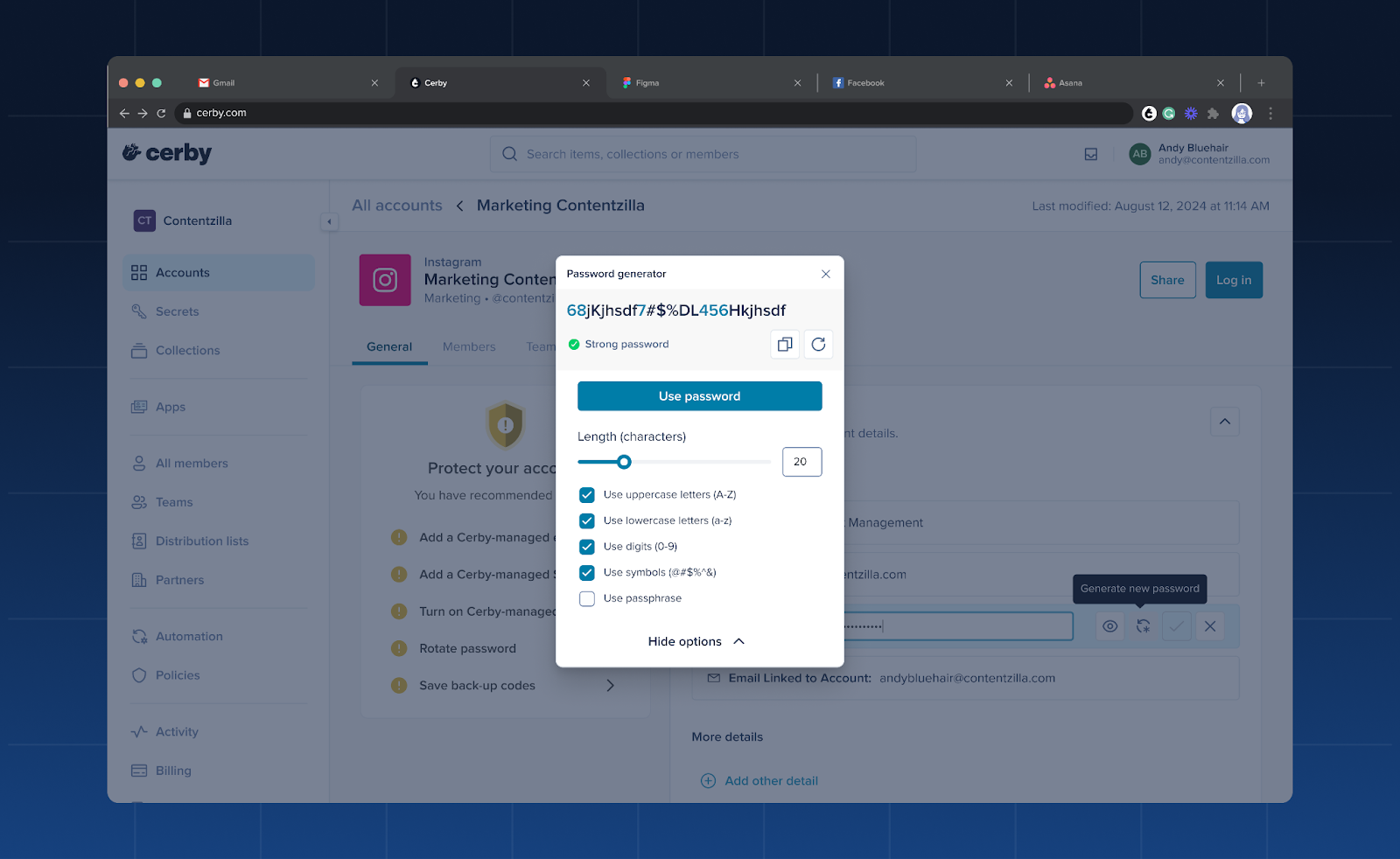
* The Cerby web app now ensures no account is left behind when it comes to security. We've integrated our password generator directly into the account saving process, in the **Add account** dialog box, as well as when editing a password in the account details page, as shown in **Figure 1**.

<figure><img src="/files/AHP27QOdLD1WzD38YsLI" alt=""><figcaption><p>Figure 1. Password generator dialog box in the account details page</p></figcaption></figure>

It's never been easier to give every single one of your accounts the strong login credentials it deserves.

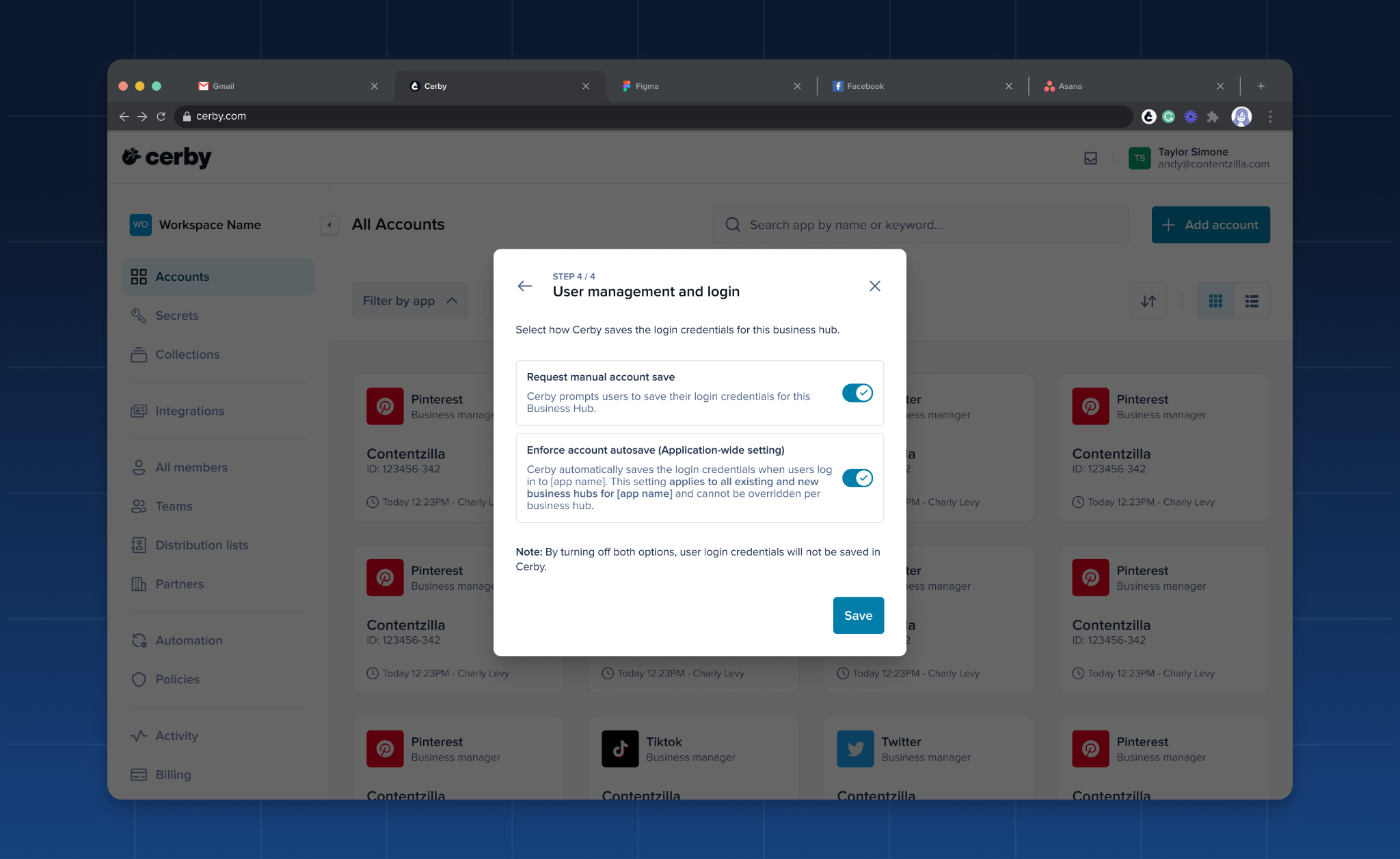
* Flexibility is the keyword! As a user who connects a business hub for your app, you can now select how you want Cerby to handle the way users save and connect their app user accounts to the integration.
* A dialog box is displayed for you to choose if you want Cerby to prompt users to save their login credentials for the business hub or if you want to let Cerby autosave the accounts when users log in to the app, as shown in **Figure 2**.

<figure><img src="/files/MTj39nlgKoWWPNNURdA2" alt=""><figcaption><p>Figure 2. User management and login dialog box</p></figcaption></figure>

* Tired of scrolling? We've given the **Secrets** page a major organizational upgrade. You can now sort and filter your secrets like a pro. Find that critical login detail or important key in seconds. You can filter by category or secret type, and sort by alphabetical order, creation date, and last updated date.
* We've implemented under-the-hood optimizations to the **Users** table in the business hub details page. This improvement directly addresses load time latency, significantly improving performance and responsiveness when viewing and interacting with large lists of users.

### Cerby browser extension

Explore the latest features in our Cerby browser extension:

* Ever wondered why the Cerby browser extension didn't work properly in incognito mode or private tabs? Well, that's because this browsing mode is not supported; therefore, some features may not work as expected. If you need the full user experience, Cerby recommends using a standard browser window. So, we started showing this information in disclaimer banners and messages.
* Talking about showing messages in the extension. We have implemented an in-context alert to provide you with clear guidance when you encounter verification challenges in multi-factor authentication (MFA) methods that Cerby does not manage. This alert aims to unblock you by explaining the situation and offering actionable next steps, preventing you from being blocked without clear direction.
* The user experience of logging in to an app with Google single sign-on (SSO) was improved as follows:
* Clicking on a Google SSO account card in the browser extension now redirects users properly to the intended URL. The goal is to ensure correct behavior for federated authentication flows when users access their accounts via the extension.
* We've added a Google SSO chip to the browser extension popup and inline menu to improve visibility into authentication types.
* The password generator is now available in the inline menu at all times, even if the input field is not selected or the Cerby browser extension has no active session. The goal is to ensure you can consistently generate strong passwords across all your login attempts.
* We implemented a technical security measure known as the frame-ancestors directive. This measure strengthens our platform's defense against user interface (UI) injection attacks, helping to keep your account data secure and aligned with best security practices.

### Cerby mobile app

Dive into the newest additions to our Cerby mobile app:

* We now support MFA with biometrics from versions iOS v1.0.264 and Android v1.0.216 onward to protect sensitive operations in the Cerby mobile app, such as viewing a secret. This approach ensures that sensitive operations are only authorized by you. Additionally, we've enabled biometric locking on the Android app, requiring fingerprint or facial recognition when reopening from the background.
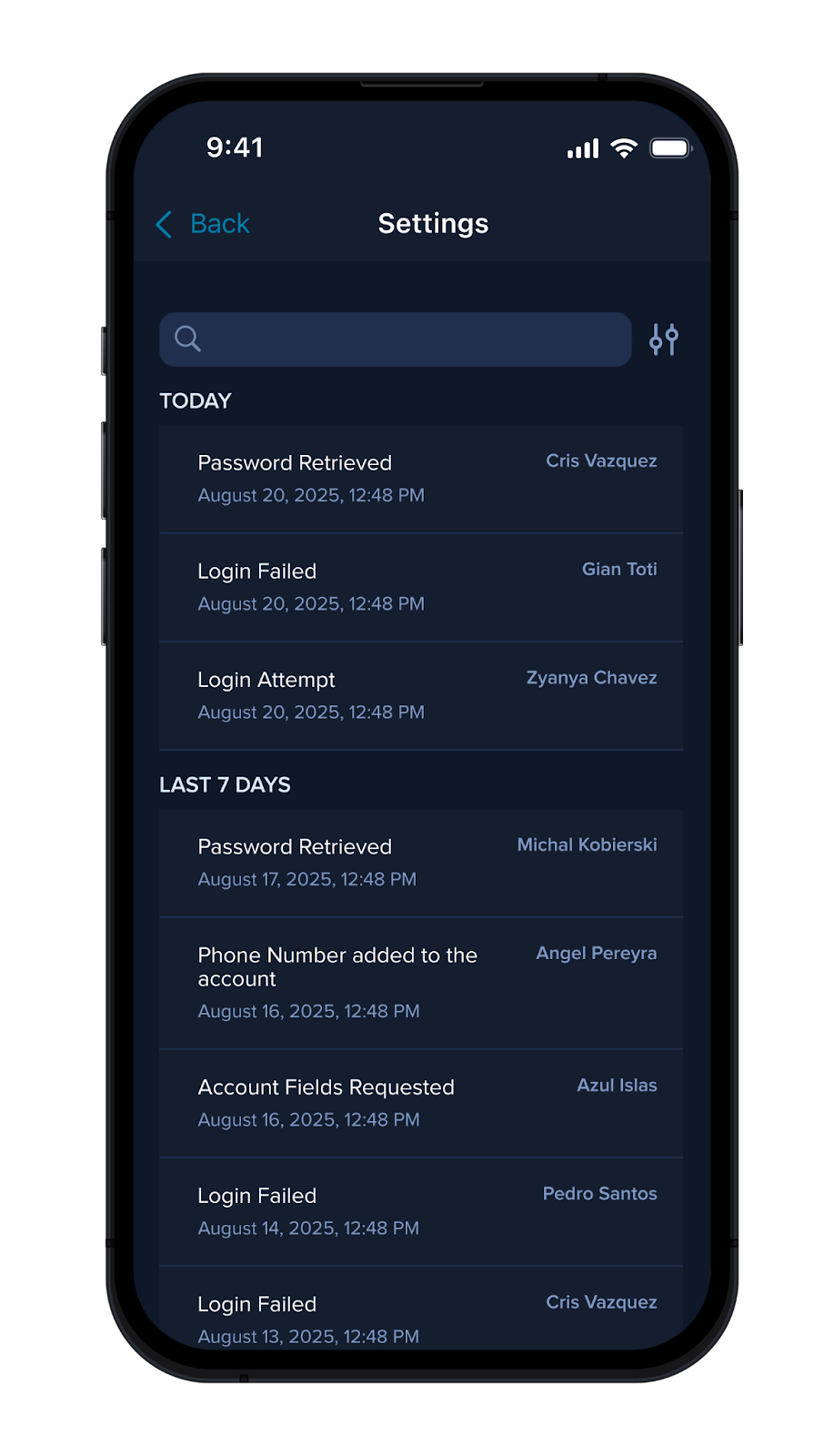
* To provide greater visibility and security, account **Owners** can now find a new **Activity** section on the account details screen, as shown in **Figure 3**.

<figure><img src="/files/ZwB8S68SR7JTiw8mox5i" alt=""><figcaption><p>Figure 3. Activity screen related to an account</p></figcaption></figure>

This feature allows you to quickly monitor the last seven days of events and actions associated with the account. This feature was released in iOS v1.0.268 and Android v1.0.216. For more information, read the article [View the details of an account using the Cerby mobile app](https://help.cerby.com/cerby-mobile-app/accounts/managing-your-accounts/view-the-details-of-an-account).

* Your data privacy is our priority. From version v1.0.264 onward, the Cerby mobile app for iOS includes a security rule that automatically hides sensitive account information if a screenshot or screen recording is detected. This feature ensures your credentials are kept private and secure, even if a capture is accidentally triggered.
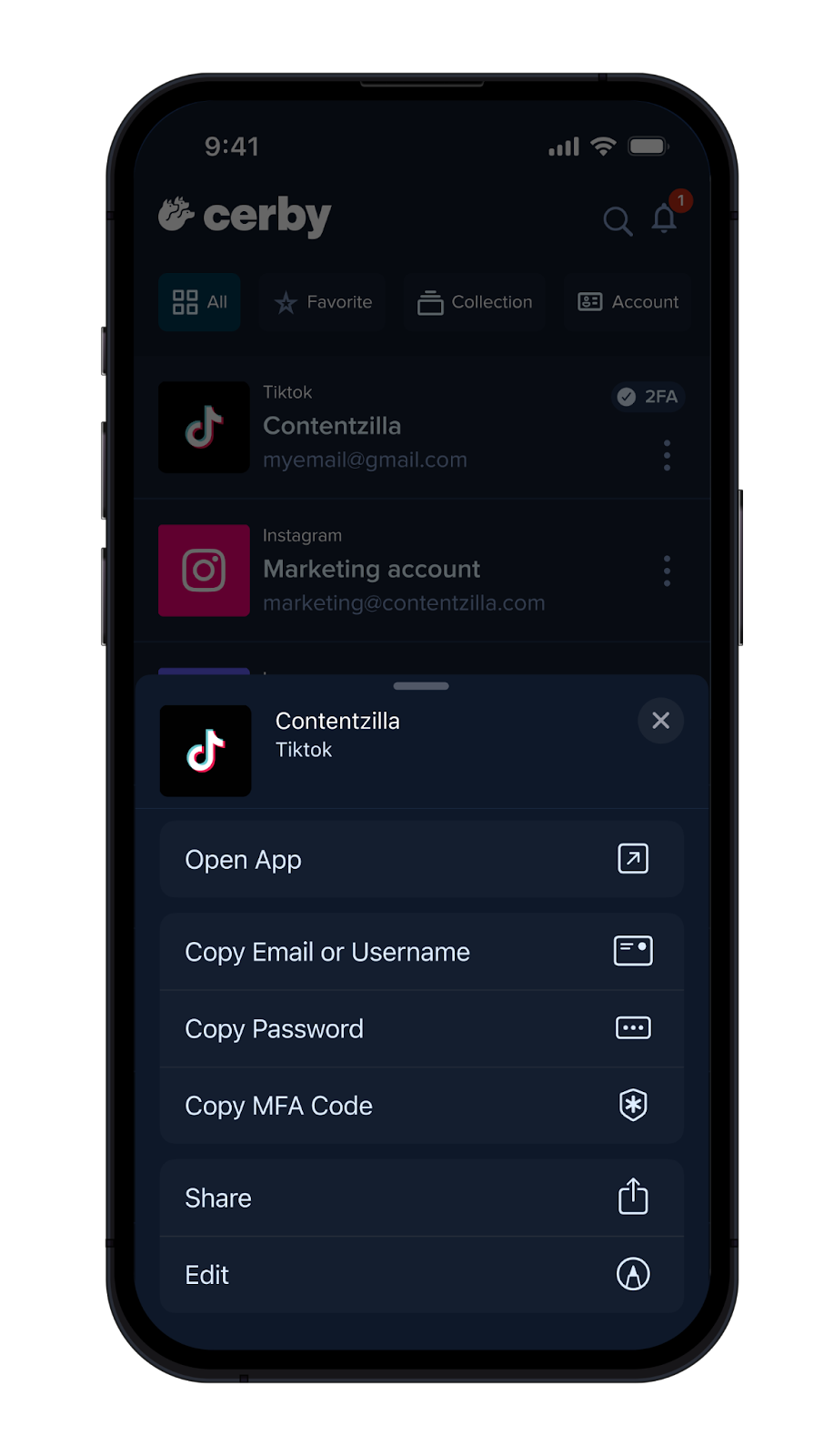
* Access common tasks instantly! We've completed and released a bottom drawer across iOS v1.0.271 and Android v1.0.222 where you can retrieve one-time codes or copy passwords much faster, saving you clicks and speeding up your daily logins.
* From the **Accounts** tab, just tap the **More options** (...) icon of an account, and a list of options will be displayed in the bottom drawer, as shown in **Figure 4**.

<figure><img src="/files/EFsqoErNHCHfWUNgbnsY" alt=""><figcaption><p>Figure 4. Quick actions bottom drawer</p></figcaption></figure>

* We've made crucial performance updates that we released for iOS v1.0.264, aiming to prevent app hangs at startup and during autofill.

***

## Fixes

Take note of the issues addressed and resolved by the Development team behind the Cerby platform:

* The issue with some failed logins for Pinterest was fixed. This fix improves how the platform handles app-specific errors, ensuring that you can reliably access your Pinterest accounts without automation job failures.

### Cerby web app

* The issue with missing information in the **Last viewed** column within the **Members** tab of the secret details page was fixed.
* The Meta sync issue that caused Cerby permissions to not reflect correctly in native Meta consoles was fixed, ensuring asset-level access is honored. Additionally, we resolved inaccuracies when displaying user matchings for Meta.
* The issue when creating an API key, due to the date picker not allowing users to select an expiration date, was fixed. The picker only allowed users to select the current date.
* The issue with some **Login-Only** users being assigned as account **Owners,** when they can only have a **Collaborator** role, was fixed.
* The issue where the password policy check wasn't correctly identifying reused passwords was fixed, ensuring users get accurate, real-time feedback during password creation.

### Cerby browser extension

* The issue with auto-login tasks failing for users on Safari and Apple devices was fixed. Reliable support is now restored for securely autofilling passwords.

### Cerby mobile app

* The issue with a memory leak in iOS that was causing performance degradation when navigating between accounts was fixed in iOS v1.0.244 and Android v1.0.205.

### CLI

* The issue where the Cerby CLI was blocked from running on macOS due to missing crypto configurations was fixed, restoring access for developers using Apple environments.

***

## Security fixes

* We've addressed a security vulnerability where workspace **Admins** were able to disable MFA checks for higher-privileged users, like workspace **Super Admins** and **Owners**.

***

## September 29, 2025

## New features

The following are the new features and improvements we released across the Cerby platform:

### Cerby web app

Check out what's new in our Cerby web app:

* We now support sending invite links when executing automation jobs for adding users to an external app. This feature is helpful for apps like JetBrains, where invite URL links are generated in the user interface and must be manually shared, instead of the app sending an email. Role updates in JetBrains go through the same flow of generating the invite URL and having to send the invite manually.
* You can now search for failed automation jobs by app name in the **Automation Log** page. We identify when an automation job requires attention or when Cerby is working to solve the issue.
* We've implemented a sorting rule when you view the details of all nested automation jobs in the **Automation Log** page. Now, when you click **View all jobs** for an automation job with the "Not completed" status and a new browser tab is displayed, we now show first the nested jobs with the "Not completed" status so you can take action.

### Cerby browser extension

Explore the latest features in our Cerby browser extension:

* We now detect DevTools and show a message to let our users know that, while DevTools are open, automations through the extension are stopped; additionally, the autofill feature is restricted both from the browser extension popup and the inline menu. Users with enough context on how to use DevTools could potentially leverage them to access login credentials.
* We've improved our detection capabilities of Okta authentication to leverage user sessions for our auto sign-in feature. Some of the login timeout errors that users encountered actually occurred because they needed to re-authenticate or provide additional authentication information to Okta.

### Cerby mobile app

Dive into the newest additions to our Cerby mobile app:

* We've released a feature that improves the autofill experience using the Cerby mobile app for iOS v1.0.260 (it was previously released for Android). Now, when logging in to an account using autofill, we display a section with suggested self-managed accounts based on the app domain.
* We've optimized some of our background processes to significantly speed up how the app handles network calls. This means a smoother and faster experience for you using the Cerby mobile app on Android v1.0.215 onwards.
* We've enabled basic full-screen support for the Cerby mobile app on iPads and Android tablets. This feature was released in versions v1.0.261 for iOS and v1.0.216 for Android.

### CLI

The Cerby CLI has the following updates:

* We've enabled the `cerby-source` header in all CLI requests to prevent you from being blocked by our web application firewall (WAF) rules. The goal is to ensure a smoother and more reliable connection when you use the [CLI](https://help.cerby.com/developer-tools/cerby-cli/explore-the-cerby-cli).

***

## Fixes

Take note of the issues addressed and resolved by the Development team behind the Cerby platform:

### Cerby web app

* The issue with being unable to remove some **Login-Only** users from a workspace was fixed. The error occurred after triggering a Cerby Universal Logout for the users.
* The issues with some daily syncs not completing for business hubs connected to Meta Business Manager and Discord were fixed.
* The issue with not detecting Instagram as a managed app when importing items using a CSV file was fixed.
* The issue with business hub **Owners** not receiving email notifications after failed automation jobs was fixed. The error occurred when users were granted shared access to the business hub through a team.

### Cerby mobile app

* The issue with Android autofill when logging in with a Google account on a web browser was fixed in v1.0.213.
* The issue with workspace **Owners** not being successfully identified was fixed for Android v1.0.214.
* The issue with the Cerby mobile app for Android crashing when fetching user permissions was fixed in v1.0.215.

***

## New supported managed apps

The following are the latest additions to the list of managed apps with supported automated tasks:

* [Airwallex](http://airwallex.com/)
* [Alabama - AL - Department of Labor](http://alabama.gov/)
* [Alabama - AL - Department of Revenue](http://alabama.gov/)
* [Arizona AZ PIT](http://efile.aztaxes.gov/)
* [Arizona AZ Unemployment Insurance](http://ftp.azdes.gov/)
* [Arkansas - AR - Division Of Workforce Services](http://arkansas.gov/)
* [Beyond Trust Remote Support](http://support.com/)
* [California - CA - E-Services For Business](http://ca.gov/)
* [Connecticut - CT - ST Web Client PMFL](http://ct.gov/)
* [DataGroomr](http://datagroomr.com/)
* [District of Columbia DC Department of Employment Services](http://essp.does.dc.gov/)
* [DV360 Advertisers Hub](http://displayvideo.google.com/)
* [Florida FL BSWA](http://secure.bswa.net/)
* [Georgia GA Tax Site](http://gtc.dor.ga.gov/)
* [Google Business Profile](http://google.com/)
* [Hallo015](http://015pbx.net/)
* [Hawaii HI Department of Taxation](http://hitax.hawaii.gov/)
* [Hawaii - HI - Unemployment Insurance](http://huiclaims3.hawaii.gov/)
* [Hunter.io](http://hunter.io/)
* [Idaho ID Unemployment Insurance](http://govconnect.iowa.gov/)
* [Idaho ID Tax Payer Access Point TAP](http://dahotap.gentax.com/)
* [Illinois IL My Tax Portal](http://mytax.illinois.gov/)
* [Intermedia](http://cp.intermedia.net/)
* [Kansas KS Labor Portal](http://kansaslabor.gov/)
* [Kansas - KS - Dept of Revenue](http://kdor.ks.gov/)
* [Louisiana LA SUI](http://esweb.revenue.louisiana.gov/)
* [Maine ME Department of Labor](http://pfml.maine.gov/)
* [Maine ME Paid Family Medical Leave PFML](http://pfml.maine.gov/)
* [Maine ME ReEmployME](http://assist.reemployme.maine.gov/)
* [Maine ME Revenue Services](http://revenue.maine.gov/)
* [Minnesota - MN - Department of Labor](http://mndor.state.mn.us/)
* [Minnesota MN Department of Revenue](http://mndor.state.mn.us/)
* [Minnesota MN Unemployment Insurance](http://www1.uimn.org/)
* [Mississippi MS Department of Employment Security](http://accessmstax.mdes.ms.gov/)
* [Mississippi MS Dept of Revenue](http://tap.dor.ms.gov/)
* [Monday Academy](http://monday.com/)
* [Montana MT Withholding](http://tap.dor.mt.gov/)
* [Alaska AK Unemployment Insurance](http://my.alaska.gov/)
* [District of Columbia DC My Tax DC](http://mytax.dc.gov/)
* [N. Dakota ND Tax Payer Access Point TPA](http://apps.nd.gov/)
* [N. Dakota ND Withholding](http://apps.nd.gov/)
* [Nebraska NE Nebfile](http://ndr-efs.ne.gov/)
* [New Mexico NM Unemployment](http://ui.dws.state.nm.us/)
* [New Mexico NM Withholding](http://tap.state.nm.us/)
* [Nebraska NE NEWorks Portal](http://neworks.nebraska.gov/)
* [Oklahoma OK Employment Security Commision](http://ok.gov/)
* [Oklahoma OK Tax Payer Access Point TAP](http://oktap.tax.ok.gov/)
* [Ordway](http://app.ordwaylabs.com/)
* [Otter.ai](http://otter.ai/)
* [Relevance](http://relevanceai.com/)
* [Rhode Island RI Dept of Labor & Training](http://taxportal.ri.gov/)
* [Salto](http://app.salto.io/)
* [Saola](http://saola.com/)
* [SC Unemployment and Tax Portal](http://uitax.dew.sc.gov/)
* [SD Labor and Regulations](http://apps.sd.gov/)
* [signNow](http://signnow.com/)
* [South Carolina - SC - Department of Revenue](http://mydorway.dor.sc.gov/)
* [Puerto Rico PR Dept of Revenue](http://suri.hacienda.pr.gov/)
* [Tennessee - TN - Department Of Labor And Workforce Development](http://jobs4tnui.tn.gov/)
* [Texas - TX - Texas Unemployment Tax Services](http://apps.twc.texas.gov/)
* [Utah - UT - Taxpayer Access Point](http://utah.gov/)
* [Virginia - VA - Virginia Tax](http://virginia.gov/)
* [Wisconsin - WI - Department of Workforce Development Unemployment Insurance](http://wisconsin.gov/)
* [Wyoming - WY - Wyoming's Online Unemployment System](http://wyui.wyo.gov/)
* [XFunnel](http://dash.xfunnel.ai/)

***

## New supported business hubs

The following are the latest additions to the list of business hubs with supported user management automated tasks:

* [Bloomerang CRM Database](http://bloomerang.co/)
* [Comparably](http://comparably.com/)
* [DataGroomr](http://datagroomr.com/)
* [Facebook](https://business.facebook.com/)
* [Hallo015](http://015pbx.net/)
* [Highspot](http://app.highspot.com/)
* [Hunter.io](http://hunter.io/)
* [Intermedia](http://cp.intermedia.net/)
* [Luru Business](http://luru.com/)
* [Netlify](http://app.netlify.com/)
* [Nooks](http://app.nooks.in/)
* [Ordway](http://app.ordwaylabs.com/)
* [Otter.ai](http://otter.ai/)
* [Relevance](http://relevanceai.com/)
* [Salto Business](http://app.salto.io/)
* [Saola](http://app.saola.ai/)
* [signNow Business](http://signnow.com/)
* [UserTesting](http://usertesting.com/)
* [Xappex](http://portal.xappex.com/)
* [XFunnel Business](http://dash.xfunnel.ai/)

***

## August 21, 2025

## New features

The following are the new features and improvements we released across the Cerby platform:

* We now support authentication provider migrations for customer workspaces from Google OIDC to Okta SAML. Our migration path prevents any data loss and reenables external guest users (for example, agencies already onboarded into the workspace) post-migration.

### Supercharged automation logs: Find, fix, and audit faster than ever

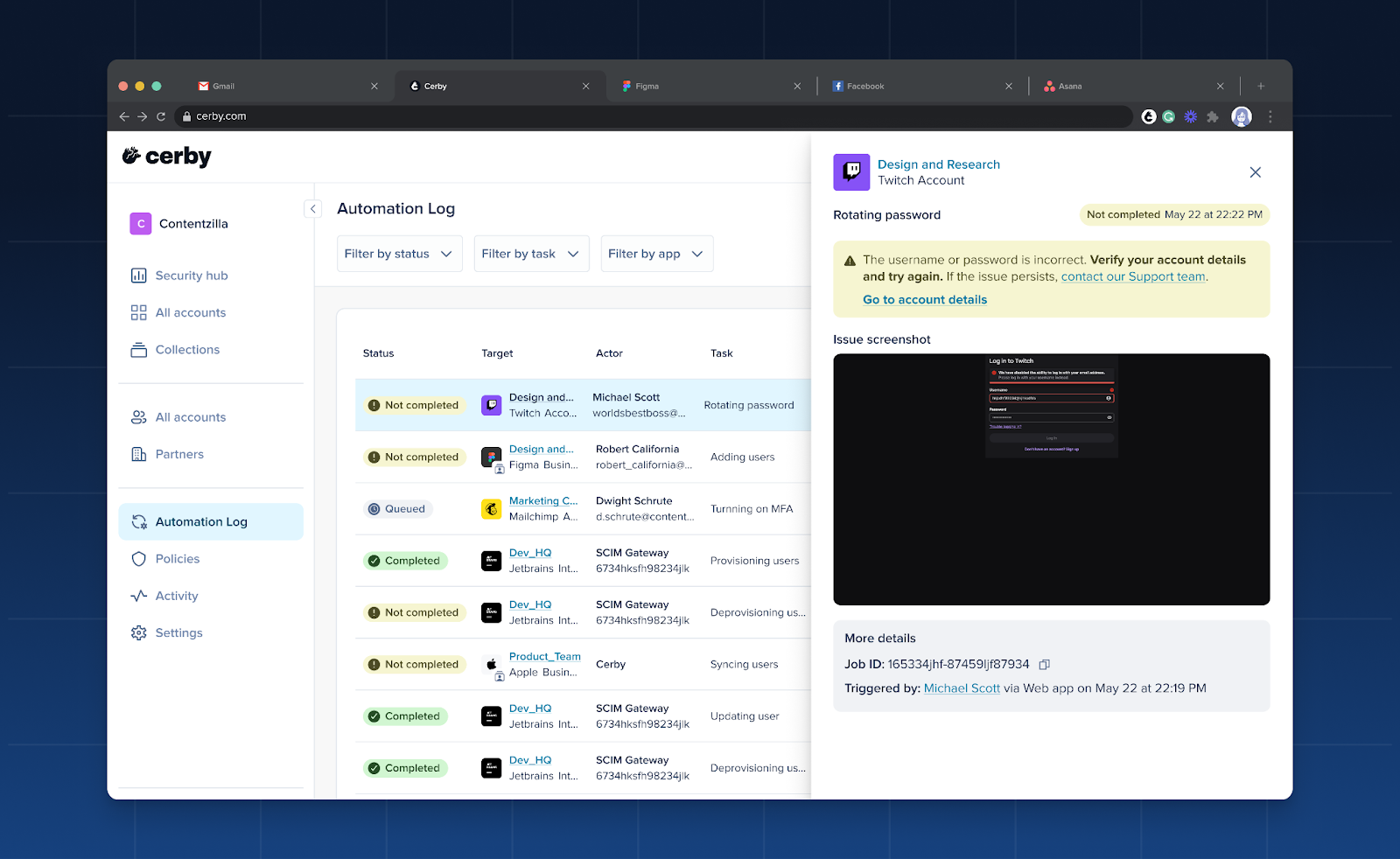
We heard you needed a clearer way to track your automation jobs, and we went above and beyond. We've re-engineered our automation logs from the ground up to provide you with a powerful audit trail tool.

The new **Automation Log** page is your centralized view of all automation jobs triggered within your Cerby workspace. It's designed to help you with the following use cases:

* Diagnose issues with jobs that haven't completed successfully.
* Identify potential security threats and misconfigurations before they become a problem.
* Serve as a vital audit trail for compliance with corporate policy.

This tool is a critical part of how we empower you to protect your accounts and perform identity lifecycle management tasks with confidence. If you are interested in trying it out, contact your Customer Success Manager.

**Figure 1** shows how the **Automation Log** page and the side drawer with automation job details look.

<figure><img src="/files/dfEC9pYiAFdG1q2Ewst7" alt="Screenshot of the Cerby web app dashboard. The Automation Log page is displayed with a table of automation jobs and their status; on top of this page, to the right, a side drawer is displayed with additional information about an automation job."><figcaption><p>Figure 1. Automation Log page and side drawer in the Cerby web app dashboard</p></figcaption></figure>

For more information, read the article [Automation Log](https://help.cerby.com/getting-started/concepts/audit-and-activity/automation-log).

### Cerby web app

Check out what's new in our Cerby web app:

* We've improved the process of connecting a service account to a business hub. In the dialog box where you are prompted to select an account, we now display a "Connected" status for the accounts that are already connected to another business hub; additionally, these accounts cannot be selected. The goal is to avoid misconfigurations due to selecting the same account for multiple business hubs.
* You can only share secrets via a public link when they have a text body.

### Cerby mobile app

Dive into the newest additions to our Cerby mobile app:

* We included a confirmation message to remind users to first remove the passkey from the app or service provider before deleting it from Cerby. This sequence ensures the passkey's public key is deactivated on the app's server, preventing it from being used for authentication and maintaining account security. It also provides a smoother user experience, as the app or service provider will then prompt for alternative login methods instead of attempting to use a non-existent passkey, ensuring consistency across all platforms. The message was released in iOS v1.0.247 and Android v1.0.206.
* We've implemented ephemeral web sessions to improve the login experience in the Cerby mobile app. We now let identity providers (IdPs) decide whether users must re-enter their credentials to access their workspace with their phone. This feature is available from versions iOS v1.0.250 and Android v1.0.208 onwards.
* As you do with the Cerby web app, you can now share an account via a public link with the Cerby mobile app. This feature, available from versions iOS v1.0.256 and Android v1.0.211 onwards, enables you to grant temporary access to your accounts and secrets for external parties who don't have access to your Cerby workspace, such as contractors, agencies, partners, and vendors. ​**NOTE:** You cannot share secrets with attachments. If you attempt to do it, the Cerby mobile app will notify you about it.
* We've released a new feature that improves the autofill experience using the Cerby mobile app. Now, when logging in to an account using autofill, we display a section with suggested self-managed accounts based on the app domain. This feature was released in iOS v1.0.257 and Android v1.0.211.

***

## Fixes

Take note of the issues addressed and resolved by the Development team behind the Cerby platform:

### Cerby web app

* The issue with not displaying account cards in the **Accounts** page when applying the **App or domain** filter from the **Group by** section of the **More filters** drop-down menu was fixed.
* The issue with being unable to download and view some secret attachments was fixed. This issue happened when attachments were incorrectly saved due to users interrupting the upload process by refreshing the page or closing the browser tab.
* The issue with deleting accounts from the **Emergency controls** section of the account details page was fixed. Some accounts were incorrectly deleted, causing that the corresponding accounts cards were displayed both as active and deleted.
* The issue with deleting an account with multi-factor authentication (MFA) turned on and managed by Cerby was fixed. For some accounts, a message was displayed in the deletion confirmation page indicating they couldn't be deleted, even though the deletion was successful.
* The issue with not redirecting users to our documentation about the Password Manager Importer when importing items from a CSV file was fixed. The link redirected back to the Cerby web app dashboard instead of the article [Import your items from a CSV file to Cerby](https://help.cerby.com/cerby-web-app/item-importer/import-your-items-from-a-csv-file-to-cerby).
* The issue with being able to see the option to remove a secret from a team, even when a user doesn't have the **Owner** role assigned, was fixed. This option was incorrectly displayed, as **Collaborators** cannot manage secrets.
* The issue with clicking the **Log in** button of some business hub cards and not starting a login flow was fixed.
* The issue with some **Guest Users** being able to connect a business hub was fixed. This is an action allowed only for workspace **Owners**, **Super Admins**, **Admins**, and **Users**.
* The issue with the search input disappearing while Cerby processes the search request when adding a business hub to a collection was fixed. The input reappeared after displaying the search results.

### Cerby browser extension

* The issue with not redirecting users to the external app after starting automated logins was fixed. From the Cerby browser extension v1.0.459 onwards, users are now redirected when they log in from the Cerby web app dashboard and then authenticating to their identity provider (IdP) and from their IdP dashboard.

### Cerby mobile app

* The issue with iOS autofill for apps supporting passkeys and regular login methods was fixed. Previously, when an external app such as LinkedIn requested a passkey for login and users selected an account with only a password, Cerby was unable to autofill the password. This issue has been resolved in iOS v1.0.257, and now you can log in with any login method available.

***

## New supported managed apps

The following are the latest additions to the list of managed apps with supported automated tasks:

* [Acquire](http://acquire-staging.com/)
* [Apple Store Apps Assets](http://appstoreconnect.apple.com/)
* [Apple iTunes Connect](http://appstoreconnect.apple.com/)
* [AppSignal](http://appsignal.com/)
* [Assembly AI](http://assemblyai.com/)
* [Auvik Sites](http://my.auvik.com/)
* [Backstage](http://backstage.com/)
* [Beyond Trust PMC](http://pm.beyondtrustcloud.com/)
* [Beyond Trust Cloud PRA](http://beyondtrustcloud.com/)
* [Beyond Trust PS](http://ps.beyondtrustcloud.com/)
* [Bloomerang Auth Identity](http://authidentity.bloomerang.co/)
* [Certified Credit](http://certifiedcredit.meridianlink.com/)
* [Cognism](https://app.cognism.com/)
* [Confluent](http://confluent.cloud/)
* [EAM DANE](http://formularios.dane.gov.co/)
* [EPS SURA](http://epssura.com/)
* [Firmable](http://firmable.com/)
* [Ixopay](http://ixopay.com/)
* [JP Morgan Chase](http://secure.chase.com/)
* [Louisiana Wage & Tax System](http://esweb.revenue.louisiana.gov/)
* [Marriott](http://marriot.com/)
* [Mesh Payments](http://meshpayments.com/)
* [OK ESC](https://www.ok.gov/oesc/newhire/app/index.php)
* [PressReader](http://pressreader.com/)
* [Protección Empresa](http://proteccion.com/)
* [Soc Care Plus](http://sistema.soc.com.br/)
* [SURI](http://suri.hacienda.pr.gov/)
* [Vercel](http://vercel.com/)

***

## New supported business hubs

The following are the latest additions to the list of business hubs with supported user management automated tasks:

* [Amazon DSP](http://advertising.amazon.com/)
* [Apple Store Apps Assets](http://appstoreconnect.apple.com/)
* [Apple iTunes Connect](http://appstoreconnect.apple.com/)
* [Apple Store](https://business.apple.com/)
* [AppSignal](http://appsignal.com/)
* [Articulate 360](http://articulate.com/)
* [Cognism](https://app.cognism.com/)
* [Confluent](http://confluent.io/)
* [Firmable](http://firmable.com/)
* [Gitlab](http://gitlab.com/)
* [Campaign Manager 360](http://campaignmanager.google.com/)
* [GTreasury Business](http://gtreasury.com/)
* [Impact.com](http://impact.com/)
* [Ixopay](http://ixopay.com/)
* [Jamf](http://jamf.com/)
* [LinkedIn Recruiter](http://linkedin.com/)
* [SolarWinds](http://cloud.solarwinds.com/)
* [Solutions LCM](http://appsmith.cerby-solutions.com/)
* [Storylane](http://storylane.io/)
* [User Interviews Business](http://userinterviews.com/)

***

## July 21, 2025

## New features

The following are the new features and improvements we released across the Cerby platform:

### Keeping it fresh and secure with password policies

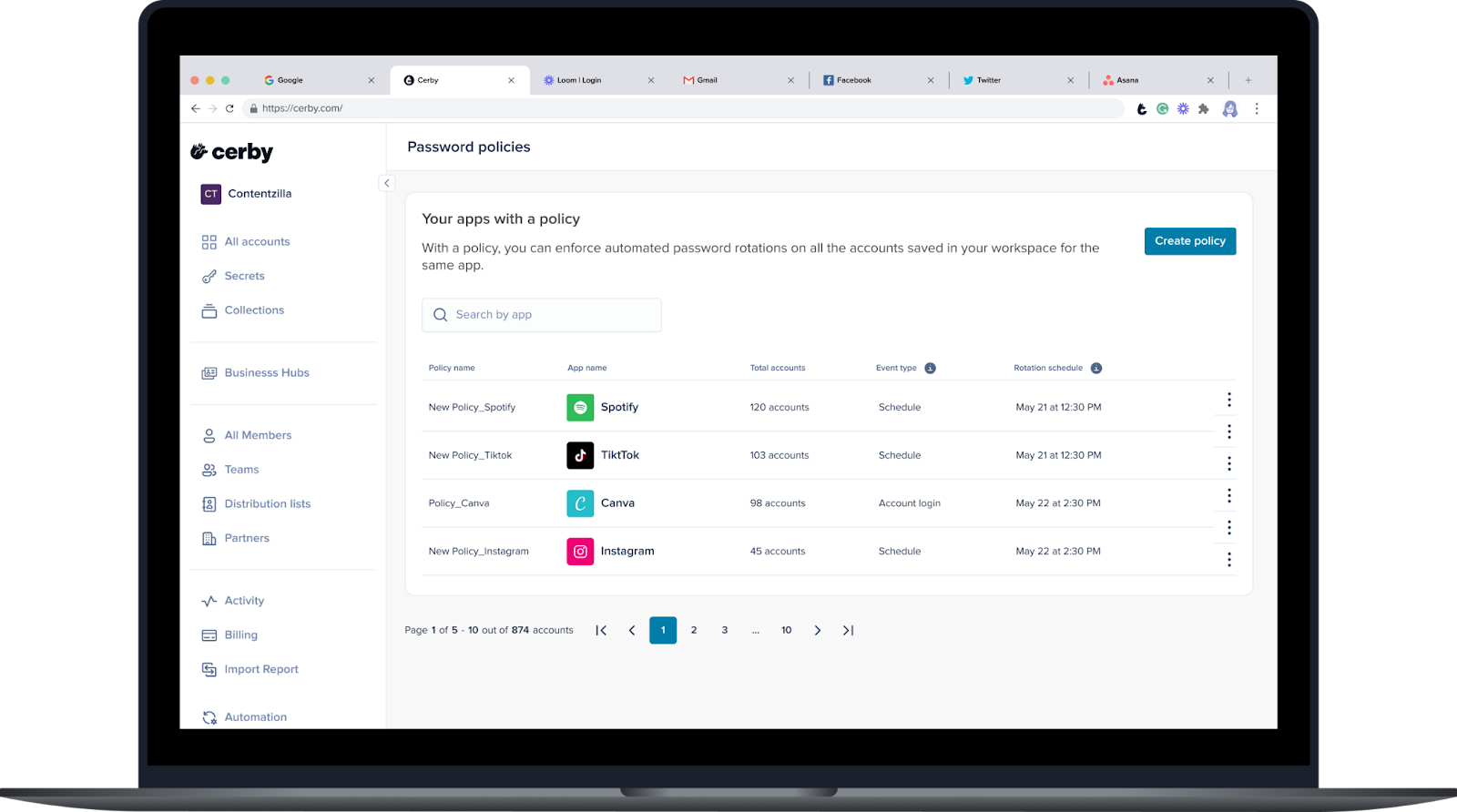
We're rolling out a powerful feature designed to boost your security posture: Password Policies powered by Cerby automation.

With this feature, you can now set policies to enforce password rotations for all the accounts saved in your workspace belonging to an app. You can choose to start the policy after a user login event or schedule rotations on a date you select, specifying the frequency and time window for execution.

The new Password Policies feature is now your go-to solution for protecting your accounts, replacing the existing Policies experience. If you are interested in trying it out, contact your Customer Success Manager.

**Figure 1** shows how the **Password Policies** page looks, with policies for multiple apps.

<figure><img src="/files/Vlcs5U4oXXYyFuBeClWr" alt="Screenshot of the Cerby web app dashboard. The Password Policies page is displayed with a list of apps that already have a policy in place."><figcaption><p>Figure 1. Password Policies page in the Cerby web app dashboard</p></figcaption></figure>

Learn more about this feature in the article [Password Policies](https://help.cerby.com/getting-started/concepts/security-posture/password-policies).

### Level up your login with RSA token MFA

If you are a user in high-security environments, such as financial institutions, we have something special for you. We're excited to announce a significant upgrade to our multi-factor authentication (MFA) capabilities.

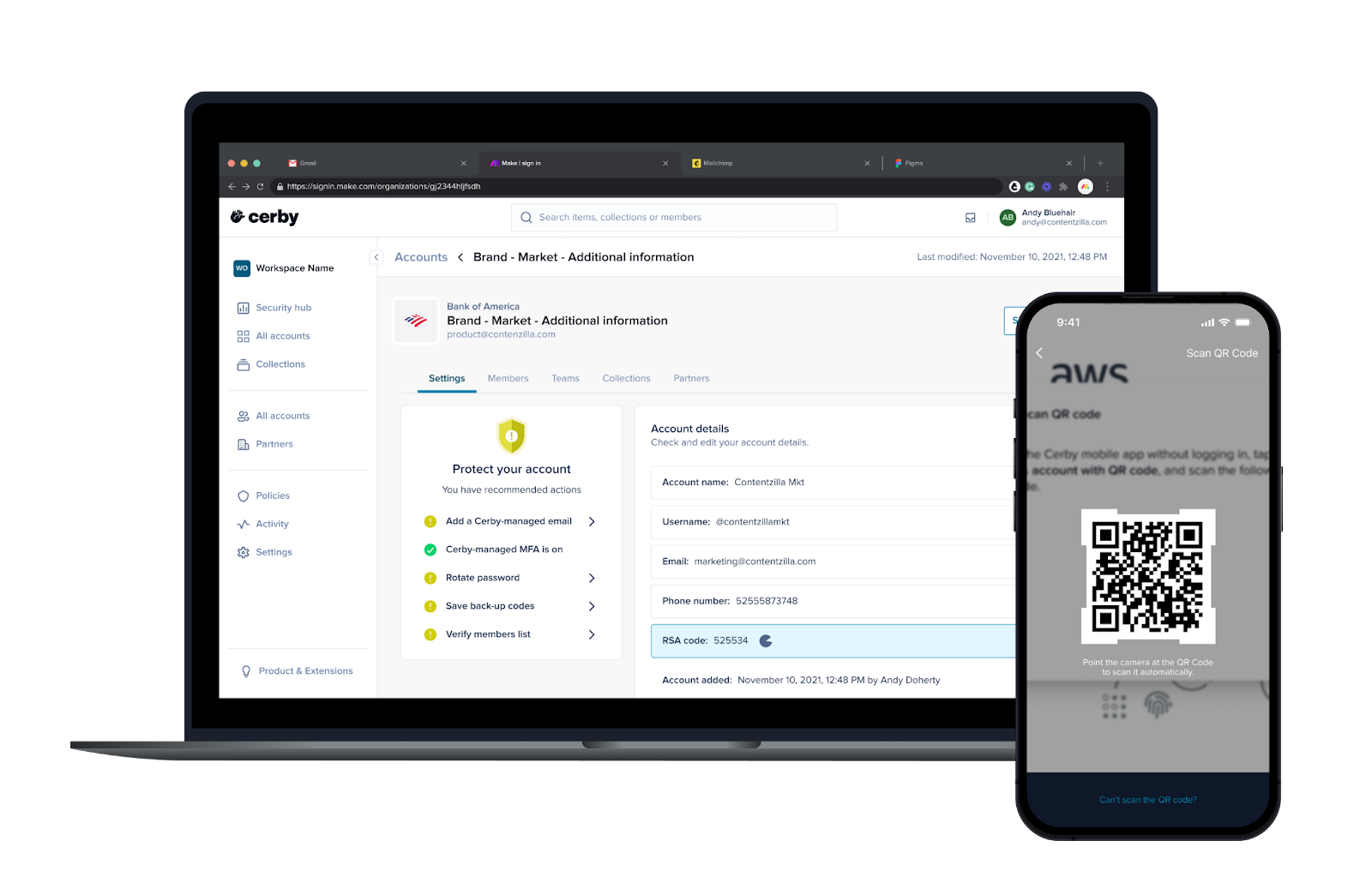
We now support RSA tokens as the MFA method of your accounts. With this feature, Cerby can streamline the retrieval of codes, enabling you to access your apps faster. Additionally, you can set RSA tokens as your MFA method in two ways: using an activation link in the Cerby web app or scanning a QR code with the Cerby mobile app (iOS and Android).

**Figure 2** shows a sneak peek of the RSA token experience.

<figure><img src="/files/zUHetbkTHZVI4OpHSYcr" alt="Screenshot of the Cerby web app dashboard (left) and the mobile app (right). The account details page is displayed in the web app with an RSA code, and a QR code being scanned is displayed in the mobile app."><figcaption><p>Figure 2. RSA code in the account details page of the Cerby web app (left) and QR code for setup in the Cerby mobile app (right)</p></figcaption></figure>

For more information, read the article [Set RSA tokens as your account MFA method](https://help.cerby.com/cerby-web-app/accounts/protecting-your-accounts/set-rsa-tokens-as-your-account-verification-method).

### Your data privacy, our priority

We heard and addressed your concerns about data privacy.

To enhance security and reduce the risk of sensitive information being exposed on screen unintendedly, we now hide by default the following data: the body of a secret and multi-factor authentication (MFA) codes. Now, users must click to show these values in the Cerby web app, browser extension, and mobile app.

This added layer of protection means you can navigate your secrets and account details with confidence.

### Expanding the identity management horizon

Our commitment to providing a versatile and comprehensive solution for your organization's unique needs continues! We're excited to announce a powerful addition to our robust suite of identity provider (IdP) integrations.

Now, you can enjoy seamless user provisioning via SCIM with OneLogin! This means you can easily set up a Cerby workspace where user accounts are automatically created and removed based on user assignments directly within your OneLogin instance, streamlining your user lifecycle management.

Check out our IdP documentation in the [Creating and setting up your workspace](https://help.cerby.com/setup-and-admin/workspace-identity-federation) collection.

### Cerby web app

Check out what's new in our Cerby web app:

* Based on user feedback, push notifications are now removed as the identity confirmation method when creating a public link with the Cerby web app for sharing an account or secret.
* We've made improvements to the performance of the **Members** table so that results now load faster.
* A new pagination feature now enables our users to customize the number of items to display per page. The available options are 20, 50, and 100 items per page, aiming to improve the user experience and efficiency. Currently, this feature is only released for business hub tables.

### Cerby mobile app

Dive into the newest additions to our Cerby mobile app:

* You can now use biometric challenges instead of magic links sent via email when you access secrets that require identity confirmation with the Cerby mobile app. This feature aims for a more secure and user-friendly experience and is available from versions iOS v1.0.242 and Android v1.0.201 onwards.
* You can now create passkeys when adding an account to Cerby. This feature was initially supported in iOS, but was released for Android in version v1.0.207. For more information about passkeys, read the article [Create a passkey for an account using the Cerby mobile app](https://help.cerby.com/cerby-mobile-app/accounts/protecting-your-accounts/passkeys/create-a-passkey-for-an-account).
* Passkeys with Cerby are now supported by Canva and Shopify.

### Cerby API

Check out the new endpoints available in our [developer portal](https://developer.cerby.com/) to perform the following actions with the Cerby API:

* Retrieve users or teams of a secret
* Share a secret with a user or team
* Retrieve a list of vaults

Additionally, we added the `lastLoginDate` attribute in the account schema. This optional value contains the date when a user last logged in to the account, which means they retrieved the account password for login.

***

## Fixes

Take note of the issues addressed and resolved by the Development team behind the Cerby platform:

* The issue with failed syncs after connecting a Discord business hub was fixed.
* The issue with the initial sync to extend accounts to Okta and not syncing teams was fixed.

### Cerby web app

* The issue with not updating the role of a user in the **Members** tab of the collection details page was fixed. In some cases, the drop-down menu was not displayed; in others, the update was not applied.
* The issue with not loading the vault settings page for an Azure key vault was fixed.
* The issue with users being able to add self-managed accounts to Cerby even when this functionality has the blocked status was fixed. Users were able to add the account by pasting the app URL in the **App name or URL** field of the **Add account details** dialog box.
* The issue with users being unable to add self-managed accounts to Cerby was fixed. In this case, self-managed accounts were not blocked.
* The following issues with the local partner experience were fixed:
  * **Guest Admins** of a local partner with the **Manager** role on shared accounts couldn't share these accounts with **Guest Users**.
  * The local partner details section couldn't be loaded.

### Cerby browser extension

* The issue with the account autosave experience not working correctly for the Livingston app was fixed.

### Cerby mobile app

* The issue with the Cerby mobile attempting to open previews for unsupported secret file attachments was fixed. Now, we display a message indicating when the preview is not supported.

### Cerby API

* The issue with retrieving users who have shared access to a secret via a collection was fixed.
* The issue with requests failing when not including the optional message when sharing a secret with a user was fixed.

***

## Security fixes

* A potential HTML injection vulnerability in auto-generated emails was fixed. User-controllable content, such as usernames or custom messages when completing automation jobs or sharing collections with other users, is now properly sanitized to prevent malicious HTML from being rendered.
* A potential security bypass on iOS devices was fixed. We've expanded and improved our detection methods for jailbroken or rooted devices, automatically blocking access to Cerby if a device is identified as potentially compromised.

***

## May 26, 2025

## New features

The following are the new features and improvements we released across the Cerby platform:

### Start your passwordless journey with Cerby

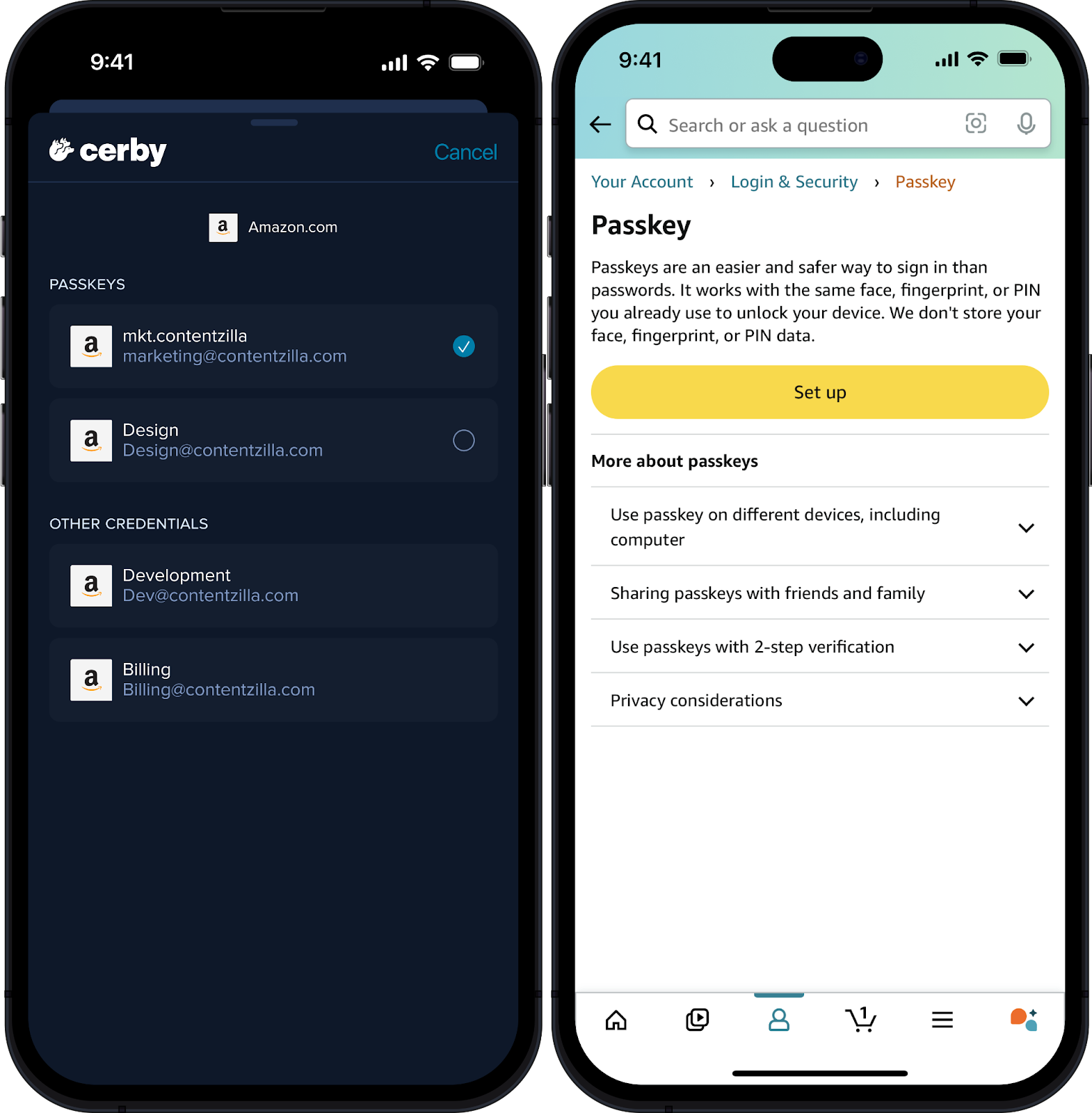
Get ready to experience the next evolution of online security and convenience: passkeys have officially arrived in Cerby!

We're thrilled to introduce this passwordless authentication method for accessing your accounts. Using a combination of device and biometric authentication with the Cerby mobile app, your login becomes phishing-resistant and stronger against common cyber threats, and your experience gets smoother and effortless.

**Figure 1** shows a sneak peek of the passkeys experience on mobile.

<figure><img src="/files/2GU0Ufg5NlGtbPWf0f2X" alt="Screenshots of the Cerby mobile app (left) and the Passkey page for logging in to Amazon. The Cerby mobile app displays a list of saved passkeys for amazon.com, and the Passkey page displays a button to set up this authentication method."><figcaption><p>Figure 1. Passkeys in the Cerby mobile app and the Passkey setup page for Amazon</p></figcaption></figure>

Want to give it a try? Take a look at the article [Explore passkeys in Cerby](https://help.cerby.com/getting-started/concepts/credential-management/passkeys), where we reference the supported operating systems and apps, as well as the instructions to create a passkey. This feature was released in the following versions of the Cerby mobile app: iOS v1.0.241 and Android v1.0.120.

### Gain more control over your secrets

The wait is over! Based on your feedback, we've released significant improvements to the Secrets feature.

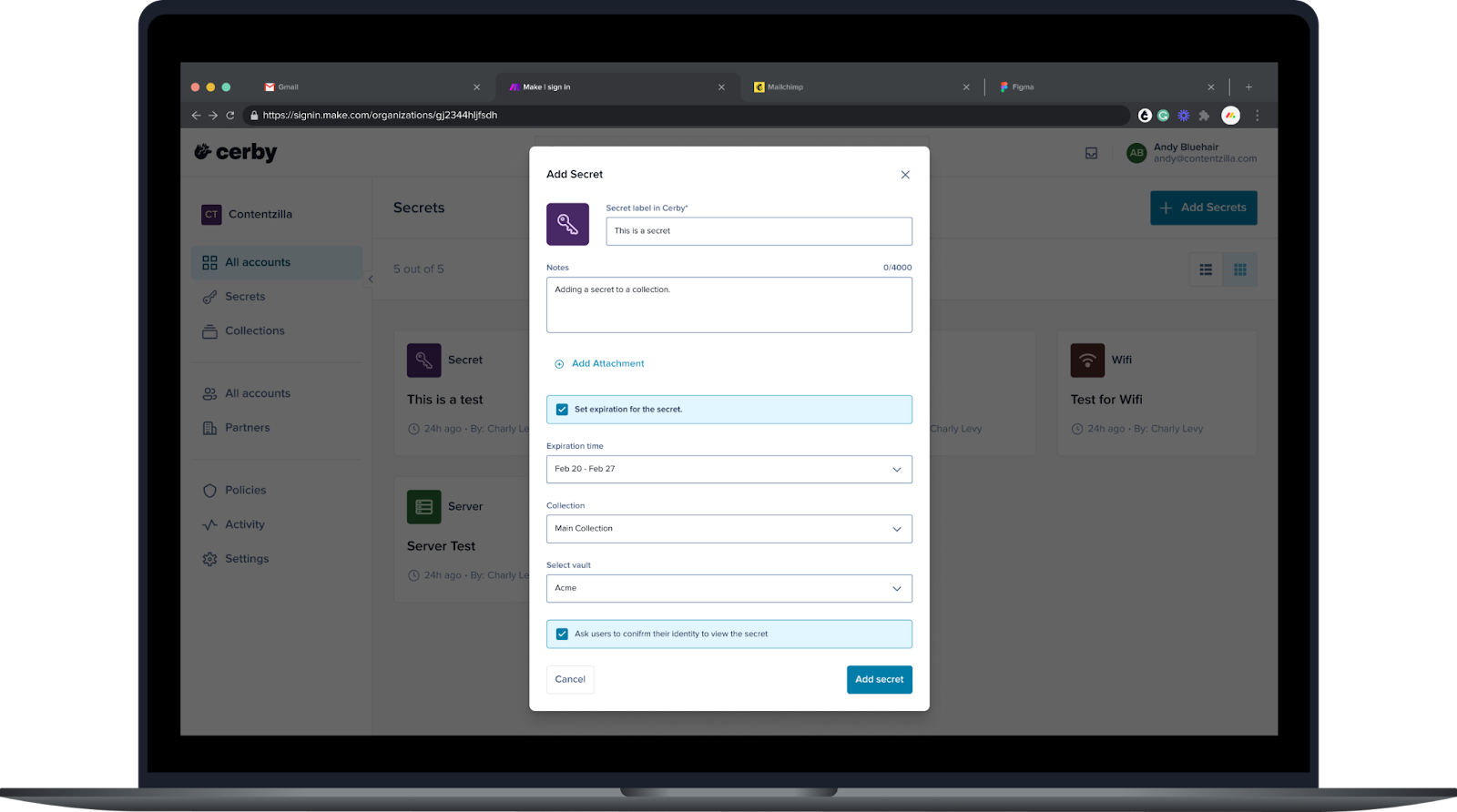
Now, you can create secrets with an expiration time between 1 to 30 days. When they expire, they are automatically deleted. The goal is to reduce manual cleanup efforts in the Cerby dashboard and enhance protection for your sensitive information. This feature is available when adding or editing a secret, as shown in **Figure 2**. For instructions, read the articles [Add a secret](https://help.cerby.com/cerby-web-app/secrets/managing-your-secrets/add-a-secret) and [Edit a secret](https://help.cerby.com/cerby-web-app/secrets/managing-your-secrets/edit-a-secret).

<figure><img src="/files/LLv4VJ9na6wt4APSp9td" alt="Screenshot of the Add Secret dialog box in the Cerby web app. The &#x22;Set expiration for the secret&#x22;  and &#x22;Ask users to confirm their identity to view the secret&#x22; options are selected."><figcaption><p>Figure 2. Add Secret dialog box in the Cerby web app dashboard</p></figcaption></figure>

Additionally, as a secret **Owner**, you can turn on or off the identity confirmation challenge to view a secret anytime. Previously, you could only set up this configuration when adding a secret; now, you can also do it when editing a secret.

### Cerby browser extension

Explore the latest features in our Cerby browser extension:

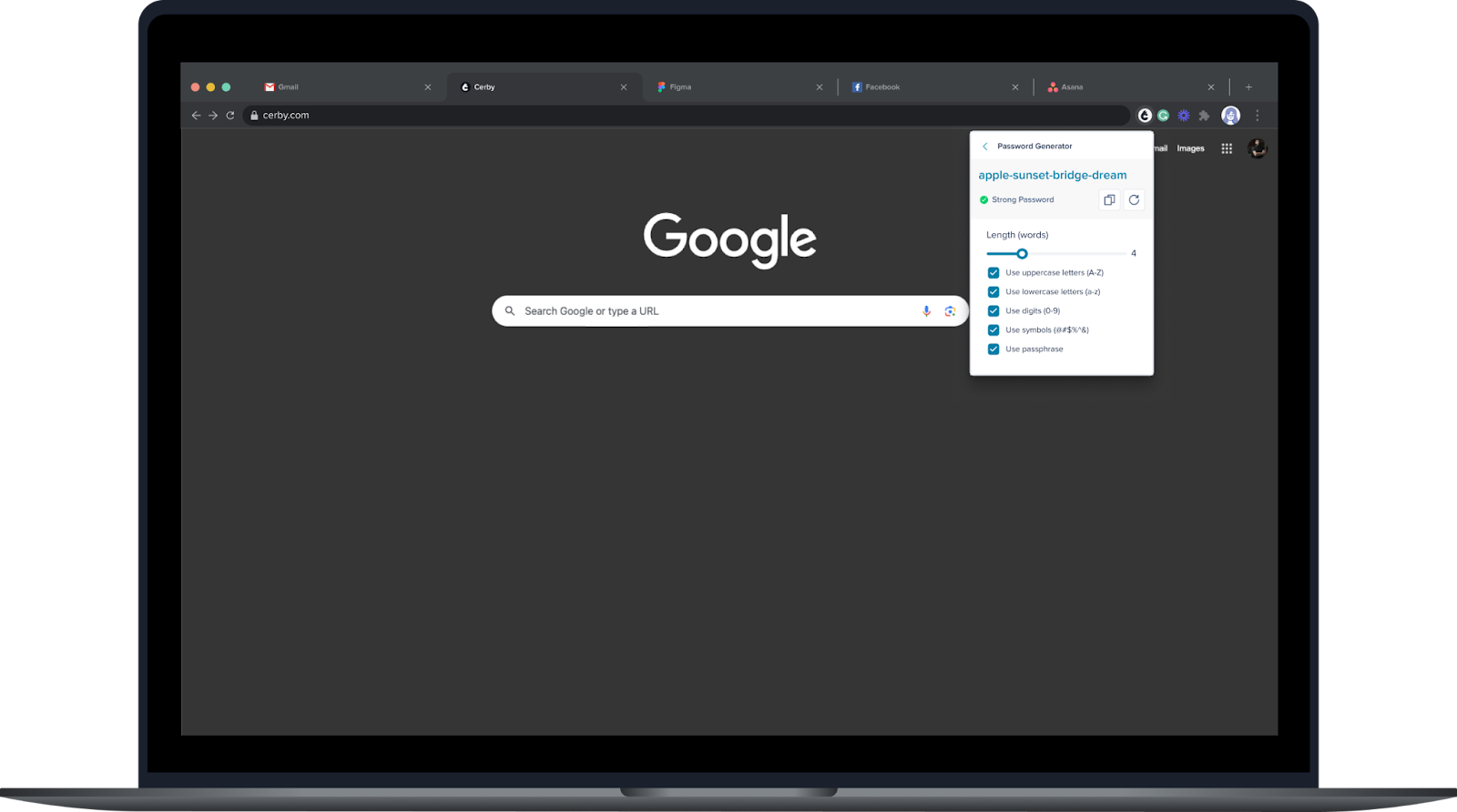
* Our Password Generator is getting more robust. Now, you can generate passphrases and specify the number of words and their complexity using the other password strength selectors.

Give it a try by completing the following steps:

1. Open the Cerby browser extension popup.
2. Click the **Password generator** icon. The **Password generator** page is displayed, as shown in **Figure 3**.

   <figure><img src="/files/GcuibVUct5EZPYbpIutV" alt="Screenshot of the Cerby browser extension popup on top of a web browser. The popup displays the &#x22;Use passphrase&#x22; option selected and a generated passphrase."><figcaption><p>Figure 3. Password generator page in the Cerby browser extension popup</p></figcaption></figure>
3. Select the **Use passphrase** option.
4. Move the **Length (words)** slider to select the number of words in the passphrase.
5. Select other password strength options to make the passphrase more complex, if necessary.

* Connecting your existing user accounts to a business hub just got easier, and you don't even have to use the Cerby web app. Whether you log in to your account through the app's login page or the dashboard of your identity provider (IdP), such as Okta, the Cerby browser extension now displays a page where you can select any of your existing accounts to connect it to the business hub, as shown in **Figure 4**.

<figure><img src="/files/QSo4wx6GSYDo16OeC4HC" alt="Screenshot of the &#x22;Select an account to log in&#x22; page in a web browser. The page displays a list of existing accounts in Cerby for the same external app so that the user can select one."><figcaption><p>Figure 4. Select an account to log in page</p></figcaption></figure>

If you don't have an account for the app, the **No accounts saved for this business hub** page is displayed or you are redirected to the app's login page.

* To enhance your future logins and avoid errors, autosaving your accounts with the Cerby browser extension is now more granular.

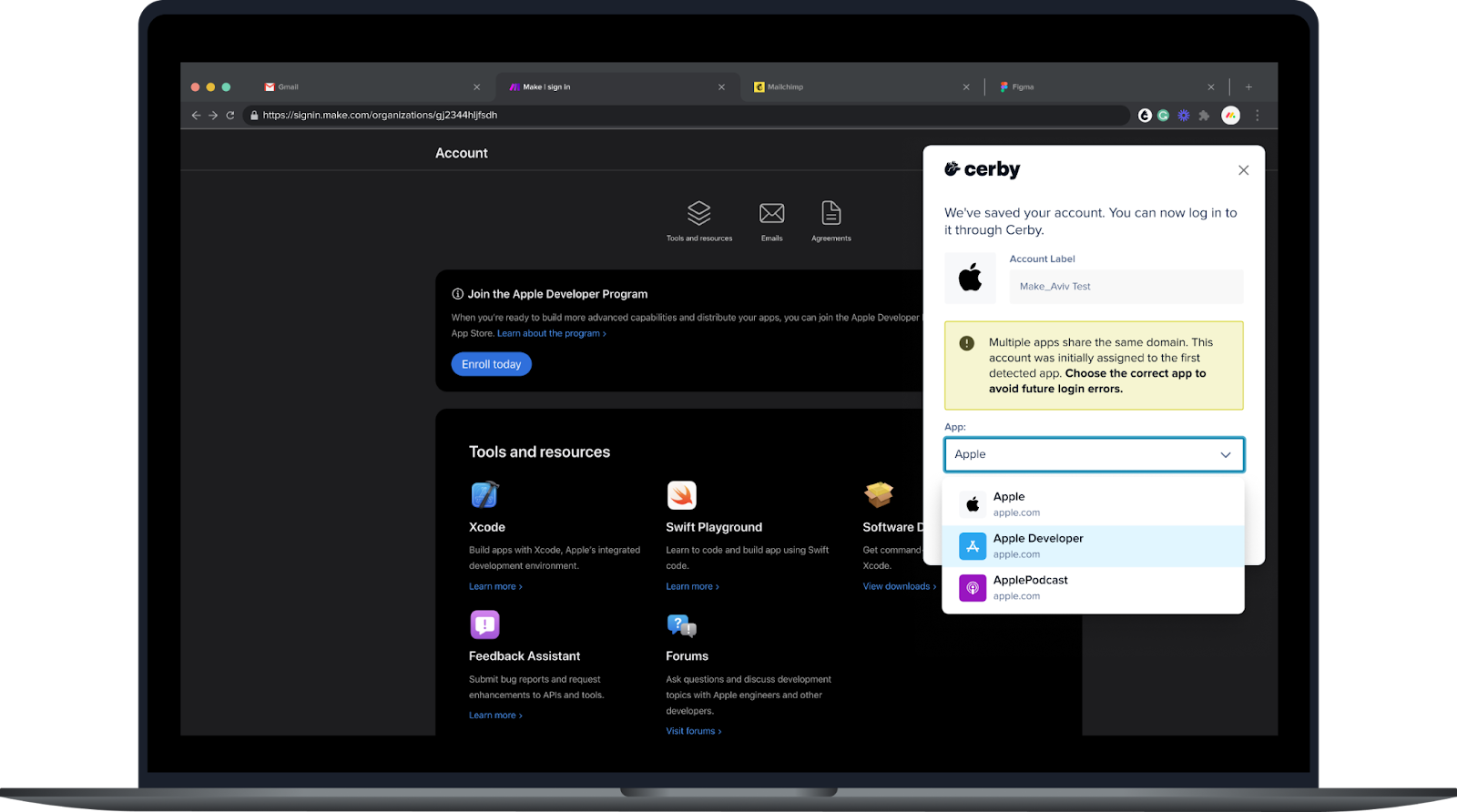
You can now select the corresponding app during an account autosave prompt when multiple accounts have the same domain, as shown in **Figure 5**. Cerby will remember your selection the next time you log in.

<figure><img src="/files/9HwXxVovXxWWctrxAYSq" alt="Screenshot of the Cerby browser extension popup on top of a web browser. The popup displays a message saying that the account was saved, and a callout prompts the user to select the correct app among multiple shared domains"><figcaption><p>Figure 5. Account autosave prompt in the Cerby browser extension</p></figcaption></figure>

### Cerby mobile app

* You can now enjoy the following improvements in the Cerby mobile app for iOS v1.0.241 and v1.0.247:
* Global search navigation
* Async vault synchronization
* MFA code autofill during login
* Hidden secret and time-based one-time password (TOTP)

### Cerby API

Check out the new endpoints available in our [developer portal](https://developer.cerby.com/) to perform the following actions with the Cerby API:

* Retrieve the password of an account
* Create a secret
* List vaults

***

## Fixes

Take note of the issues addressed and resolved by the Development team behind the Cerby platform:

* The issue with assigning an **Owner** to an account saved in a local vault integrated with AWS KMS was fixed.
* The issue with being unable to delete Cerby-managed phone numbers from accounts was fixed. Some users with numerous accounts encountered errors when trying to delete an associated Cerby-managed phone number.

### Cerby web app

* The issue with not loading accounts in the **Add accounts to collection** dialog box was fixed. Users encountered an infinite loading state when they had **Owner** access to numerous accounts.
* The issue with not loading the account details page when a password was last rotated by a user outside a workspace (for example, the Cerby Technical Support team) was fixed. We now display in the account details page that the last password rotation was performed by Cerby.
* The issue with displaying the email and phone number as required values in the account details page of social media accounts was fixed. Users were blocked from creating Cerby-managed email addresses and phone numbers, so they had to enter dummy values in the fields first.
* The issue with incorrectly displaying the status of some MFA methods in the account details page was fixed.
* The issue with searching for a nonexistent workspace member in the **Members** tab of the collection details page was fixed. The **No results found** message is now displayed and it doesn't get stuck there.
* The issue with displaying disabled business hubs as duplicates when using the search bar in the **Business Hubs** page was fixed. Now, we identify disabled business hubs with the "Disabled account" status.
* The issue with the inconsistent status between business hub integrations in the **Business Hubs** page and the integration details page was fixed. In some cases, the "Up to date" status was displayed despite the value in the **Last updated** field was "Not synced."
* The issue with connecting two different service accounts to a business hub integration was fixed. The error occurred when a second integration **Owner** updated the service account. Now, when the service account is updated, the old account is disconnected from the integration automatically.
* The issue with collection **Collaborators** being able to add subcollections to a collection was fixed.
* The issue with not displaying an option to remove a host-guest partnership in the **Partners** page was fixed.
* The issue with the link of an expired verification magic link was fixed. Instead of reloading the page, the link now redirects to an article with more information about the email magic link as MFA identity confirmation method.
* The issue with displaying collections to which a user has the **Collaborator** role when adding a business hub to a collection was fixed. Only collections a user owns are now displayed.
* The issue with not updating the role of a user after changing it in the **Members** tab of the collection details page was fixed.
* The issue with incorrectly displaying the dialog box for sharing an account instead of a business hub was fixed. Users were able to share a business hub as an account if they clicked the **Share** icon right after loading the **All accounts** page or if the internet connection was slow.
* The issue with a **Team Admin** being able to select the **Remove from team** option from the **More options** (...) drop-down menu to remove themselves from a team was fixed.
* The issue with the service account being incorrectly displayed in the **Unmatched Users** table of a business hub details page, instead of the **Onboarded Users** table, was fixed.
* The issue with not preserving the filters in the **All accounts** page when navigating through other pages and returning to it was fixed.
* The issue with displaying an empty page of assets in the business hub details page was fixed. We've optimized how we retrieve the assets to avoid timeouts.

### Cerby API

* The issue with retrieving custom roles as entitlements of an integration was fixed.

***

## March 12, 2025

## New features

The following are the new features and improvements we released across the Cerby platform:

### Revolutionizing enterprise security with Universal Logout

Cerby continues to deliver robust protection, keeping users one step ahead of cyber threats. We have partnered with Okta to extend the reach of its Universal Logout feature to nonfederated or disconnected apps secured with Cerby.

With a unified approach, Cerby enables a one-to-many **Universal Logout**, immediately revoking user sessions across a wider range of applications, including those lacking global token revocation. This feature significantly improves incident response times and minimizes potential security damage.

Want to hear something better? Cerby's Universal Logout is also available as a standalone feature. It lets you safeguard all your apps and devices, whether they're connected through Okta or not.

If you want to learn more, read the blog [Extending Okta's Universal Logout: Cerby Boosts Security Across Applications](https://www.cerby.com/resources/blog/extending-oktas-universal-logout) or the article [Universal Logout](https://help.cerby.com/getting-started/concepts/security-posture/universal-logout).

### Shhh, Cerby is making login magic behind the scenes

Get a significant boost to your team's productivity without compromising security. We have released background **auto sign in** to authenticate the Cerby browser extension right after accessing your identity provider (IdP).

By leveraging existing, secure IdP sessions, say goodbye to manual interactions with our browser extension and hello to a more streamlined login to your accounts from your IdP's dashboard.

This feature is available in Okta-based workspaces with [extended account access](https://help.cerby.com/getting-started/concepts/credential-management/extended-account-access) turned on, and we are working to support other IdPs in future releases. Contact your Customer Success representative for more information.

### Flexibility meets security: Use your AWS KMS environment in Cerby

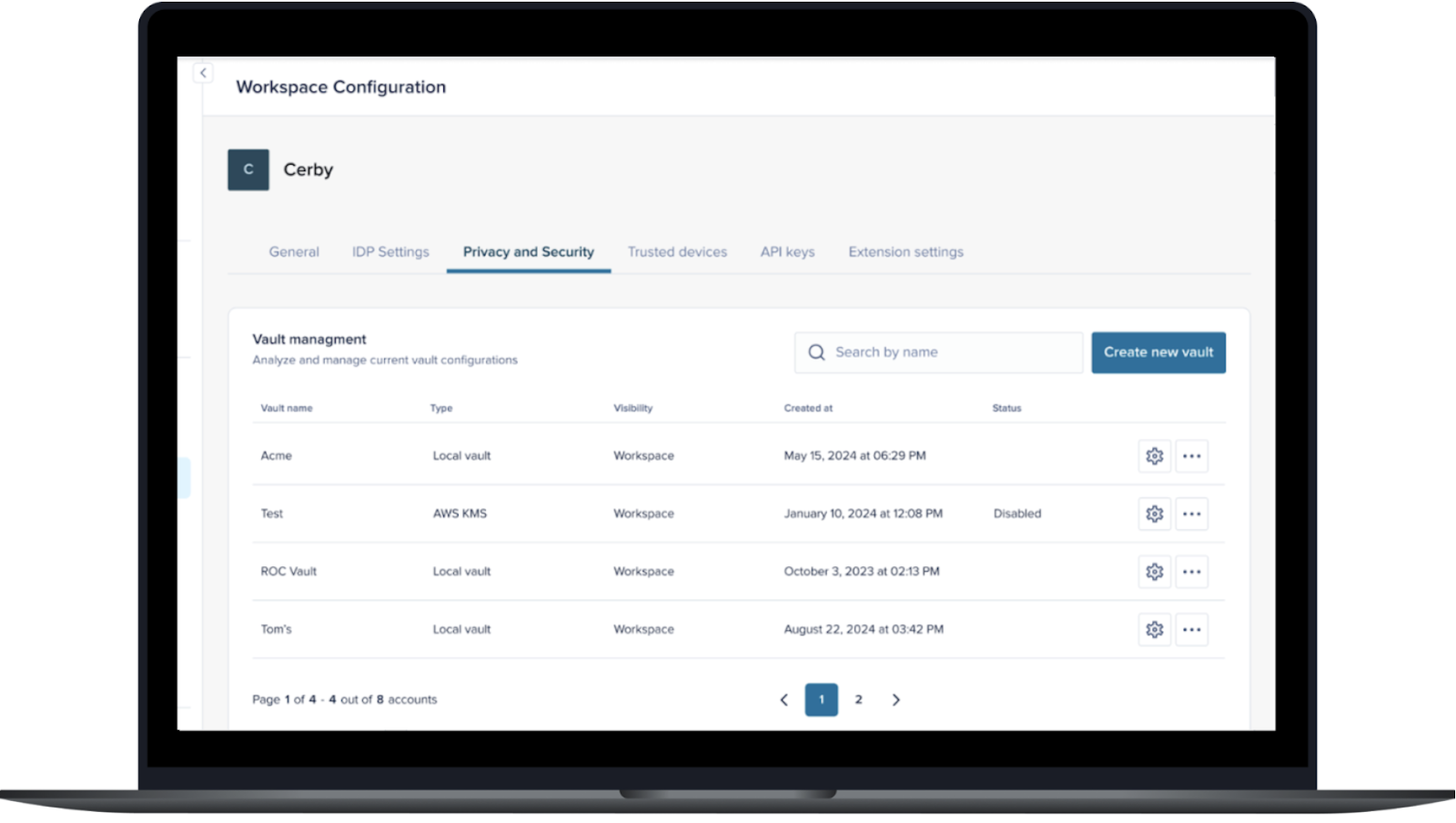
Following the success of our [Azure Key Vault](https://help.cerby.com/setup-and-admin/vault-management/set-up-an-azure-key-vault-integration) integration, we are excited to announce the addition of **AWS Key Management Service (KMS) support**! Integrate your AWS KMS environment with Cerby to protect your accounts and secrets and take full control of data encryption and decryption.

Leverage Cerby's Zero Knowledge architecture while maintaining full ownership and control over your keys. We provide the tools, and you retain absolute sovereignty. In essence, your data, your keys, your platform.

Ready to set it up or want more information? Take a look at the article [Set up an AWS KMS vault integration](https://help.cerby.com/setup-and-admin/vault-management/set-up-an-aws-kms-vault-integration). **Figure 1** shows how an AWS KMS vault is displayed in the Cerby web app.

<figure><img src="/files/6VnNMY63QGXpViD3uYWF" alt=""><figcaption><p>Figure 1. Privacy and security tab in the Workspace Configuration page of the Cerby web app dashboard</p></figcaption></figure>

### Say goodbye to unauthorized changes in your app settings

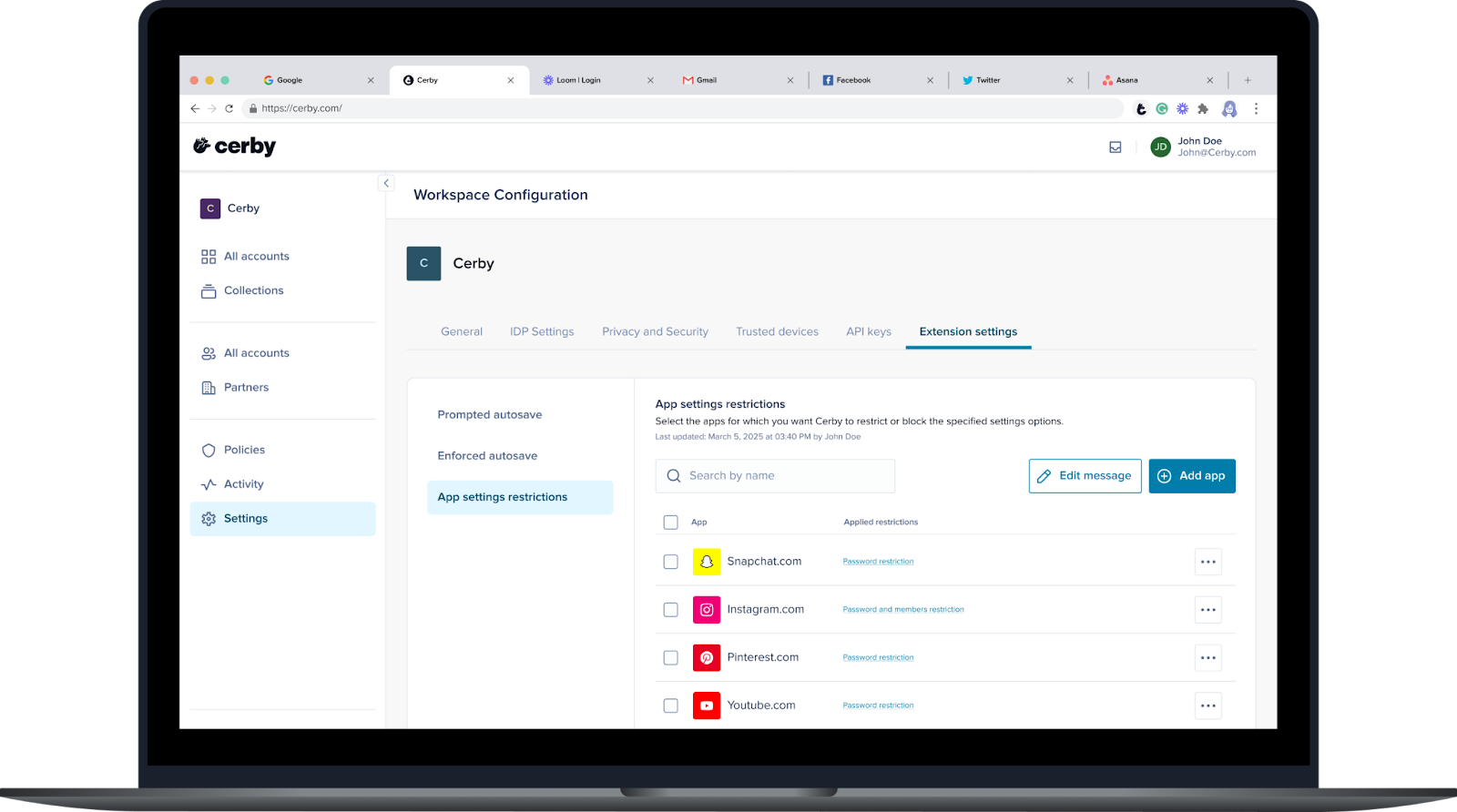
Cerby has been your silent guardian in the complex world of shared accounts, and now we're expanding our vigilance. With the new **App settings restrictions** feature, you can prevent unauthorized changes to your app settings, a task that seemed impossible until now.

Powered by the Cerby browser extension, we detect when users attempt to modify the password or member settings in your app and take action based on your preferences. We can fully block the user interface or guide users make changes through Cerby.

For more information on how this feature works, read the article [Explore App settings restrictions](https://help.cerby.com/setup-and-admin/workspace-settings/extension-settings/app-setting-restrictions/explore-app-setting-restrictions). Explore the extension settings, as shown in **Figure 2**, where you can manage this feature.

<figure><img src="/files/s2duYq8Q0cKZ8YepZe5r" alt=""><figcaption><p>Figure 2. Extension settings tab in the Workspace Configuration page of the Cerby web app dashboard</p></figcaption></figure>

### Fast track to Cerby from your password manager

We've been keeping a secret, but you guessed it: our **CSV File Importer** is live!

In addition to our importers for [LastPass](https://help.cerby.com/cerby-web-app/item-importer/migrate-from-lastpass-to-cerby) and [1Password](https://help.cerby.com/cerby-web-app/item-importer/migrate-from-1password-to-cerby), we've designed a universal and flexible method for migrating your items from your enterprise password manager (EPM). You just need to upload a CSV file to Cerby, and we'll do the rest.

So, prepare your file and take control of your data migration. Check out the instructions and template in our article [Import your items from a CSV file to Cerby](https://help.cerby.com/cerby-web-app/item-importer/import-your-items-from-a-csv-file-to-cerby).

### Proactive security starts here

Here's another long-awaited release: the **Security Hub**, a comprehensive view of the health of all the accounts saved in your workspace. The goal is to help you spot and address proactively potential vulnerabilities before they escalate.

In the first version of this feature, we are providing you with a report of orphaned accounts. Now, you can quickly identify any accounts that should be assigned to one or more **Owners** so that account management capabilities are not lost.

If you want to learn more about the Security Hub and orphaned accounts, take a look at the articles [Security Hub](https://help.cerby.com/getting-started/concepts/security-posture/security-hub) and [Assign Owners to orphan accounts in your workspace](https://help.cerby.com/setup-and-admin/security-governance/security-hub/assign-owners-to-orphaned-accounts-in-your-workspace).

### Cerby web app

Check out what's new in our Cerby web app:

* The wait is over! After much anticipation and multiple requests, we're thrilled to unveil the support of verification codes in the Cerby web app. As shown in **Figure 3**, those who prefer switching tabs and copy-pasting their login credentials can now find the codes on the account details page when Cerby manages multi-factor authentication (MFA).

<figure><img src="/files/1Zp8nv82hjB97UQ1ew7q" alt=""><figcaption><p>Figure 3. MFA codes in the account details page of the Cerby web app dashboard</p></figcaption></figure>

* Check the new features and improvements in the business hub user experience:
* The **Business Hubs** page now has a search bar to easily find business hubs when users have multiple integrations connected to Cerby.
* You can now share access to a business hub with other workspace members without granting a seat or license in the external app. This behavior applies only to business hub **Owners**, whereas **Collaborators** are always granted a seat.
* When assigning a seat to a user who didn't have one, you can also select the roles to assign them on assets.
* The **Unmatched users** tab in the business hub details page is now removed when no user is listed with the unmatched status.
* You can now disconnect the token of a native partner. Just go to the corresponding tab in the business hub details page and select **Disconnect token** from the **More options** (...) drop-down menu.
* Team deprovisioning events from the corporate identity provider now trigger password rotations for business hub users.
* We now provide more information in the table of the **Automation tasks** page when an automated task is not completed.
* We now prevent **Super Admins** with the **All-Access Mode** turned on from being able to manage (add or remove) accounts and secrets within a collection. These management actions are available in the **Accounts** and **Secrets** tabs of the collection details page.

### Cerby browser extension

Explore the latest features in our Cerby browser extension:

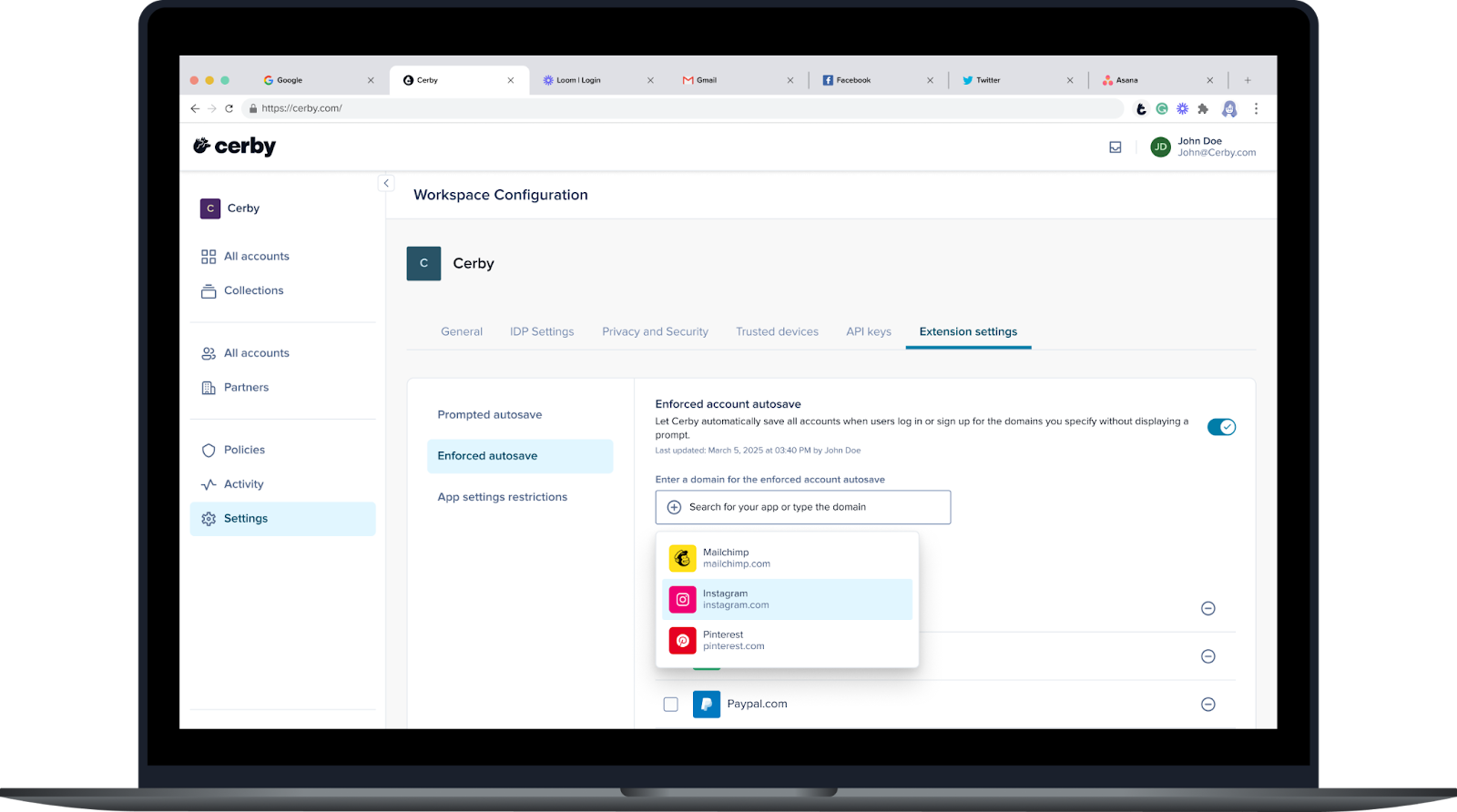
* Here's one to Cerby adoption, security, and improved user experience. Workspace **Admins** can now turn on the **Enforced account autosave** feature to let the Cerby browser extension automatically save all accounts when users log in or sign up for the domains you specify without displaying a prompt.

You can only turn on and configure this feature using the Cerby web app as follows:

1. Select the **Settings** option in the left menu.
2. Activate the **Extension** **settings** tab.
3. Select the **Enforced autosave** option in the left panel, as shown in **Figure 4**.

   <figure><img src="/files/ex0yOZnOm6U1485qYZ3y" alt=""><figcaption><p>Figure 4. Enforced account autosave settings in the Cerby web app dashboard</p></figcaption></figure>
4. Activate the **Enforced account autosave** switch to turn on the feature for your workspace.
5. Add the domains for which you want to enforce account autosave.

### Cerby mobile app

Dive into the newest additions to our Cerby mobile app:

* We released the new account details screen in the mobile app for iOS v1.0.235 and Android v.1.0.130. Additionally, we improved the loading time for account passwords and secrets in iOS and started supporting software license secrets in Android.
* Cerby is implementing biometric security to prepare for passkeys. From versions 1.0.221 for iOS and 1.0.182 for Android, the Cerby mobile app supports **Biometrics Login** to enable users to unlock and access the app. This feature is compatible with Face ID or Touch ID on iOS and Face Lock or Fingerprint recognition on Android. For guidance on setting up your biometrics, read the article [Turn on the Biometrics Login feature](https://help.cerby.com/cerby-mobile-app/app-customization/turn-on-the-biometrics-login-feature).

**Figure 5** illustrates the user experience of this feature.

<figure><img src="/files/JxcZKAjpzm12W2nTLBMz" alt=""><figcaption><p>Figure 5. Biometrics in the Cerby mobile app</p></figcaption></figure>

* If you use shared company phones and devices, keep reading; we have a cool feature for you. You can now access an account's login credentials without having to log in to the Cerby mobile app by simply scanning a QR code with the phone. The code is generated in the Cerby web app. After scanning the code and seeing the login credentials, you can launch the app and use the phone's autofill functionality to log in to the account. You can also manually copy and paste the values. For more information on how to use this feature, read the article [Access an account via a QR code using the Cerby mobile app](https://help.cerby.com/cerby-mobile-app/accounts/accessing-your-accounts/access-an-account-via-a-qr-code). It is available in iOS v1.0.222 and Android v1.0.189 onwards.

***

## Fixes

Take note of the issues addressed and resolved by the Development team behind the Cerby platform:

* The issue with users keeping their **Owner** role on items when they are downgraded to the **Login-Only** role was fixed. **Login-Only** users can only have the **Collaborator** role on items.

### Cerby web app

* Business hub fixes:
  * The issue with letting users update the role of a YouTube channel **Owner** from a Cerby business hub integration was fixed. YouTube doesn't support updating such a role in any scenario.
  * The issue with not displaying custom roles when inviting users to a business hub or updating their roles was fixed.
  * The issue with sending invites for unmatched users provisioned via a group assignment in the identity provider (IdP) was fixed. Because these users already existed in the app, now Cerby only matches the users with their identity in the business hub integration.
  * The issue with sharing a business hub and its assets with a team and not granting access to the assets was fixed. This scenario is now handled via the claim access flow.
  * The issue with incorrectly displaying the security status of business hub members was fixed.
  * The issue with displaying the overview dialog box of the wizard to connect a business hub, even when users select the **Don't show this again** option, was fixed.
  * The issue with being unable to remove local partners, onboarded users, and unmatched users from a business hub was fixed.
  * The issue with sharing a business with a team to which some users already had access was fixed. The security status of these users changed incorrectly to **Cerby only** and the **Log in** button was disabled for them.
  * The issue with being unable to share the automation or service account with a team that already has shared access as an **Owner** to a business hub was fixed.
  * The issue with removing a team from a business hub and granting individual access to it was fixed.
* The issue with being unable to update the role of a user on an item when they have a **Mixed role** was fixed. The role update is done in the **Members** tab of the secret and account details pages.
* The issue with the infinite loading after filtering by collection in the **Accounts** view was fixed. This error only occurred when no collections exist.

### Cerby browser extension

* The issue with being unable to detect the password update field in the account settings of Instagram was fixed in the Cerby browser extension v1.0.426.

### Cerby mobile app

* Issues with the global search were fixed on iOS v.1.0.229 and Android v1.0.199.
* The issue with the **Add custom fields** bottom menu not working after tapping it in the account details screen was fixed on iOS v1.0.227 and Android v1.0.195.
* The issue with successful identity confirmations not redirecting to editing a secret was fixed on iOS v1.0.227 and Android v1.0.195.


---

# Agent Instructions: Querying This Documentation

If you need additional information that is not directly available in this page, you can query the documentation dynamically by asking a question.

Perform an HTTP GET request on the current page URL with the `ask` query parameter:

```
GET https://help.cerby.com/updates-and-releases/whats-new/2025.md?ask=<question>
```

The question should be specific, self-contained, and written in natural language.
The response will contain a direct answer to the question and relevant excerpts and sources from the documentation.

Use this mechanism when the answer is not explicitly present in the current page, you need clarification or additional context, or you want to retrieve related documentation sections.